
What’s New in
SpeechMotion 5.00 Production
build
12112100 for Wednesday November 21, 2012
Notable Enhancements:
·
Importing SpeechMotion formatted files into Site Tables
·
E-Sign Portal: “play” and “display” Options for HTML Viewers
·
RDS Field “%value%” Variable in String Expressions
·
Additional Voice fields for “Fusion Text Wave” Format
·
Unassign Jobs from VR
·
New Report Variable X.DOLBEY_ORDERS
Additional Changes and Fixes:
·
FIX: ANSI Character Set for Non-English Installations
·
FIX: Improved Modem Support w/Updated FaxMan Jr Drivers
·
FIX: #USET08 Macro for HL7 Uploads
·
CHANGE: A31 HL7 Message Now Updates SSN#
·
CHANGE: Additional “Extra” Fields for MPI
·
CHANGE: Expanded Mrun, Acctno, Orderno Field Lengths
·
CHANGE: Expanded Doctor, Address, Patient Name Fields
Importing SpeechMotion formatted files into Site Tables
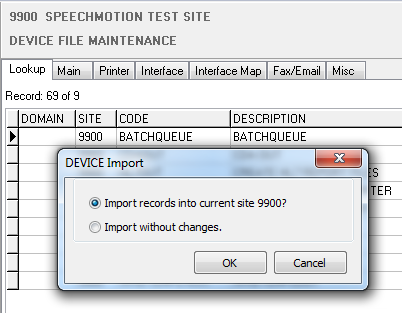
Importing SpeechMotion formatted *.EXP files in site tables such as forms, devices etc.,
always imported them into the site referenced in the *.EXP file regardless of the current selected site.
Users were required to manually edit the *.EXP
file before importing. This is no longer the case.
When importing the following tables, users will be
prompted with options to import the records into the current site.
·
FORMS
·
DEVICE
·
TEMPLATE
(normals)
·
GENDIC (dictionary)
RDS field “%value%” Variable in String Expressions
When configuring fields for a form, the following change
was made to the string expressions option.
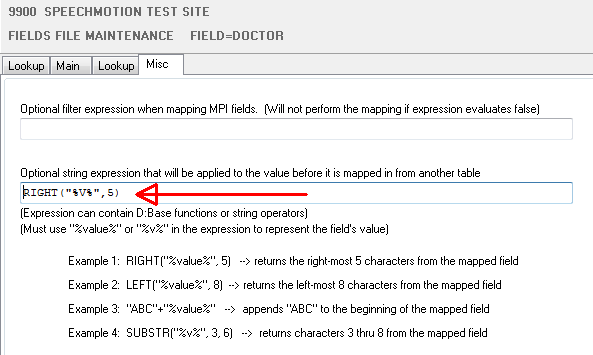
The ‘%value%’ variable can now be substituted with a
shorter value variable “%v%”. Either one will work.
The string expression was previously limited to 100
characters. It will now accept up to 200 characters.
E-Sign Portal: “play” and “display” Options for HTML Viewers.
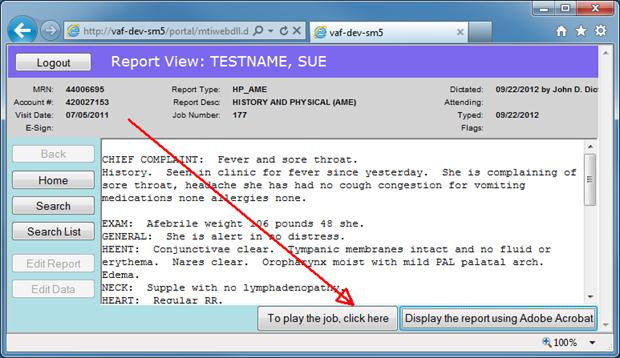
When displaying reports in the E-Sign Portal. Users with
ActiveX disabled in their user profile had no options to play the voice job
or display the report (for printing). These options were added.
Additional Voice fields for “Fusion Text Wave”
Format.
Changes relating to MTVIMP (voice import) and “User
Defined Fields” in Fusion and DVI formats.
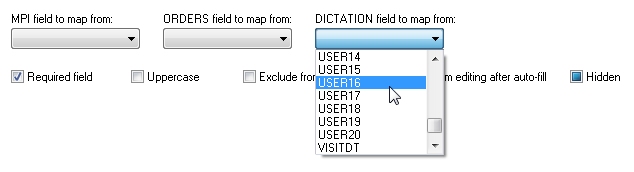
Additional fields were added to the Voice table to
accommodate all User Defined fields in “Fusion Text Wave” file format. Fields
User7 – User20 were added.
Fields User5, User6 were previously reading the incorrect
data in the fusion header. This was corrected.
“DVI Text Wave” file previously only imported User1 – User
4, it now imports User 1 – User 10.
The Fields maintenance form was updated to include the new
Voice (Dictation) fields.
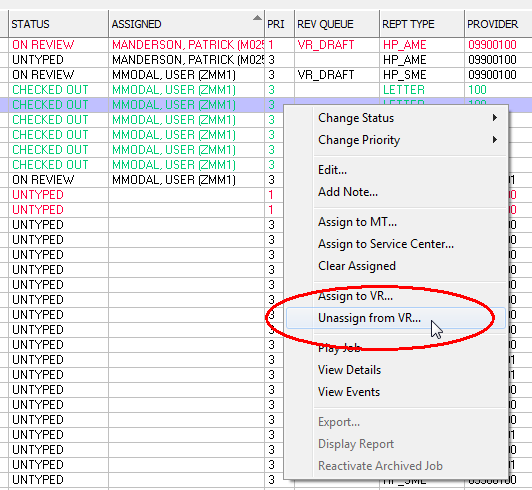
Unassign Jobs from VR
In Voice Manager, you can now “Unassign” jobs checked out
to MModal, User (ZMM1). This operation also sets the job status to “UNTYPED”.
No further steps are required.
Note: Executing this function on any job that is not checked
out to VR is ignored.
New Report Variable X.DOLBEY_ORDERS
This variable can be used in a report. It lists all the
associated orders for Dolbey Fusion Transform.
The output looks like:
/order2
<orderno>
/order3
<orderno>
/order4
<orderno>
/order5
<orderno>
/order6
<orderno>
|
