
What’s New in SpeechMotion 5.00 Production
build 12121900 for Wednesday December
19, 2012
This release includes
enhancements to server and database connections and improved overall
stability.
Notable Enhancements
· Fusion
Voice field mapping
· Additional
MPI fields: visit time, discharge time
Additional Enhancements:
· Updated
User Guide
· New
HL7 upload fields
· New
Report: Unsigned Reports Summary - by Site (D021S)
· Report:
Billing Summary (M103) – report description added
· DVI
voice import string expressions
Changes and Fixes:
·
FIX: Tab sized were incorrectly being set when using MS Word templates
· CHANGE:
Searches and date calendars
Fusion Voice
Field Mapping
The Field mapping table allows you to override the default mapping of the
FUSION_WAV and FUSION_TXT_WAV voice imports. This works exactly like
DVI field mapping but with additional enhancements.
For example, the Fusion Voice USRDEF00
field is mapped to the SpeechMotion USER1
field by default. This can be changed so that USRDEF00 is mapped to USER11.
The Field mapping table also support logical expression
and string expressions.
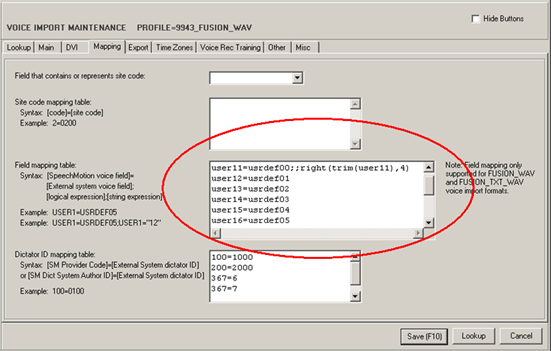
On the Mapping tab. USER7 to USER20 were added as
selections on the pull down to the ‘Field that contains or represents site
code’ field.
Additional MPI
fields: visit time, discharge time
MPI fields Visit date and Discharge date (VISITDT, DISDT) now include the
time component (VISITTM, DISTM).
These are stored in the MPI table and are available on the MPI maintenance
screen.
Time fields are not handled automatically, they have to be
explicitly configured in MPI mapping.
The new TIME fields can be
applied in a MPI mapping using the following as an example:
· VISITTM,PV1,44,,TIME
· DISTM,PV1,45,,TIME
Discharge date and time are automatically handled with the
following HL7 Messages :
· Discharge
(A03)
· Cancel
Discharge (A13)
The new fields are also displayed on Master Patient Search
results.
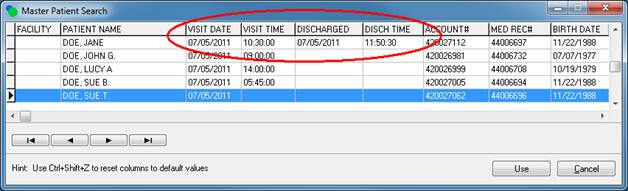
Visit time is also included along with the visit date on
the report options screen.
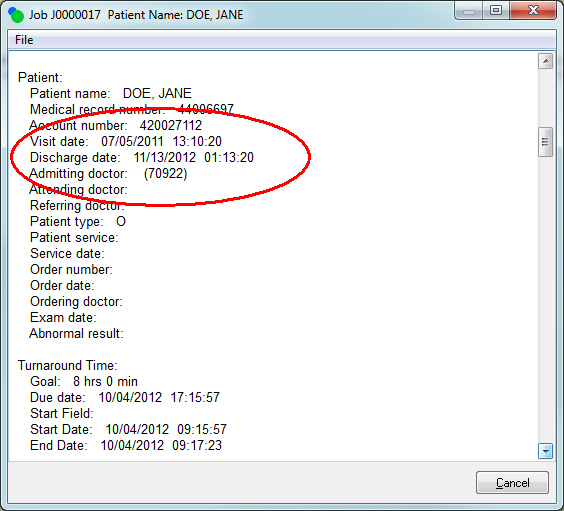
Visit time and discharge time
are also included in the report details screen.
Updated User
Guide
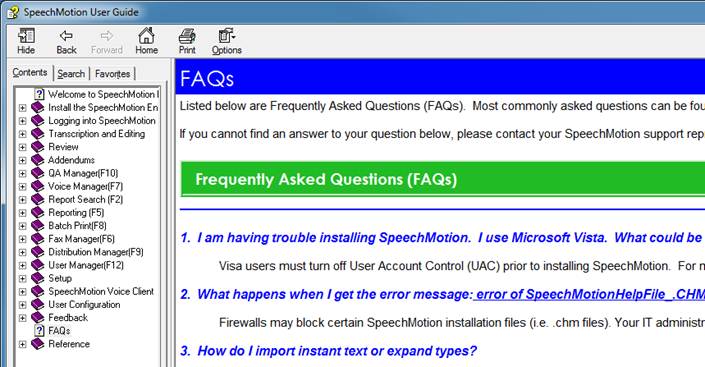
The user guide was updated to include a new FAQ section.
33 Items are included in this update. The questions were compiled by
the SpeechMotion support team and consists of the most common questions.
New HL7 upload
fields
The following upload field variables have been added:
· X.ALL_ORDERS
– strings together order numbers in this format:
orderno1~orderno2~orderno3~etc
· X.EDITSTATUS
– Returns a single character (P for preliminary, or C for corrected/edited)
regarding the status of a report.
New Report:
Unsigned Reports Summary - by Site (D021S)
This report is similar to D021 which displays a summary of
unsigned reports by provider name.
The new report allows more information about the provider
be included.
Report: Billing
Summary (M103) – report description added
This report was update to include the report description
(form description) in addition to the report type (work type).
Report: Transrate
Payroll Export (ZTRA) – now includes QA Audit activity.
This report previously queried transcription, editing and
QA review line activity. It will now include QA audit line activity.
This change was made to support QA Auditing productivity reports
in TRA Payroll application.
DVI voice import
string expressions
String expressions can now be included in the field
mapping table in for Voice Imports (MTVIMP).
The syntax for the Field Mapping table is:
[SpeechMotion
voice field]=[External system voice field];[logical expression];[string
expression]
On the DVI tab. USER
FIELD5 to USER FIELD10
were added as selections on the pull down to the ‘DVI field that contains or
represents site code’ field.
Additional
Changes and Fixes:
·
FIX: Tab sizes incorrectly being set when using MS Word templates
This was a bug introduced in last month’s update. It affected Meridian 1
customers and a hotfix was applied on that server after the Thanksgiving
holiday.
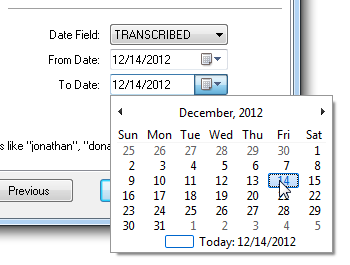
· CHANGE:
Searches and date calendars
Date calendar components and some date handling routines were updated to
support future enhancements.
When selecting a date range field type in report search, both dates (start
range, end range) are automatically populated with the current date. This
change also applies to searches in Voice Manager, Distribution Manager and QA
Manager.

SpeechMotion
Software Team
|