|

What’s New in
SpeechMotion 5.20 Production
build
13011600 for Wednesday January 16, 2013
This release includes a
number of bug fixes, updates to the AnyModal Editor and expanded browser
support for the E-Sign Portal.
Notable Enhancements:
·
Updated File Wizards
·
AnyModal Editor v7.77.1
·
Force Report Type lookup on specific
Work Types
·
Sorting Dictionary Lookups
·
E-Sign Portal Browser Support
·
10 digit dialing when sending faxes
Additional Enhancements and Fixes:
·
Added: Search crawlers and E-Sign Portal
·
Added: et.speechmotion.com and SM5
·
Added: Forced Restructure option for MTDBMAINT
·
Fixed: Site users and QA feedback
·
Fixed: Voice Capture log files recycle too soon
·
Fixed: Linked images when Printing
·
Fixed: Report E-Sign by Report Type (D020R)
·
Fixed: Distribution Rules and PrintALL devices broken
·
Fixed: E-Sign Portal – Interface and Thread Exceptions
·
Fixed: Voice Manager – does not log assigning job when done
from edit window
Updated File Wizards
When creating new configurations, you can use a wizard.
The following
wizards were added or updated.
Devices
·
Added: BATCHQUEUE
– Batch Queue device
·
Added: NO_DISTRIBUTE
– No distribute device. Used to change the status of a report from
Distribution Pending (DP) to Delivered (DE).
·
Added: NULL –
Null device. This is the same as the NO_DISTRIBUTE device.
·
Added: PATIENT_LOC
– Print to patient location
Forms
·
Added: Z-BATCHLOG
– Batch Cover Sheet
·
Added: Z-FAILEDFAX –
Failed Fax Cover Sheet
·
Added: Z-FAXCOVER –
Fax Cover Sheet
Voice Import
·
Added: DVI_TXT_WAV
– Import DVI_TXT_WAV voice files
·
Added: FUSION_WAV –
Import Fusion WAV voice files
Config for Workflow server
·
Added: MTPTLOC –
Print to Patient Location
·
Updated: MTMPI-ADT-PROD
– Added default ADT mapping
·
Updated: MTMPI-ADT-TEST
– Added default ADT mapping
Config for Gateway server
·
Added: MTUPLOAD-DVI_TXT_WAV
– DVI_TXT_WAV import
·
Added: MTUPLOAD-FUSION_WAV
– Fusion WAV import
Updated AnyModal Editor
The AnyModal editor was updated to the most recent version. Most of the
changes are enhancements yet to be implemented. However there are a few
bug-fixes included.
·
Resolved various editing issues with copy/paste operations and
jump markers.
·
Auto-Correct spaces with quotations
Users can manually handle spacing after end of sentence quotation.
Previous behavior removed one of the
spaces (if spacing was set to 2) between sentences when the sentence ended
with the end of sentence punctuation inside the quotation. This issue has
been resolved to allow users to manually handle spacing after end of sentence
quotation.
·
Users are now able to select text before a section title with
shift-end and then type text without involving the following title,
unexpectedly, in the current paragraph.
·
Users are now able to select text and overtype the text in
mm:status="template" field without losing Jump Marker.
·
Replacing selected text in a section body will no longer affect
the following section title. In older editor behavior, the replacement text may
have been inserted into a section title. This behavior has been corrected.
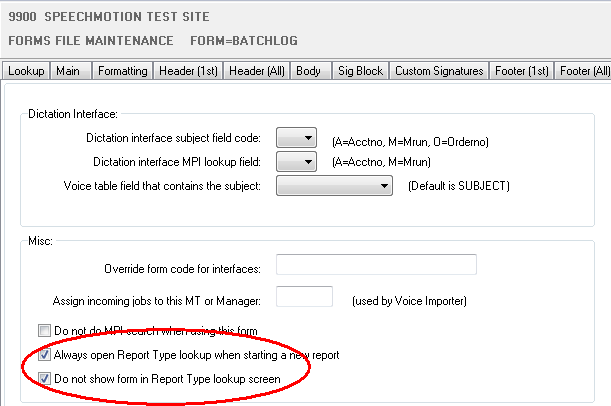
Force Report Type lookup on specific Work Types
Two new Forms options that
control how Report Type lookups are displayed when starting a new report.
·
Always open Report Type lookup when starting a new report
This option forces the Report Type lookup screen when starting a new report
in both the Transcription module and the Review Edit module.
This is useful in situations when a dictation is dictated under one report
type such as a STAT but you want the transcriptionist to always change the
report type to a different report type.
·
Do not show form in Report Type lookup screen
This option can be used with the ‘Always open Report Type lookup when
starting a new report’ so that the current form is not displayed in the
Report Type lookup screen. This will keep the transcriptionist from
selecting the original form.
This can also be used to not display forms such as envelopes, fax cover
sheets, and batch print cover sheet in the Report Type lookup screen.
in FORMS->OTHER tab
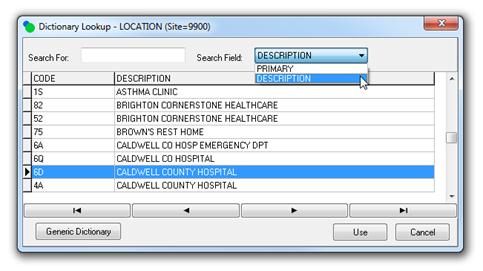
Sorting Dictionary Lookups
Dictionary lookups can now be searched and sorted by PRIMARY code or DESCRIPTION. The
Dictionary Lookup will remember the value of the Search Field and use it the
next time the Dictionary Lookup is opened.
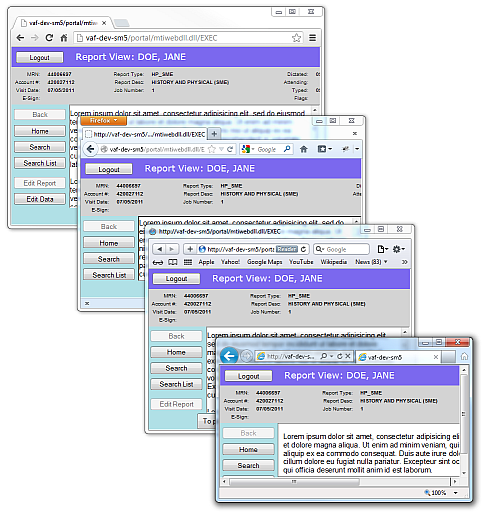
E-Sign Portal Browser Support
E-sign Portal will no longer reject sessions from browsers
other than IE.
All major browsers are enabled.
·
Internet Explorer (required for Edit
option)
·
Gecko (Mozilla/Firefox)
·
Google Chrome
·
Apple Safari (iPhone, iPad)
Note: The “Edit Report”
option is only available for Internet Explorer with the SpeechMotion Web
Editor ActiveX control installed. Browsers other than IE will not have an
option to “Edit” a report .
10 digit dialing when sending faxes
MTSNDFAX now supports 10 digit dialing.
This is where the customer’s phone system determines
whether a fax phone number is a long distance call or not.
The new option is ‘Use 10 digit dialing’. This option will
dial all fax phone numbers with the Area Code and Fax phone number combined
and will not include a 1 to dial as long distance. When this setting is set
to Y, MTSNDFAX will ignore the Long Distance setting in the Address table. No
changes are necessary in the Address table.
The Fax Area Code and Fax Phone field must be populated or
MTSNDFAX will log an error and not send the fax. The error is also logged in
Fax Manager
Additional Enhancements and Fixes:
·
Added: Search crawlers and E-Sign Portal
ROBOTS.TXT is now deployed to all E-Sign Portal splash pages. This should
help exclude the pages from being crawled by search engines such as Google
and Bing etc.
·
Added: et.speechmotion.com and SM5
SpeechMotion
5 applications (MTCLIENT, MTCTRL) now “phone home”, recording user, version
and machine info.
SpeechMotion 4.10 ChartNet Client no longer phones home.
Additional
changes were made to allow future enhancements regarding usage trends and
improved usage reporting.
·
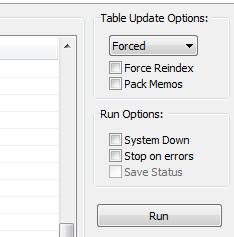
Added: Forced Restructure option for MTDBMAINT
Database maintenance utility now includes a “FORCED” option for both
restructure and reindex. Restructure is set to “AUTOMATIC” by default.
Force Reindex option forces reindex regardless of index definition changes.
This option can be used to recreate index due to possible corruption, without
having to delete them first.
The database maintenance utility also check for collation changes
(localization). This behavior is necessary for future enhancements.
·
Fixed: Site users and QA feedback
Site users
with “Review Reports” function access were not able to see or edit QA
Feedback notes.
This was resolved.
·
Fixed: Voice Capture log files recycle too soon
Voice
Capture Server MAX_LOG_FILE_LENGTH was increased from 1.6MB to 16MB
·
Fixed: Linked images when Printing
Linked report images are now correctly cached to temporary space even if the
site has yet distributed any reports.
·
Fixed: Report E-Sign by Report Type (D020R)
·
Fixed: Distribution Rules and PRINTALL
devices broken
Distributions rules that use PRINTALL
devices now correctly work in SpeechMotion 5.
·
Fixed: E-Sign Portal – Interface and Thread Exceptions
This addresses issues causing an “EXCEPTION: THE APPLICATION CALLED AN
INTERFACE THAT WAS MARSHALLED FOR A DIFFERENT THREAD” error in E-Sign Portal
when users were displaying reports with the “No ActiveX” option requiring
MSWord to render the report.
This should reduce the number of stale MSWord instances on Trover’s workflow
server.
·
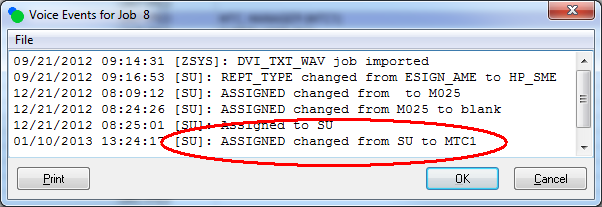
Fixed: Voice Manager – does not log assigning job when done
from edit window
In Voice Manager, when changing job assignments either one or many jobs at a
time, the application never logged who did the assignment. This has been
resolved.

SpeechMotion Software Team
|