|

What’s New in SpeechMotion 5.20 Production
build 13032000 for Wednesday March 20, 2013
This release includes an
overhauled Gateway Services installation, Gateway request handling, improved
HL7 message support and updated spell check dictionary.
Enterprise Client
·
FIXED: Incomplete markers causing
text to remain inside marked area
·
FIXED: Enterprise Client incorrectly
scales main form on non-standard DPI settings
·
FIXED: Previous Reports by
Transcriptionist ignores editors/reviewers
·
ADDED: Stedman’s Medical
Pharmaceutical Dictionary 2013
·
ADDED: New playback speed options for
Voice Client
·
ADDED: Login hotkeys for URL list
·
ADDED: Release Notes linked from
Enterprise Client help menu
·
ADDED: Updated list of report fields
in forms maintenance screens
·
ADDED: Address/CC Referral maintenance form now includes
street, city, state and zip code
·
CHANGED: Voice Player supports custom
sizes
·
CHANGED: Distribution errors now
indicate Gateway
·
CHANGED: Distribution device
maintenance UI overhauled
·
CHANGED: Updated SpeechMotion
Enterprise Client installer
Additional Enhancements and Fixes
·
FIXED: Stuck VR Jobs
·
FIXED: HL7_RTF
outbound device issues with Word templates
·
ADDED: New outbound device interface type – CUSTOM
·
ADDED: Support for HL7 repetition segments and sub-component
fields
·
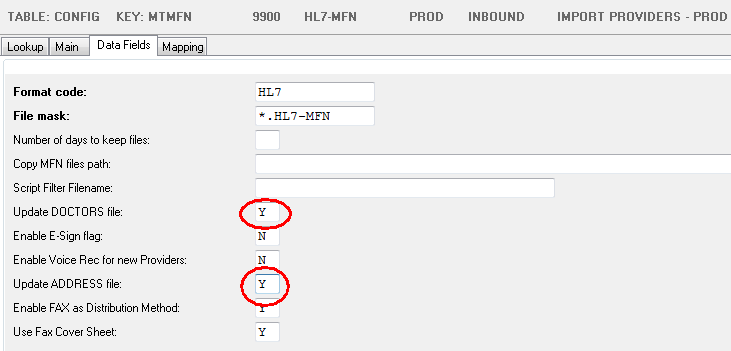
ADDED: Improved support for MFN HL7 messages for provider and address lookup changes
·
ADDED: MPI/ADT feeds now include visit/discharge date and time,
consulting Dr. name and code
·
ADDED: New field X.ADDENDUMNOTICE
·
ADDED: X.SIGNATURES format option for bold status
·
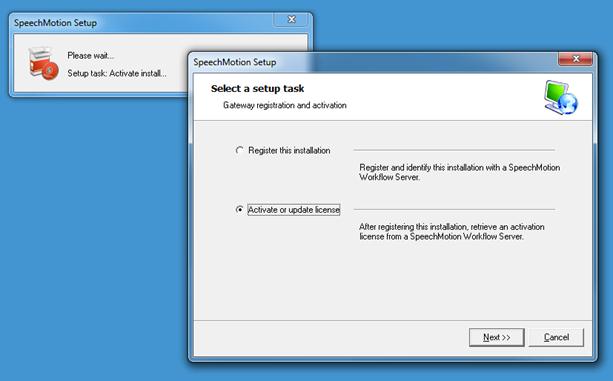
ADDED: New Gateway Services Installer
Management
Reports
·
E-Sign Lag Detail (T014D)
·
Raw Turnaround (T100D)
·
Billing Detail (D103) – added billing
amount
·
Site Turnaround by Report Type (M008) – added report
description
·
Transrate Payroll Export (ZTRA) – added start_time
Known Issues
·
AnyModal Editor: Issues with periods and auto-capping next
word regardless of sentence boundary.
The resolution for this will be in a release expected the end of Q2 2013.
FIXED: Incomplete markers causing text to
remain inside marked area
Users experienced difficulty with incomplete markers when
using the AnyModal Editor. Text typed outside the marker would sometimes be
part of the marked area.
FIXED: Enterprise Client incorrectly scales main form on non-standard DPI
settings
Users with non-standard DPI scaling enabled on their PC
would see malformed placement of text and button elements on the main
Enterprise Client form. Changes were made to scale the form evenly
regardless of DPI settings.
FIXED: Previous Reports by Transcriptionist ignores editors/reviewers
When
looking up previous reports (F6) by transcriptionist (option #8). VR reports
would list the reports handled by ZMM1 (VR) and edited/reviewed by anyone.
This was fixed so that ZMM1 (VR) reports will list reviewers as
transcriptionist instead.
ADDED: Stedman’s Medical Pharmaceutical Dictionary 2013
The
Enterprise Client spell checking tools were updated to include the most
recent Stedman’s Medical Pharmaceutical Dictionary. The 2013 list includes
over 8,000 additional terms. This updated was also published in the
SpeechMotion 4.10 Client.
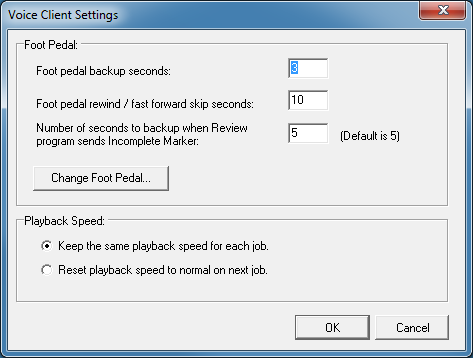
ADDED: New playback speed options for Voice Client
Voice
Client (MTVCLIENT): By default playback speed is set at the previous job’s
speed.
An option was added to reset the speed to normal on all new jobs.
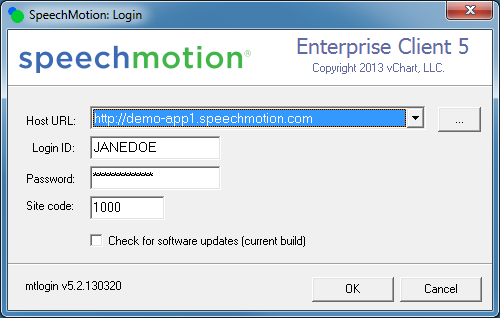
ADDED: Login hotkeys for URL list
Enterprise
Client Login (MTLOGIN): Users logging into SpeechMotion with a long list of
server URLs can jump through the list using the keyboard.
Keying
a letter jumps through the list of URLs starting with that letter.
For
example: the ‘d’ key will jump to a site named http://demo-app1.speechmotion.com
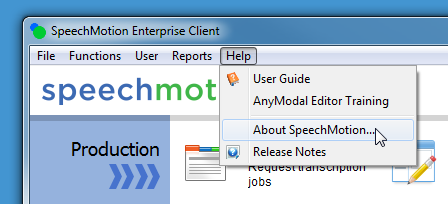
ADDED: Release Notes linked from Enterprise Client help menu
Formatted
release notes are now available directly from the Enterprise Client’s help
menu.
The
URL to the most current production release will always be here:
http://download.speechmotion.com/installs/5.20/releasenotes/releasenotes.htm
Notes
for the previous few releases will be listed on the download site.
ADDED: Updated list of report fields in forms maintenance screens
When
maintaining forms, the list of available form fields was updated. The list
can be seen by clicking on the INSERT FIELDS
button on the header, body and footer tabs.
ADDED: Address/CC Referral maintenance form now includes state, city,
street and zip code
Additional fields now
supported in MFN HL7 messages are now displayed in the address maintenance forms.
CHANGED: Voice Player supports custom sizes
The
Voice Player (MTPLAY) now supports a user configurable height and width. The
settings are saved when logged out.
Stretching the form horizontally stretches the audio scrubber giving the user
more control over playback.
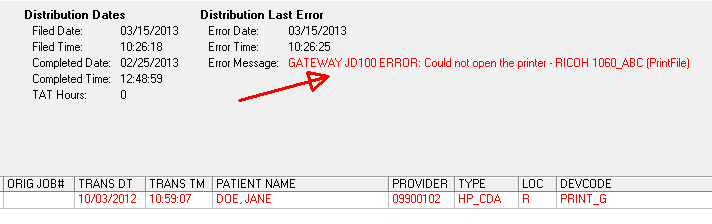
CHANGED: Distribution errors now indicate Gateway
Errors
that display in the distribution manager screen now indicates when the error
originates from the Gateway server.
This new behavior is part of the new Gateway Services enhancements and will
not do so with legacy Gateway installations.
The
screenshot below shows a distribution error occurred on the Gateway server
identified as “JD100”
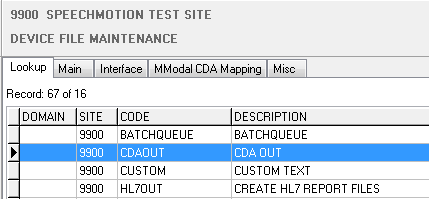
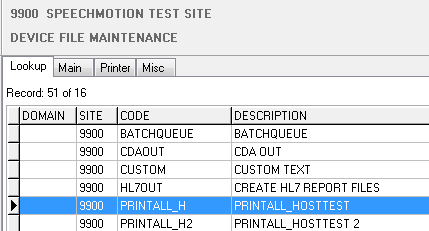
CHANGED: Distribution device maintenance UI overhauled
Previously,
the tabs and controls In device file maintenance would display regardless of
which device type was selected.
All relevant tabs and controls are now only visible for their corresponding
device types.
CHANGED: Updated SpeechMotion Enterprise Client Installer
The
Enterprise Client Installer was updated.
·
URL list now supports quick select keys
·
Enabled tab stops to the URL list dropdown
·
Disabled tab stops from URL list edit button
·
Updated download UI
·
Updated displayed version string
·
Updated digital signature
Additional Enhancements and Fixes
FIXED: Stuck VR Jobs
On rare occasions, jobs queued to VR would not process due
to a malformed response of a previously submitted job. Changes were made to
handle malformed responses and allow all other jobs to process.
FIXED: HL7_RTF device issues with Word templates
Distributions using outbound
device type HL7_RTF would
generate an error if the form config included a Word template. The device
would incorrectly produce a *.doc
file instead of the required *.rtf.
Changes were made to ensure the result is always RTF when a Word template is used.
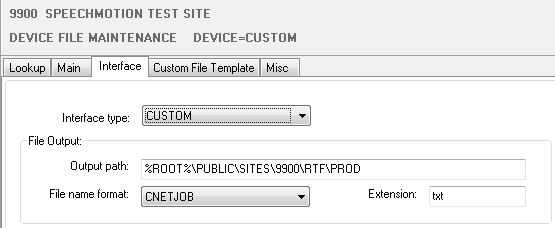
ADDED: New outbound device interface type – CUSTOM
This new device can be used
to create text files with custom content and formatting.
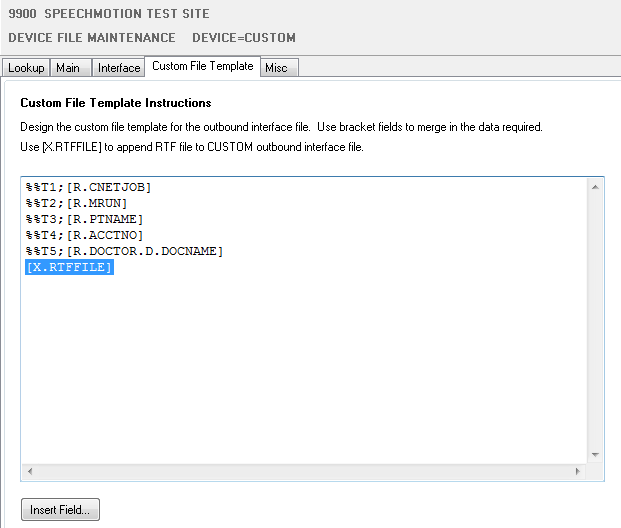
The content of the files is written in the Custom File Template tab using
free form text or report Fields.
A new field [X.RTFFILE] can be used for Custom
files. This field simply appends the RTF file at the end of the text file.
ADDED: Support for HL7 repetition segments and sub-component fields
Two additional fields have
been added to the end of the current mapping syntax.
These fields are sub-component
piece, and repetition piece.
The new syntax for mapping is:
[field
name],[segment],[field piece],[component piece],[format code],[sup-component
piece],[repetition piece]
The first five fields have not
changed so all current mapping will still function as it always has with the
exception of the fix for getting the last component of a field before a
repetition segment.
Mapping usage and examples.
PID|1||123456^^^^^RAD~654321^^^^^MR||LASTNAME^FIRSTNAME^MIDDLENAME||19651008|M|||6430
East 75th
Street^^Indianapolis^IN^46250|||||||45342322&0945768|123121234
ADDED: Improved support for MFN HL7 messages
for provider and address lookup changes
Workflow service application MTMFN now supports specific
init configurations for both provider and address updates.
ADDED: MPI/ADT feeds now include visit/discharge date and time,
consulting Dr. name and code
Visit discharge date/time and the consulting Dr. name and
code are now displayed on the MPI maintenance forms.
ADDED: New field X.ADDENDUMNOTICE
When this report field is
used, it displays “THIS REPORT HAS x ADDENDUM(S)” when the report
has addendums. Otherwise, the field displays nothing.
The message can
be overridden in the Sites->Misc->Misc Options - Override X.ADDENDUMNOTICE option.
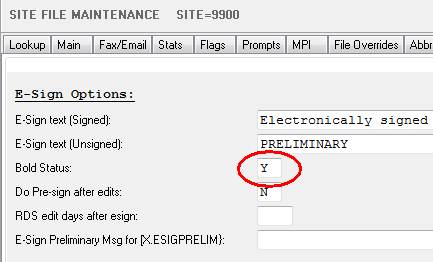
ADDED: X.SIGNATURES format option for bold status
The default configuration
displays the e-sign status in bold text.
You can override this in the sites maintenance screen.
Changing the value to ‘N’
displays the status in normal text.
ADDED: New Gateway Services Installer
The installer was overhauled
to support enhanced Gateway security features, installation identification
and simplified setup.
Updates to existing Gateway
installations will be performed by SpeechMotion support teams in phases over
the next few weeks.
The new installer will be
available on the SpeechMotion download site shortly after the first Gateway
server is updated.
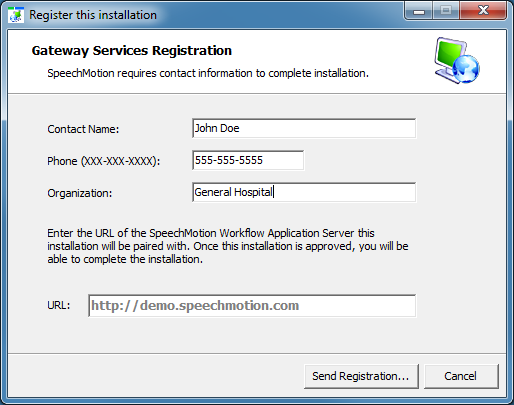
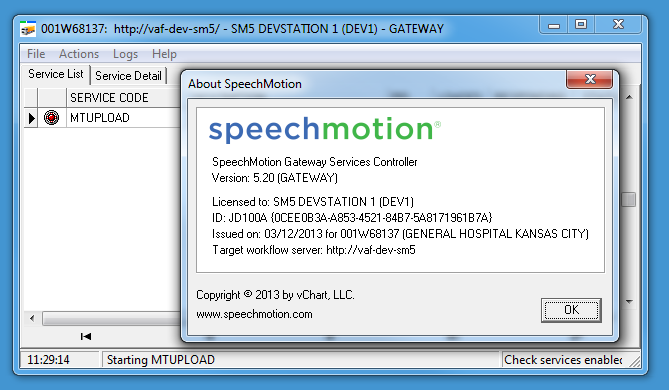
Service controllers now
include a Help->About screen detailing installation and registration info.
Management Reports:
·
E-Sign Lag Detail (T014D)
This report displays the number of hours
lapsed while a report is waiting to be e-signed for both dictator and
co-signer (if available).
·
Raw Turnaround (T100D)
Customers wishing to import raw STAT and
turnaround data for import into their own reporting tools can do so with this
report.
The report supports CSV file output.
·
Billing Detail (D103) – added billing
amount
A per report billing amount is now included
in the list of columns.
·
Site Turnaround by Report Type (M008) – added report
description
The report descriptive text is included along with its code.
·
Transrate Payroll Export (ZTRA) – added start_time
This report now includes the start_time
in addition to the start_date.

SpeechMotion Software Team
|