|
What’s New in SpeechMotion 5.20 Production
Release Summary
This release includes support for service centers; changes that address numerous workflow related issues, as well as issues with Enterprise Client. Enterprise Client: · FIXED: Report search locks up on refresh · FIXED: Transcribe filter dialog issues · FIXED: QA Feedback is intermittently displaying feedback without markup · FIXED: Change password dialog can lock user records · FIXED: Site users cannot see results in stats reports · FIXED: Previous reports by transcriptionist · ADDED: Service Center configurations · ADDED: Force MPI multiple visit date confirmation · ADDED: Service Date added to report search · CHANGED: Report: Billing Summary by Category (B107S) · CHANGED: Report: Daily Dictation Log (V005D2) · CHANGED: QA Auditing Updates Workflow Servers: · FIXED: Numbered list font issues · FIXED: Workflow errors “Stuck in transcribe status”
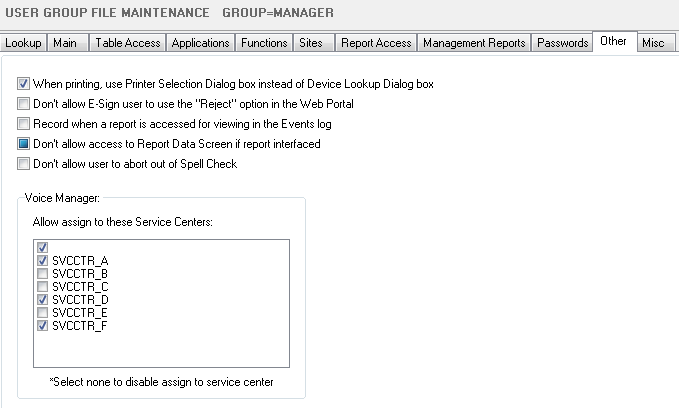
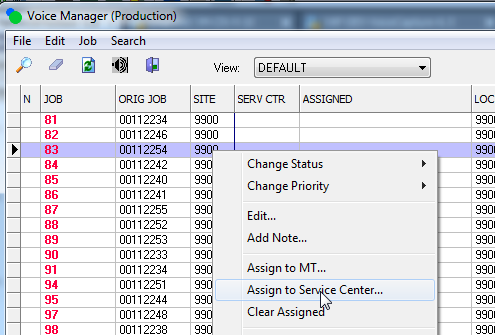
Release Details FIXED: Report search locks up on refreshIn report search, when users clicked “Refresh” the application would freeze for approximately 120 seconds before displaying an error. This would occur if the user had issued a MPI search on the previously opened report. FIXED: Transcribe filter dialog issuesClicking on “Request Jobs” in the transcribe module using the filter option would sometimes appear as If the application locked up. This is caused by the filter dialog remaining hidden behind the main form instead of displaying up front. FIXED: QA Feedback is intermittently displaying feedback without markupIn rare cases, QA Feedback markup is not visible. This happens when documents in review are rendered for feedback before the main document is rendered. In other cases, some documents FIXED: Change password dialog can lock user recordsPreviously it was possible to lock a user profile record when changing passwords. Changes were made to address this. FIXED: Site users cannot see results in stats reportsPreviously, site users would not see any results in reports that ran from the stats table when VR was used to transcribe jobs. Any new reports created after this update will display correctly on a stats report for a site users. Older reports will require a MTUTILS “Rebuild to Stats”. FIXED: Previous reports by transcriptionistThis option would return no results if the current report was new and edits were in progress. ADDED: Service Center configurationsThis enhancement allows multiple groups of MTs working in separate organizations to isolate their work activity. The following areas are affected when users are assigned a “Service Center” As a user assigned to a Service Center: · Voice Manager – view is limited to service center jobs · Report Search – results are limited to service center reports · Previous Reports – results are limited to service center reports · QA Audit – audits are limited to service center reports · Stats Reports – results are limited to service center reports Assigning service center jobs require workpools to explicitly be written for them: · Transcribe – via voice workpools · Review – via review workpools Service Center names are configured in the System->Other tab. Non service center users can be given the option to assign jobs to service centers from the voice manager. These permissions are assigned from the User Group->Other tab.
Jobs from voice manager can be assigned to a service center. The list of assignable service centers is maintained in the User Group->Other tab.
ADDED: Force MPI multiple visit date confirmationWhen users are prompted to select a visit date from a multiple visits prompt, they will be required to confirm their selection. This behavior can be enabled at the user group level under Misc->Force Confirm MPI visit date. ADDED: Service Date added to report searchService date was added to the list of date field options in report search. CHANGED: Report: Billing Summary by Category (B107S)This report was updated to show counts for In House, Site User, Voice Rec and Transcribe separately. CHANGED: Report: Daily Dictation Log (V005D2)This report was updated to include the dictation length in seconds. CHANGED: QA Auditing UpdatesA number of minor updates to the QA Auditing module. ·
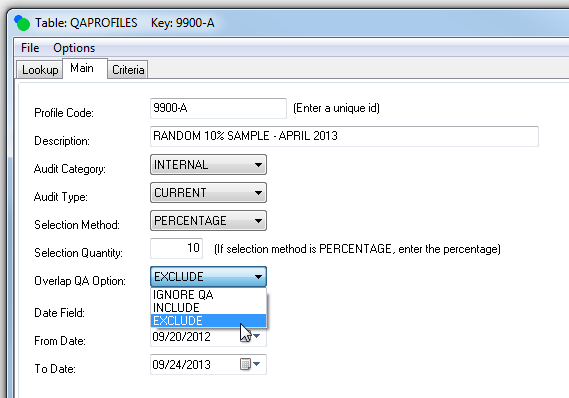
QA Profile editor now includes
Overlap Option: INCLUDE,
EXCLUDE, IGNORE QA ·
QA Samples (worklist) now include
columns that indicate the last QA · Cloning a QA Profile does not clone the lastrundate, lastruntime, lastruntotal fields. · QA Manager now supports Service Centers Note:
These changes require a data grid reset in
order to see the new fields. The Overlap QA Option selects reports based on their previous QA status FIXED: Numbered list font issuesNumbered lists configured with AMP templates would sometimes render the numbers in an incorrect font size. Changes were made to resolve this issue in MTRENDER. FIXED: Workflow errors “Stuck in transcribe status”Various workflow related conditions and errors are addressed. On rare occasions reports are left in TRANSCRIBED or REVIEW COMPLETE status and never progressing to the next state.
|