|
What’s New in SpeechMotion 5.20 Production
Release Summary This update includes bug fixes for VR jobs, improvements in the SpeechMotion editor and enhances playback control of voice players. Enterprise Client: · Changed: Improved foot pedal and keyboard command support for voice players · Changed: Improved bookmark navigation with text formatting · Changed: Increased turnaround goal configuration values · Changed: Previous reports grid now supports custom column orders · Added: Report: Turnaround Category – By Doctor and Report Type (T007DS) · Changed: Total dictation minutes added to the following: o Report: Daily Dictation Log (V005D) o Report: Jobs Received by Date (V006S) o Report: Jobs Received by Doctor (V008S) · Changed: QA reports now display weighted and non-weighted scores in the following: o QA Summary By Client / Physician (QA01) o QA Detail by Client / MT (QA02) o QA Summary by Client / MT (Ranked by Avg) (QA03) o QA Ranking by MT (QA04)
Workflow Server: · Fixed: VR Jobs are unassigned but still checked out for hours · Fixed: Inactive flag ignored on scheduled batch jobs · Fixed: Patient name not updating on A31, A34 HL7 ADT messages · Changed: Calculation codes with billing reports · Added: Device option to ignore Word template option in forms · Added: Force VR blank document/draft training override
Enterprise Client Changed: Improved foot pedal and keyboard command support for voice playersKeyboard and foot pedal control over voice players was overhauled to address occasional issues relating to garbled or doubled-play as well as improve overall playback control. These
key commands are now supported in all playback scenarios:
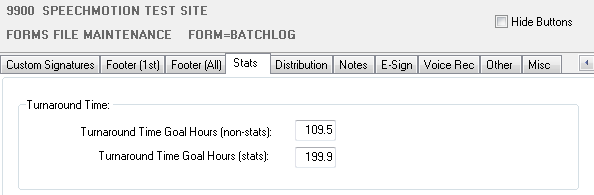
Changed: Improved bookmark navigation with text formattingIn the SpeechMotion editor, when typing text after landing on a bookmark using the navigate bookmark keys [F1] and [CTRL]+[F1], the default document format would be used, ignoring the currently selected text formatting. This has been changed. New text will inherit the attributes of the current selected text after landing on a bookmark. Issues regarding signature blocks where bookmark navigation would not work has also been resolved. Changed: Increased turnaround goal configuration valuesTurnaround goals can now be set to higher values. The highest is 999.9. This change is applied to the FORMS and SITES stats tab.
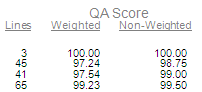
Changed: Previous reports grid now supports custom column ordersDragging around the column in a previous reports lookup screen would revert to the default order on each subsequent lookup. This is no longer the case. Column order is retained for the next lookup. Note: To reset column orders back to default: [CTRL]+[SHIFT]+[Z] Added: Report: Turnaround Category – By Doctor and Report Type (T007DS)This report displays turnaround categories grouped by Doctor name. Changed: Total dictation minutes added to the followingTotal dictation length in minutes was added to summary band at the the bottom of these reports. · Report: Daily Dictation Log (V005D) · Report: Jobs Received by Date (V006S) · Report: Jobs Received by Doctor (V008S) - New Changed: QA reports now display weighted and non-weighted scores in the followingThe following reports now display weighted and non-weighted QA scores. · QA Summary By Client / Physician (QA01) · QA Detail by Client / MT (QA02) · QA Summary by Client / MT (Ranked by Avg) (QA03) · QA Ranking by MT (QA04) Weighted scores are based on a 100 line report standard. Non-weighted scores simply subtract points from 100.
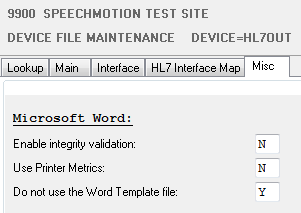
Workflow Server Fixed: VR Jobs are unassigned but still checked out for hoursWhen jobs were being pulled back from VR because they were approaching their 2 hour due date, VR service inadvertently cleared the assignment of another job without checking the job back in. This left the job unattended until checkout limits were reached 3-4 hours later and routed to transcription. Fixed: Inactive flag ignored on scheduled batch jobsThe inactive flag for batch schedule configurations is now working. Fixed: Patient name not updating on A31 A34 HL7 ADT messagesPatient name and SSN fields are now updated when receiving A31, A34 HL7 messages. Changed: Calculation codes with billing reportsBilling and payroll calculation codes are now stored in the STATS table. · TRANCALC – payroll calculation code · SITECALC – billing calculation code This was necessary to support future enhancements to billing reports. Added: Device option to ignore Word template option in FormsDevices->Misc tab now includes an option to ignore the Word template options configured in forms.
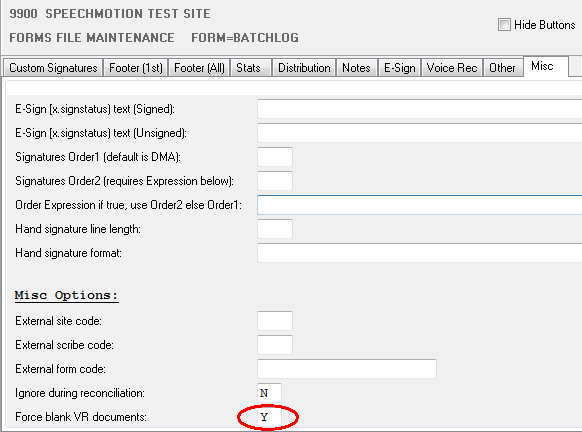
This option is used when a form has multiple distribution devices and one of them has to assemble the document without the Word template. Added: Force VR blank document/draft training overrideThis option will force VR jobs to return blank documents with document models regardless of author trained status. This essentially treats the job as a training job. The option can be applied at both the FORM level and at the SITE level.
. |