|
What’s New in SpeechMotion 5.20
Release Summary This release includes fixes relating to signatures and expanders and additional enhancements to HL7 interfaces. Enterprise Client: · Fixed: Issues with expanders and auto-capitalization behavior · Fixed: Errors when exiting SpeechMotion after double-clicking form close button · Fixed: Split job error: “The report key for this document does not match…” · Fixed: Insert doctor (signature) bitmap issue · Fixed: Change password dialog tab order · Fixed: Provider CSV import issues with VR flag · Changed: Modified reports must be checked in from the editor modules · Added: Ad hoc VR assignments Reporting: · Changed: Report: Turnaround Time Detail (D040), (D041) · Changed: Report: Jobs Received by Doctor (V008S) Workflow Server: · Fixed: Addendums not shown with MS Word templates · Fixed: Issues with X.SIGNATURES and co-sign options · Fixed: Doctor extra fields and empty X.SIGNDOCEXTRA · Added: New device type: HL7_PDF · Added: New device wizards for HL7_RTF and HL7_PDF · Added: New HL7 format modifiers: APPEND, COMBINE · Added: New HL7 e-sign X.STATUS code · Added: Pre-sign distribution on preliminary signature option · Added: ALLSCRIPTS_XML_WAV voice import DICT_ID field option
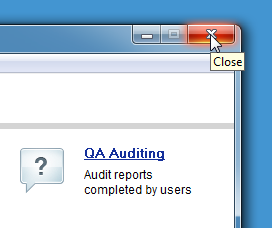
Enterprise Client Fixed: Issues with expanders and auto-capitalization behaviorThe AME editor now handles auto-capitalization of expanders the way SpeechMotion editor does. It will now capitalize the first letter of the ExpandType if the first letter of the abbreviation is capitalized and will now capitalize all of the ExpandType if the whole abbreviation is capitalized. This behavior is consistent with the SpeechMotion editor. Fixed: Errors when exiting SpeechMotion after double-clicking form close buttonExiting SpeechMotion can create errors when clicking on the form close button. Users who double-click the form close button could trigger multiple shutdown commands and potentially result in client errors. This has been resolved.
Fixed: Split job error: “The report key for this document does not match…”Users splitting jobs in the AME editor could receive this error when opening a report. If a user closed an edited
report from a split, and later re-opened it before completing it, they would
receive this error. Users could continue to complete the report without any
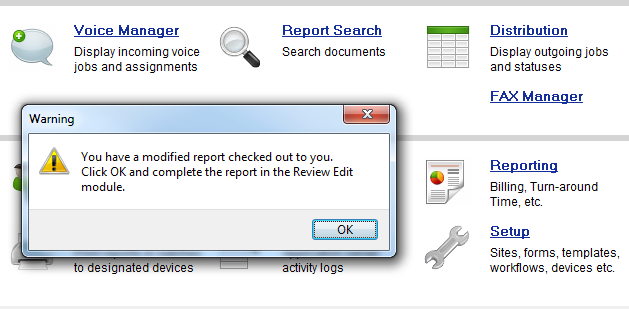
addition problems. Fixed: Insert doctor (signature) bitmap issueUsers complained that the wrong (signature) bitmap was inserted for a doctor. This issue was fixed in both SpeechMotion ChartNet Client 4.10 and SpeechMotion 5.20. Fixed: Change password dialog tab orderPassword change dialog box previously had backwards tabbing order. This has been corrected. Fixed: Provider CSV import issues with VR flagImporting provider records would sometimes ignore the (enable) VR flag field. When importing 2 or more provider records at a time using the PROVIDER CSV file type, the VR flag could be ignored which has the effect of disabling VR for a doctor. This has been resolved. Changed: Modified reports must be checked in from the editor modulesUsers now have to check-in or abort modified reports before exiting SpeechMotion. Previously when users exited SpeechMotion they were
prompted to either “Check In” or “Delete” modified reports left behind. Now, users are prompted to handle the modified reports from within the editing module they were created in before exiting SpeechMotion.
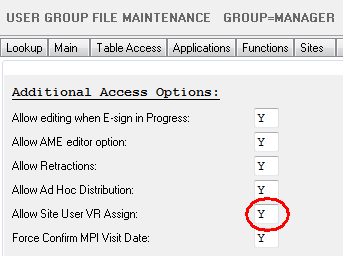
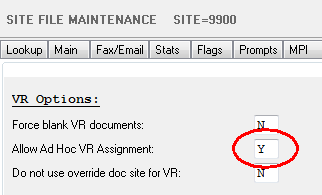
Added: Ad hoc VR assignmentsNew voice manager options to send jobs to VR. Normally, jobs assigned to VR are rejected if the provider is not enabled for VR Administrators wishing to manually assign individual jobs to voice rec for providers who do not have VR enabled can now do so. Jobs for providers assigned this way will have to be trained as usual. Once trained, the jobs will result in VR drafts and be assigned to the VR_DRAFT queue. This only applies to the current job. Subsequent jobs imported from the same provider will be assigned to a transcription queue as usual. To configure ad hoc VR assignments: 1. The user who assigns jobs has to have access to voice manager 2. If the user is a site user, they need
permission to the “Allow Site User VR Assign” option in user groups Misc tab. 3. Enable VR for the site 4. Enable “Allow Ad Hoc VR Assignment” site
misc option. 5. Lastly, each form needs to be enabled for VR. If the form isn’t enabled for VR, the ad hoc assignment is rejected.
Reporting Changed: Turnaround Time Detail (D040), (D041)VR column added to indicate jobs that were completed using Voice Rec. Changed: Jobs Received by Doctor (V008S)The following changes were made to this report: · This report now includes normal job count and stat job count columns. · This report now allows user to filter by specific doctor and or report type.
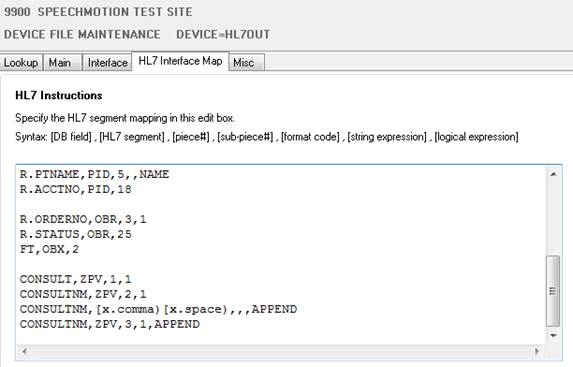
Workflow Server Fixed: Addendums not shown with MS Word templatesAddendum markup was not shown when MS Word templates were used. This has been resolved. Reports that contained linked addendums now include the addendum text if MS Word templates are used with the form config. Fixed: Issues with X.SIGNATURES and co-sign optionsDoctors who complete their residency and no longer require co-sign. Reports created when the doctor had co-sign enabled, no longer display the co-sign providers after co-sign is disabled. This has been resolved. If the report previously had a co-signature, it will always render the co-signature regardless of the doctors co-sign config. Fixed: Doctor extra fields and empty X.SIGNDOCEXTRAUnsigned reports and blank extra fields were leaving empty lines in the rendered report. Previous usage was [X.SIGNDOCEXTRA1)[X.NEWLINE)which would insert a newline when the extra1 field was blank. This is undesirable in some configurations. The following new fields are now available for use in custom signature options on the Misc tab for in Sites or Forms. · [X.SIGNDOCEXTRA1+NEWLINE) · [X.SIGNDOCEXTRA2+NEWLINE) · [X.SIGNDOCEXTRA3+NEWLINE) · [X.SIGNDOCEXTRA4+NEWLINE) · [X.SIGNDOCEXTRA5+NEWLINE) · [X.SIGNDOCEXTRA6+NEWLINE) Using these new fields, if the extra field is empty, the empty space will collapse. Added: New device type: HL7_PDFHL7 messages with embedded PDF documents. This new device works much like HL7_RTF. Instead, the PDF document is encoded in base64 and stored in OBX. Added: New device wizards for HL7_RTF and HL7_PDFCreate new device wizard now includes options for HL7_RTF and HL7_PDF Added: New HL7 format modifiers: APPEND, COMBINETwo additional format modifiers for use with HL7 mapping configurations. These new formats allow you to concatenating two or more values from a HL7 message and store the concatenated value in one field in the MPI, Orders, Doctor, or Address tables depending on the interface. · The APPEND format will concatenate two or more fields and/or literal text into one value. However, the value will be empty if the value from the first field is empty. · The COMBINE format will concatenate two or more fields and/or literal text into one value even if the first field is empty Examples for using APPEND In this message, the consulting physician id is in field ZPV.1, last name is in ZPV.2, and first name is in ZPV.3. To properly put the consulting physician’s name in the SpeechMotion MPI table we store it as Lastname, Firstname. To do this with the APPEND format the syntax in the Mapping is:
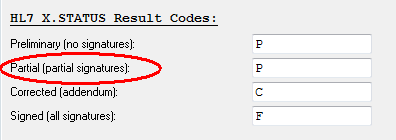
The result will be “Nichols, James.” Note: Contact your SpeechMotion account rep for additional documentation relating to APPEND and COMBINE Added: New HL7 e-sign X.STATUS codeX.STATUS field used in outbound HL7 messages was updated to include a new status code:
ResultCodePreliminary : string; // no signatures default=P ResultCodePartial : string; // partial signatures default=P (new) ResultCodeCorrected : string; // addendum default=C ResultCodeFinal : string; // signed default=F
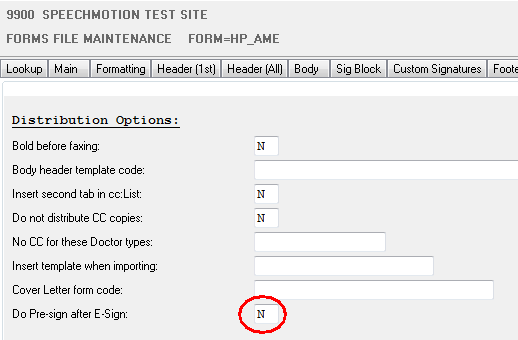
Added: Pre-sign distribution on preliminary signature optionReports can distribute after the 1st signature of dual signature configurations. By default, pre-sign distributions are triggered when
the report is put on e-sign. To enable pre-sign distributions after each preliminary signature. 1. Enable e-sign for both the provider and forms 2. Create a PRE-SIGN distribution device on the forms 3. Enable
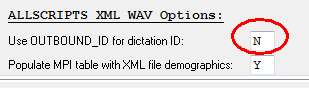
pre-sign after e-sign on the Forms misc tab. Added: ALLSCRIPTS_XML_WAV voice import DICT_ID field optionDICT_ID can be filled from an alternate import field. Normally, DICT_ID is filled from the AUTHOR_ID in ALLSCRIPTS_XML_WAV imports. This option overrides the default assignment and uses OUTBOUND_ID as the input field instead.
|