|
What’s New in SpeechMotion 5.20
Release Summary This release describes
hotfixes applied throughout this maintenance cycle. Enterprise Client: · Fixed: cut/copy/paste not working on Forms/Providers notes tab · Changed: Report: Billing Invoice – by Provider by Report Type (No Amt) (M202A) Workflow Server: · Added: E-Sign Portal incomplete report options · Added: HL7 upload fields for addendums and E-Sign · Added: Report export options for Dolbey Fusion Transform and multiple orders
Enterprise Client Fixed: cut/copy/paste not working on Forms/Providers notes tabWhen edit notes on the Forms->Notes tab or Providers->Notes tab. Cut, copy paste did not work. Cut, copy & paste now work as expected. Changed: Report: Billing Invoice – by Provider by Report Type (No Amt) (M202A)This report displays billing quantities by report type and provider. Users can now run this report for a specific report type. Billing unit type column was added.
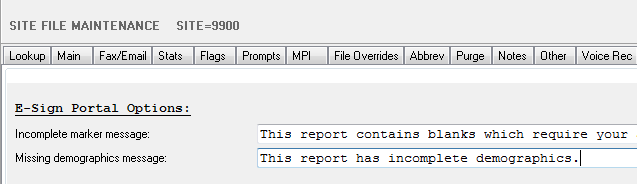
Workflow Server Added: E-Sign Portal incomplete report optionsSeveral new options were added that handle how incomplete markers are displayed while e-signing and what messages are shown when the report is incomplete. 1. Custom incomplete markers 2. Additionally, warning messages displayed when
reports are incomplete can also be customized:
Added: HL7 upload fields for addendums and E-SignA number of HL7 fields were added relating to addendums and parent records. These new fields return the values associated with the parent record of an addendum. · X.PA_TRANSDATE, X.PA_DICTDATE, X.PA_SIGNDATE · X.PA_DOCTOR, X.PA_SIGNDOC Added: Report export options for Dolbey Fusion Transform and multiple ordersDolbey formatted list of order numbers for use with Fusion Transform ·
X.DOLBEY_EXAMS |
|
|



SpeechMotion Software Team