|
What’s New in SpeechMotion 5.30 Release Summary The 5.30 October release includes a new and improved transcription work pool module. A FAQ section regarding the new module appears at the end of this document. Enterprise Client: · Added: VR Drafts now route to Transcription module · Added: New transcription work pool module with VR Draft editing, improved handling of STAT and split jobs · Added: STAT job indications · Added: New “DRAFT” columns in voice client and voice manager · Added: Voice notes are now passed to the transcribe module/report · Added: Tone control in AME editor · Changed: Simplified transcription work pool module with fewer prompts · Changed: Password prompts are no longer required to complete a voice job · Changed: VR Drafts now display in report Transcriptionist Daily Log (D002) · Changed: Report: Untyped Jobs (V002) report now includes VR jobs Additional Client Updates: · Fixed: Report data screen: MPI data isn’t clearing previous data when new data is empty · Fixed: Hotkey not working in lookup dialogs · Fixed: Grand Average for Report: QA Summary (QA01) · Fixed: “Set Filter” in setup will remove filter on Cancel · Fixed: Error using Reveal Codes (F11) in setup screens · Added: WebEdit (E-Sign Portal) and incomplete markers · Added: Additional columns to Multiple Visits screen Workflow Server: · Added: Partial Dictation Workflow New Transcription Module FAQ: 1. When users close the RDS to begin typing in the report, audio playback stops. 2. After users close the RDS to begin typing in the report, there is a 1 or 2 second delay. 3. Sometimes the “Complete Report” dialog displays automatically, sometimes it does not. 4. If a job is marked STAT after its received by the MT, the MT sees no STAT indicators in the Voice Client or Job Header in the Transcription module. 5. The Complete Report dialog says the report is “Incomplete”. 6. The Voice Player appears in the middle of my screen when I start a new job. I have to minimize it each time.
Enterprise Client Added: VR Drafts now route to Transcription modulePreviously VR jobs were routed to the Review Edit module VR_DRAFT queue. VR_DRAFT review queues will be phased out as VR jobs will now route to the Transcription module as UNTYPED jobs. This change has to be enabled on a per site basis. Contact your SpeechMotion account rept to enable VR Transcription. Note: After this update. Any pre-existing jobs in VR_DRAFT review queues will have to be completed in the Review Edit module. Added: New transcription work pool module with VR Draft editing, improved handling of STAT and split jobsThe transcription work pool module was overhauled to satisfy numerous user productivity requests.
· VR Draft editing · Simplified “Complete Report” actions · More notifications relating to job playback, incomplete or missing demographics Added: STAT job indicationsVisual indicators have been added to notify users when STAT jobs are received.
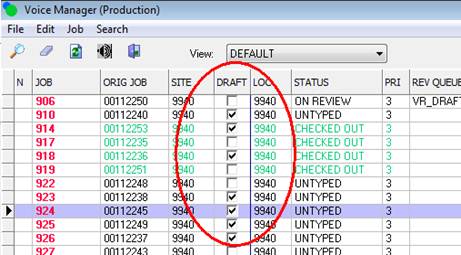
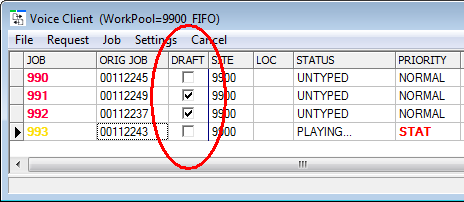
When the Voice Client receives a STAT job, the task button flashes for 30 seconds. Added: New “DRAFT” columns in voice client and voice managerVoice Manager and Voice Client now indicate jobs with associated VR draft content.
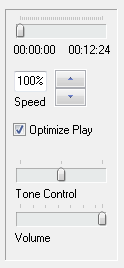
Note: If you do not see these columns, you will have to reset your grid with keys: CTRL+SHIFT+Z Added: Voice notes are now passed to the transcribe module/reportNotes added to jobs in the Voice Manager are now passed along to the new Transcription work pool module and report. Previously voice notes were only visible from the Voice Manager. Added: Tone control in AME EditorThe tone of the audio can be adjusted when typing in the AME editor. The tone control works much like the tone control on a stereo system. By default, the middle position is normal, left is low, right is high.
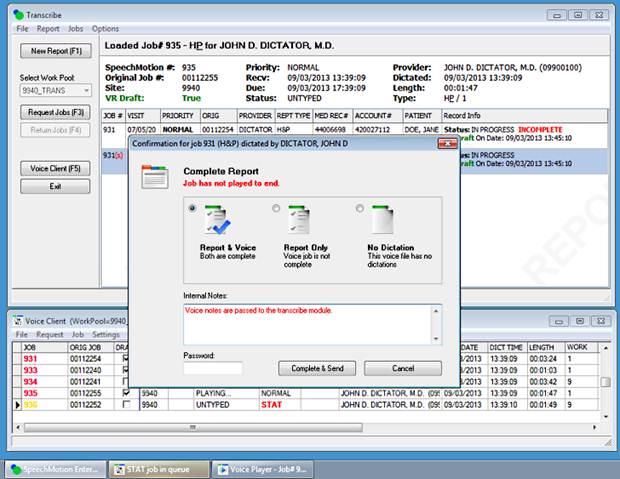
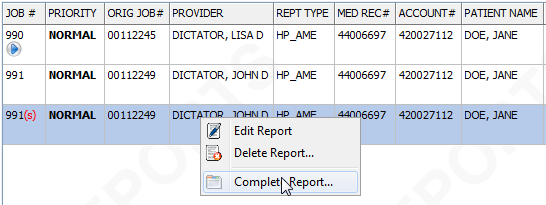
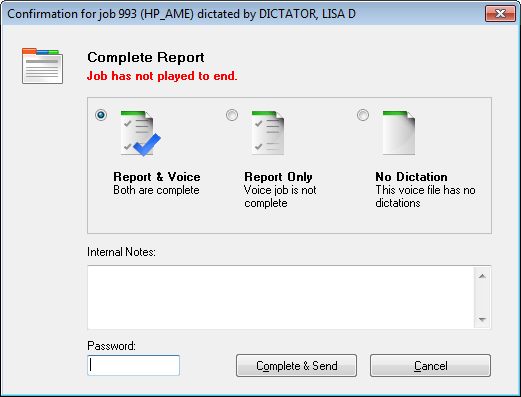
Changed: Simplified transcription work pool module with fewer promptsMany changes to how the transcription module loads jobs and prompts when jobs are complete. 1. When completing a report, the report and voice job is returned within the same action. Users are no longer required to enter passwords twice. 2. The “Complete Report” dialog automatically displays
after a report is saved when users are typing reports normally within the
workpool. However, when users are loading jobs interactively the “Complete
Report” dialog does not automatically display when saving the report. In
these cases, users will have to right-click on the job and select “Complete
Report…”. 3.
Previously notifications
relating to the job were displayed in numerous message dialogs. Eg. “Report
is missing demographics”, “Report is incomplete”, “Job has not played to
end”.
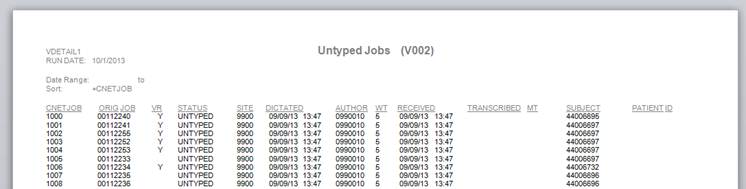
4. Notes added to the voice job in Voice Manager are passed to the Report document as well as displayed in the “Complete Reports” dialog. Changed: Password prompts are no longer required to complete a voice jobUsers previously had to type in their password twice, once for the report and again to mark a voice job “Complete”. This is no longer necessary. Only completed reports require a password confirmation. Changed: VR Drafts now display in report Transcriptionist Daily Log (D002)Transcription related management reports now correctly include VR drafts edited in the transcription module. When users ran Transcriptionist Daily Log (D002) it returned a list of reports transcribed by the user. Previously, VR jobs were transcribed by the VR service “ZMM1” and would not show up in the daily log because the user was not the scribe. This is no longer the case. VR Draft reports created in the new Transcription work pool module correctly record the MT as the scribe. Note: Pre-existing VR Drafts edited in the Review Edit module are not included. Changed: Report: Untyped Jobs (V002) report now includes VR jobsUser running this report to see how many jobs are left untyped no longer have to run a separate report to list VR Jobs in VR_DRAFT queue.
Additional Client Updates Fixed: Report data screen: MPI data isn’t clearing previous data when new data is emptyWhen updating patient data on the Report Data Screen, new data with empty fields would not clear out the previous values. This has been corrected. Fixed: Hotkey not working in lookup dialogsLookup dialogs for Forms, Sites, Templates etc. would not respond to hotkeys. ALT+U hotkey to select the highlighted row in lookup dialogs would not work. This has been corrected. Fixed: “Set Filter” in setup will remove filter on CancelWhen users cancel out of the Set Filter menu item, the current filter is removed. This has been corrected. When users cancel out of Set Filter the current filter is retained. Fixed: Error using Reveal Codes (F11) in setup screensWhile in Forms setup, the F11 key would generate an error if the displayed tab did not contain a RTF component. This has been corrected. Fixed: Grand Average for Report: QA Summary (QA01)This report was displaying an incorrect Grand Total for non-weighted scores. The grand total for non-weighted scores is now averaged instead of summed. Added: WebEdit (E-Sign Portal) and incomplete markersWhen editing a report from the E-Sign portal, users now have a menu option to find incomplete markers within the document. Users who currently have the WebEdit ActiveX component installed will have to download the update: http://download.speechmotion.com/download/default.aspx Note: This update is optional and not required. Added: Additional columns to Multiple Visits screenThe following fields were added to the Multiple Visits lookup screen. · Facility · Birthdate · Consulting Doctor
Workflow Server
Added: Partial Dictation Workflow Changes were made to how Edit (Replace) report actions handle previous reports. Previously the parent report would not execute workflow if it was in Review. This is no longer the case. Parent reports if Edit (Replace) actions now execute workflow when they are in Review. This new behavior allows programmatic control using Workflows and Form fields. · Partial dictations are handled using Previous Reports (F6) Edit (Replace) actions from the Transcribe module. · The first report is routed to a review queue. · Subsequent reports use Previous Reports (F6) Edit (Replace) actions on the parent report.
New Transcription Module FAQ
1.
When users close the RDS to
begin typing in the report, audio playback stops. 2.
After users close the RDS to
begin typing in the report, there is a 1 or 2 second delay. 3.
Sometimes the “Complete
Report” dialog displays automatically, sometimes it does not. 4.
If a job is marked STAT after
its received by the MT, the MT sees no STAT indicators in the Voice Client or
Job Header in the Transcription module. 5.
The Complete
Report dialog says the report is “Incomplete”.
6.
The Voice Player appears in
the middle of my screen when I start a new job. I have to minimize it each
time.
.
|



SpeechMotion Software Team