|
What’s New in SpeechMotion 5.30 Release Summary
Enterprise Client: · Fixed: Print preview grayed out after using it once · Added: Insert current time hotkey for Report Data Screen · Added: “Edit Previous Job/Create Addendum” report option · Added: Form lookup by description · Changed: Updated Previous Reports dialog · Changed: Backup Batch lists now show most recent batch on top · Changed: Improved checked in/check out handling in Previous Reports dialog Additional Updates: · Added: Support for Linked Addendums with XML editing and E-Sign · Added: Report: Transcriptionist Lines/Hour Daily Trends (M303S) · Changed: Report: Transcriptionist by Site Summary (M023) · Changed: Report Voice Rec - Author Training Status List (D120) · Changed: Report: Providers List (T003) Workflow Server: · Added: Voice pool NO_DRAFT option · Added: Support for HL7 A38 message types · Added: Voice Import field mapping with literal values · Added: Voice import support for ExScribe XML/WAV format · Added: Enhanced CUSTOM outbound device
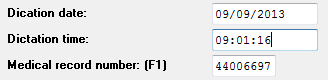
Enterprise Client Fixed: Print preview grayed out after using it onceUsers complained the Print Preview option would gray out after using it once from the AME editor. This has been fixed. Added: Insert current time hotkey for Report Data ScreenA hotkey to insert the current time in any time field on the RDS was added. The [Page Down] key is used to insert the current time in a blank time field. [Page Down] is also used to insert the current date in a blank date field.
Added:
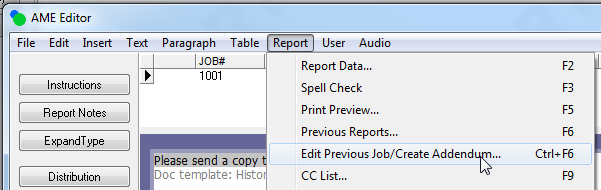
Edit Previous Job/Create Addendum report option Users previously used Previous Reports…(F6) option to look up the parent report of an addendum. This option prompts the user to select a search type. The new option (Ctrl+F6) skips the search prompt and automatically queries reports matching the same account number. If the account number isn’t available, it matches MRUN. If MRUN isn’t available, it searches by patient name.
Added:
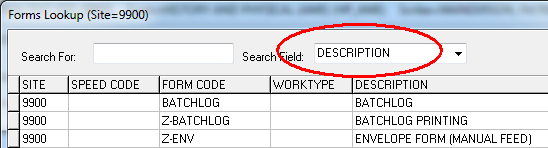
Form lookup by description
Changed:
Backup Batch lists now show most recent batch on top Since users are more likely to use the most recent batch record, the newest records now display at the top of the list.
Changed:
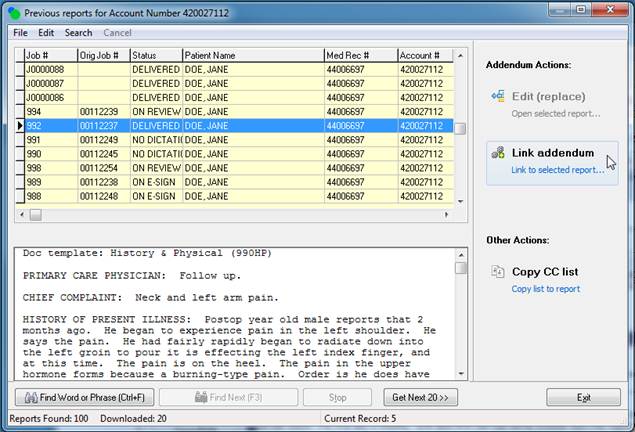
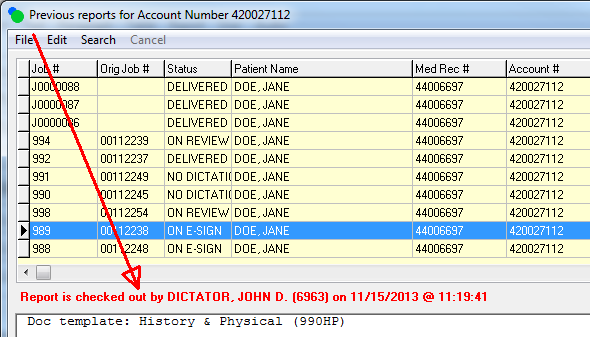
Updated Previous Reports dialog
Changed:
Improved checked in/check out handling in Previous Reports dialog Additionally, when a report is checked out during the previous reports query, users are now notified when they’re checked out.
Additional Updates Added: Support for Linked Addendums with XML editing and E-SignThe option to link a report using the AME editor with E-Sign support was previously not available. Changes were made to support Linked Addendums with XML editing and E-Sign workflows. Added: Report: Transcriptionist Lines/Hour Daily Trends (M303S)A new report similar to Transcriptionist Lines/Hour Monthly Trends (M302S). This report as well as report M302S requires a date range. To run the reports without date ranges, select the blank option in the DATEFIELD dropdown. Changed: Report: Transcriptionist by Site Summary (M023)This report now includes separate columns for Transcription and VR Editing. Changed: Report Voice Rec - Author Training Status List (D120)This report previously displayed all authors. Changes were made that for the report to follow the user’s site restrictions. Changed: Report: Providers List (T003)For some customers, the Author ID column would display “******” instead of the author id. Changes were made to support longer author id lengths.
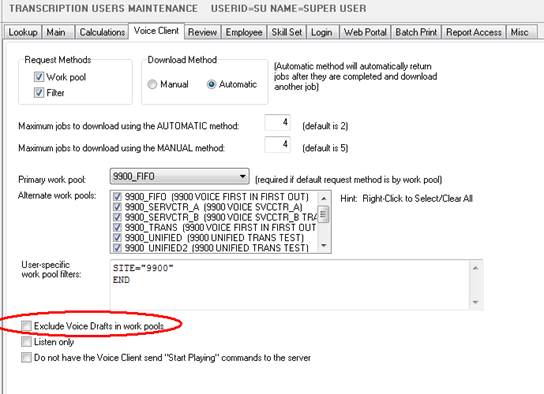
Workflow Server Added: Voice pool NO_DRAFT optionTranscriptionist not trained in Voice Rec Editing have a user option that excludes voice drafts from routing to them via work pools. When enabled, all work pools assigned to the user will exclude Voice Drafts. However Voice Drafts can still be assigned manually using the Voice Manager. Use this option when MTs are transitioning into VR editing.
Added:
Support for HL7 A38 message types Previously these messages were handled as A08 (update patient information). This has the effect of leaving the records in the table. Changes were made to correctly delete the patient record (by account number) from MPI.
Added:
Voice Import field mapping with literal values If you want to always insert a value of ‘20’ into the user5 field the syntax in Field Mapping is: user5=”20” Note: The literal value you want to insert needs to start and end with double quotes. Field Mapping is support in the following Voice Import formats: · ALLSCRIPTS_XML_WAV · DVI_TXT_WAV · DVI_VOX · EPIC_XML_WAV (New) · EXSCRIBE_XML_WAV (New) · FUSION_TXT_WAV · FUSION_WAV · VOICESCRPT_XML_WAV (New)
Added:
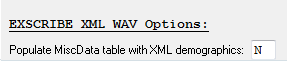
Voice Import support for ExScribe XML/WAV format Additionally, field mapping supports passing data from the XML import file to an outbound XML file without having to store the data in the report table (see. CUSTOM device interface type). A new parameter on the Misc tab of the voice import controls if the miscdata table with be populated by the EXSCRIBE_XML_WAV voice import. The parameter is in the ‘EXSCRIBE_ XML_WAV Options’ section and is labeled ‘Populate MiscData table with XML demographics’. Set this to ‘Y’ to populate the miscdata table.
Internal default mapping for EXSCRIBE_XML_WAV voice import.
Added:
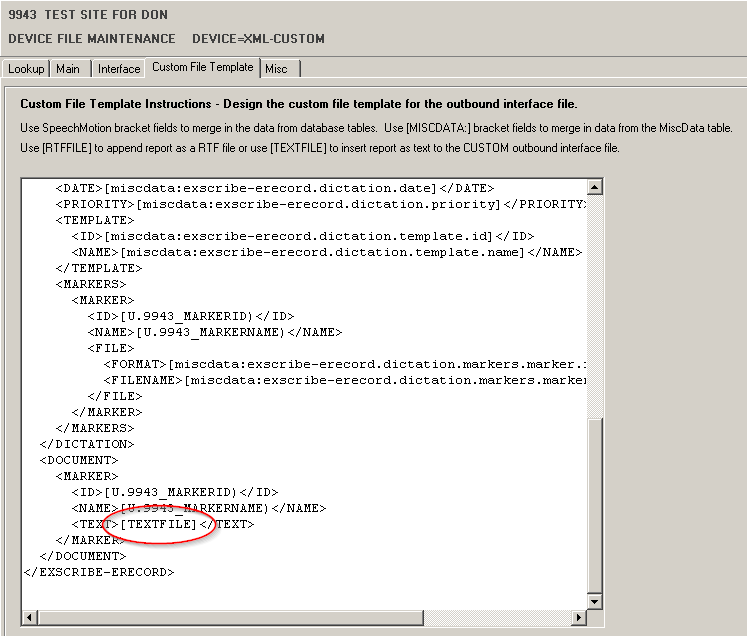
Enhanced CUSTOM outbound device The CUSTOM outbound interface device uses a text-based
template with bracket fields to create outbound files. ·
New [TEXTFILE]
field: This field inserts the report content as plain text. ·
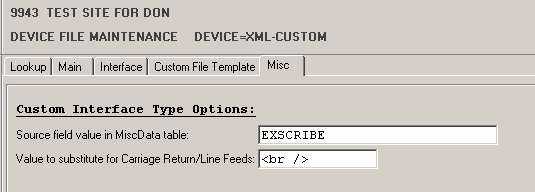
Now supports MiscData table into the custom interface
file. Data stored in the MiscData table during Voice Import can be
mapped into the outbound text file.
Text templates can also include XML markup.
|
||||||||||||||||||||||
|
|