Release notes for previous maintenance cycles can be found here:
http://download.speechmotion.com/download/default.aspx
|
What’s New in SpeechMotion
5.30 Release Summary This release includes a number of bug fixes and improved handling of Document Models.
Enterprise Client · Fixed: Name and Address on RDS disappears · Fixed: Edited changes are lost when splitting jobs in AME · Fixed: Errors when splitting reports in AME after changing forms · Added: Changing forms also changes associated document model · Added: Report: Transcriptionist Line Summary (D003) · Added: Report: QA Detail by Auditor (QA10) · Changed: Added VR columns on two TAT reports to indicate jobs using VR Drafts · Changed: Added Voice Rec indicator to report options header panel · Changed: CC distribution method can no longer be changed in CC list Workflow Server · Fixed: X.COPY field not populated on CC copies · Fixed: ‘NO CC for these Doctor types’ not working for admitting doctor · Added: Update Document Models cache · Added: Register sites to MModal · Changed: Default action for Auto CCs when distribution method is empty
Enterprise Client |
|
|
|
|
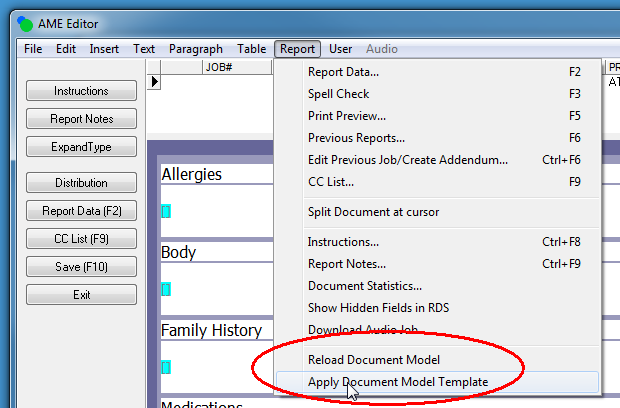
Fixed: Name and Address on RDS disappearsChanges to address fields were lost in specific circumstances. When users open new reports before editing the body of the report, if they enter an address in the CC list prior to filling in the name and address box on the RDS screen and then fill in the name and address box, Save (F10) and begin editing the body of the report. When returning back to the RDS the address entry is missing. Address entries in the RDS are now correctly saved. Fixed: Edited changes are lost when splitting jobs in AMEIn very extreme circumstances, MTs could experience a loss in edits when working with a high number of split jobs when opening, editing and closing reports rapidly. This issue has been resolved Fixed: Errors when splitting reports in AME after changing formsWhen splitting documents in AME, changing forms could generate a “missing field” error. These errors were generally harmless. Clicking through them would allow the report to continue saving. Issues with form field requirements were resolved. Added: Changing forms also changes associated document modelChanging the job’s Form Type will now reapply the correct Document Model to the displayed report. Creating a new report with no associated voice job (auto-job) will load the Document Model configured on the Form Record. Loading of Document Models occurs automatically. There are some cases, however, when the user will want to use the following menu commands: ·
Reload Document Model ·
Apply Document Model Template
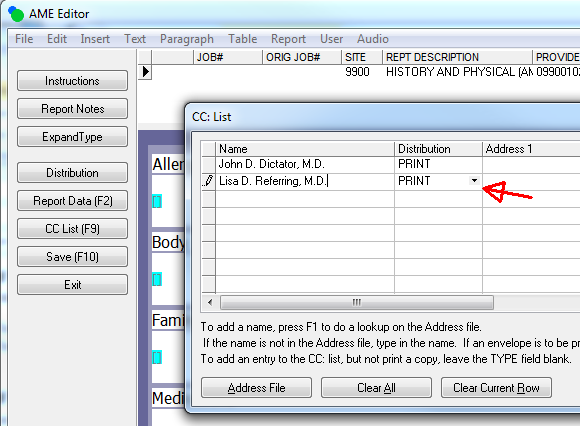
Added: Report: Transcriptionist Line Summary (D003)This report shows standard lines and elapsed times for reports that were transcribed and reports that were VR edited. These counts are separated in their own columns Added: Report: QA Detail by Auditor (QA10)This report lists all reports and lines audited for given QA Date range grouped by auditor. This is useful for auditing the auditors. Changed: Added VR columns on two TAT reports to indicate jobs using VR DraftsVR columns were added to the following TAT reports. · Turnaround Time Detail (D041) · Turnaround Time Detail 3 (T013D) Changed: Added Voice Rec indicator to report options header panelWhen displaying report options in the Review or Report Search modules, the header panel now displays Voice Rec = Yes/No . Changed: CC distribution method can no longer be changed in CC listDistribution methods for Addressees can no longer be changed in the CC list. CCs added manually in the list can be set to either PRINT or NONE.
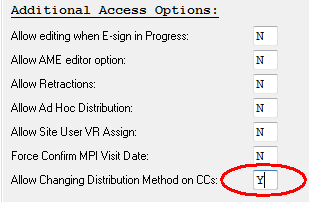
This new behavior can be overridden in the user group options misc tab.
Note: This change will be applied as a hotfix after the maintenance release.
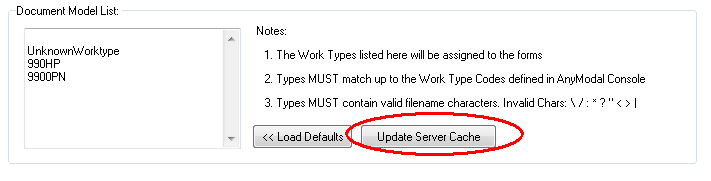
Workflow Server Fixed: X.COPY field not populated on CC copiesWhen the Address record's distribution method is set to MULTI the [X.COPY)(copies to) field is not populated on the printed copy of a report. The [X.COPY) field is now correctly written when addresses use MULTI options. Fixed: ‘NO CC for these Doctor types’ not working for admitting doctorThe form option prevented the correct handling of admitting doctors when mid-level providers were configured. Designator for mid provider was changed from MP to P. Added: Update Document Models cacheEnterprise Client and Workflow servers now cache local copies of document models. Workflow server cache is : /system/voicerec/mmodal/docmodel/<site>/ Enterprise client cache is: /speechmotion/temp/<site>/ When Models are updated in the AnyModal Console with new section headers. The updated models have to be copied the SpeechMotion Workflow Server. Updating the Model Cache can be done in both the Site and Forms VR tab.
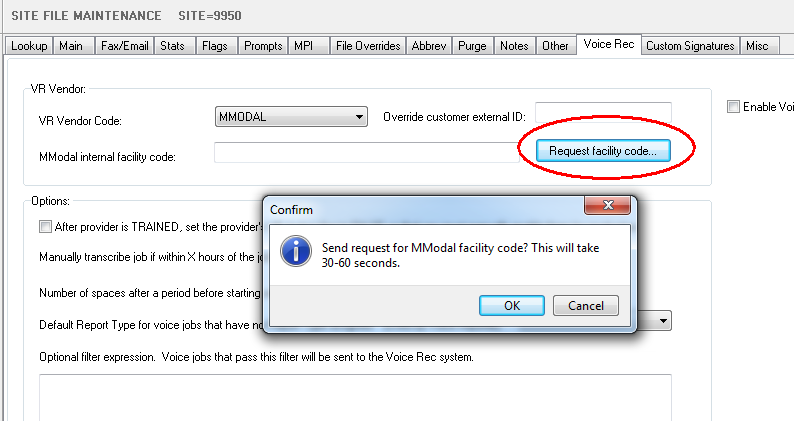
When clicked, all document models for the site will be updated. Note: Previously, a list of valid document models was maintained in the System table under the WorkTypes tab. This is no longer the case. Document Model lists are now maintained in the Site VR tabs. Added: Register sites to MModalPreviously, voice jobs had to be submitted to MModal to register new sites for use with AnyModal Console. This is no longer required. The VR tab includes a site registration request. Once this is clicked, it is recommended you close out the site record to unlock it for updates once the response is returned. Note: Site does not have to have VR enable to make use of this configuration.
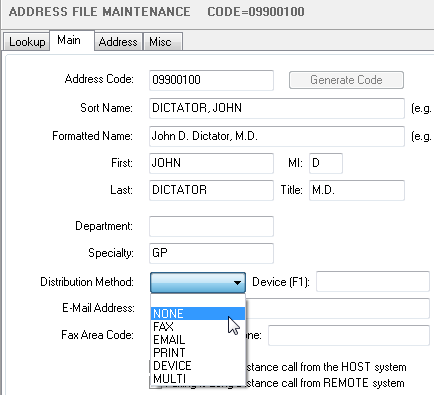
Changed: Default action for Auto CCs when distribution method is emptyChanges to auto CC distribution behavior when the provider’s method is empty. Currently the default action when automatic ccs are added to a report is to not add the cc when the Address record's distribution method is set to blank. This has been changed so that the when the distribution method is blank it will create the auto cc using PRINT as the distribution method. This will match the method that is used when cc are added by selecting from an address lookup.
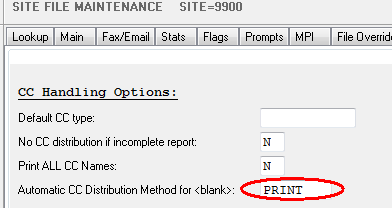
An override option is available for sites that prefer to work the old way. ‘Automatic CC Distribution Method for <blank>’ is on the Misc tab in Site File Maintenance. The default is PRINT. This can be changed to NONE to get the previous behavior for automatic CCs with a <blank> distribution method.
|


SpeechMotion Software Team