Release notes for previous maintenance cycles can be found here:
http://download.speechmotion.com/download/default.aspx
|
What’s New in SpeechMotion
5.30 Release Summary This release includes updates to batch distribution and report data screens. Enterprise Client · Fixed: Lookup word using Google · Fixed: Report version history and E-Sign · Fixed: Issues with right-click and close on taskbar when modules are loaded · Fixed: Login error when print spooler disabled · Changed: Transcriptionist Activity Log (D001) – Lines/hour · Changed: QA reports QA02, QA03 scribe filter · Changed: Transcription/Edit elapsed time added to reports · Changed: STAT flag in RDS read-only by default · Changed: Draft flag in RDS is now hidden by default Workflow Server · Fixed: BATCHRTF distribution errors · Fixed: Start/End time in userlog VR Edit entries · Added: X field for CCs with Meditech · Added: X field for displaying CCs · Added: Trending reports now track VR Edit productivity · Added: DVI_TXT_WAV voice import option for AuthorTime
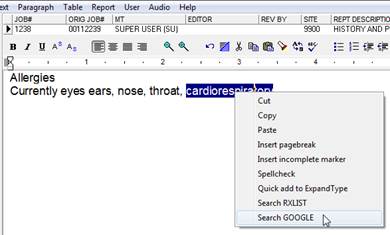
Enterprise Client Fixed: Lookup word using GoogleSome users experienced errors when looking up words in the SpeechMotion editor using the Google word lookup option.
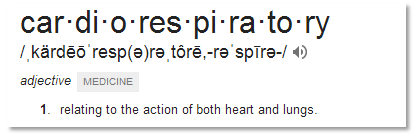
The call to Google was also updated to make use of their ‘define:’ operator so results will display like this:
Fixed: Report version history and e-signUsers were unable to view report version history after the report was signed. This issue has been resolved. Fixed: Issues with right-click and close on taskbar when modules are loadedUsers experienced lockups and errors after right-clicking the SpeechMotion taskbar item and selecting Close. This occurred when any module (Transcribe, Review, Report Search) was loaded. Changes were made to keep users from closing SpeechMotion while modules were loaded. Fixed: Login error when print spooler disabledSome users experienced errors when launching SpeechMotion. This issue has been resolved. Note: SpeechMotion Enterprise Client installer was also updated. Changed: Transcriptionist Activity Log (D001) – Lines/hourThis report now displays a lines/hour summary.
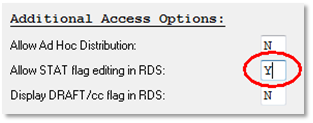
Changed: QA reports QA02, QA03 scribe filterUsers asked to run these reports for specific MTs. These QA reports now include scribe and site filters. · QA Detail by Client/MT (QA02) · QA Summary by Client/MT – Ranked by Avg (QA03) Changed: Transcription/Edit elapsed time added to reportsElapsed Trans/Edit time (Hours) have been added to the following reports. · Site Provider Summary (M007) · Transcriptionist Summary (M021) · Transcriptionist Hourly Summary (M022) Changed: STAT flag in RDS read-only by defaultThe STAT flag can no longer be changed when displayed in the report data screen. Customers who
wish to have this for select MTs can enable editing using the following user
or user group options:
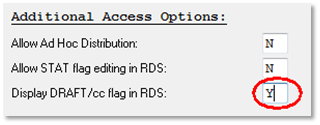
Changed: Draft flag in RDS is now hidden by defaultThe ‘DRAFT’ option in the report data screen is no longer visible by default. The draft option
flags the report to not distribute CCs and include a “DRAFT” indicator on the
report. Customers wishing to use this can have it enabled here:
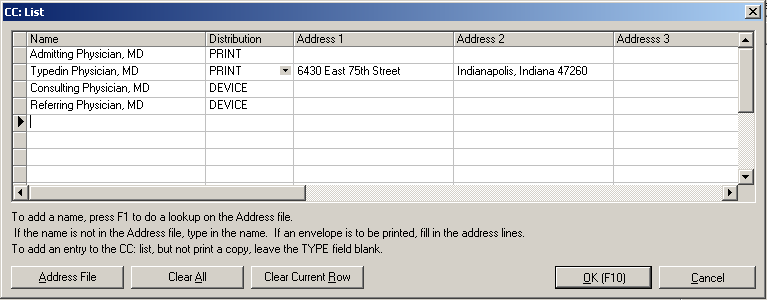
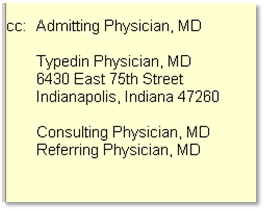
Workflow Server Fixed: BATCHRTF distribution errorsOutbound distribution option BATCH RTF leaves batch report in PENDING status in distribution manager. This has issue has been resolved. Fixed: Start/End time in userlog VR Edit entriesUserlog entries were incorrectly recording start/end entries when users activity is VR EDIT. Elapsed time is correctly displayed. This fix resolves the start/end times in the Transcriptionist Activity Log (D001) report. Added: X field for CCs with MeditechAdded a new field called X.MEDITECH_CC. This field will format the cc doctors in a format used when sending RTF or Word documents to Meditech’s Import Desktop application. The format of this field will be: <CT-Copy To: x addrcode> or <CT-Copy To: name;address1;address2;address3> The first format is used when the cc is added via a lookup from the SpeechMotion address table. x is the value from the Extra1 field in the address table. Valid values are ‘d’, ‘r’, and ‘i’. Any other value in the Extra1 field and x will default to ‘d’. The second format is used when a name is manually typed into the CC list. There will be one ‘<CT-Copy To’ line per entry in the CC list. Added: X field for displaying CCsCreated a new field called X.ALL_CC_NAMES5 for displaying the CC doctors on reports. This new field displays doctors that were added to the CC list from selecting from the address table by name only. Doctors that were added to the CC list by typing in their name and address will display these doctors’ names and addresses. The name and address will be on separate lines. There will be a blank line for separation before and after the name and address lines. The following in the CC list creates the below example.
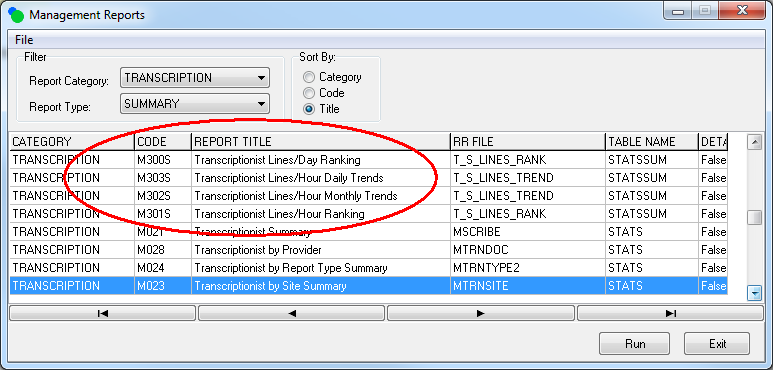
Added: Trending reports now track VR Edit productivityThe following reports had previously only tracked Transcription and Review activities. Changes were made to include VR Editing in addition to Transcription and Review activities. · Transcriptionist Lines/Day Ranking (M300S) · Transcriptionist Lines/Hour Ranking (M301S) · Transcriptionist Lines/Hour Monthly Trends (M302S) · Transcriptionist Lines/Hour Daily Trends (M303S)
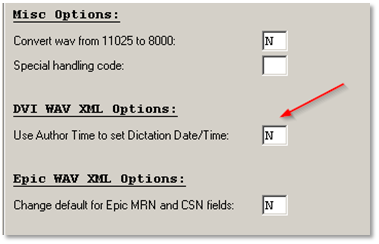
Added: DVI_TXT_WAV voice import option for AuthorTimeAdded a parameter called ‘Use Author Time to set Dictation Date/Time’ for the DVI_TXT_WAV voice import. This parameter will cause the DVI_TXT_WAV voice import to use the value from the Author Time field in the text file to set the dictation date/time fields in SpeechMotion. Currently, the DVI_TXT_WAV voice import will first try to use the value from the Author Time Long field to set the Dictation Date/Time in SpeechMotion. If the Author Time Long field is not in the text file the voice import then uses the value in the Author Time field for the dictation date/time. This new parameter keeps the voice import from using the Author Time Long field to set the dictation date/time. The new parameter was added because the value from Author Time Long does not work as expected when changing back and forth between daylight savings time and standard time and also when the system is set to one time zone and the voice import is set to another time zone.
|
|
|