Release notes for previous maintenance cycles can be found here:
http://download.speechmotion.com/installs/
|
What’s New in SpeechMotion
5.40 Release Summary
Enterprise Client · Added: Report - Dictations Received Minutes/Hour Daily Trends (M305S) · Changed: Improved report preview display in Report Options and Batch Preview screens E-Sign Portal · Fixed: Edited Reports are lost after session timeout in E-Sign Portal Workflow Server · Fixed: Issues relating to font spacing · Fixed: Improved handling of word wrapped text in table cells · Added: Allow report edit options added for Batch Preview screen · Changed: Report events and Voice Events are logged in ISO date-time format
Enterprise Client Added: Report - Dictations Received Minutes/Hour Daily Trends (M305S)The number of jobs and dictation minutes received at a specific hour can now be displayed in this new report. Note: The data for this report is
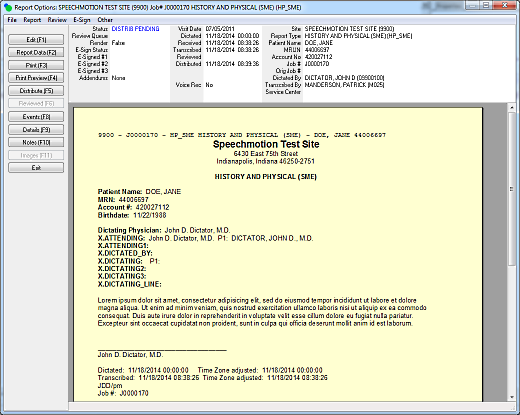
generated at the end of each day. Changed: Improved report preview display in Report Options and Batch Preview screensWhen opening reports in Report Search, users will no longer have to display the report in Print Preview to view it in its completed form with headers and footers. The Report Options screen had previously displayed the body of the report without headers and footers. This is no longer the case.
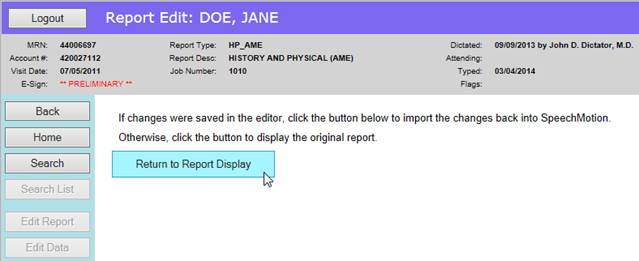
E-Sign Portal Fixed: Edited Reports are lost after session timeout in E-Sign PortalUsers editing reports in the E-Sign portal would lose their changes after a session timeout. When users save their changes in the ActiveX Web Editor, the file is sent to SpeechMotion and waits for the user to import the change when they click on “Return to Report Display”. If the session has already timed out by then, the user will only have to log back in and return to the last report they were editing. When the report is displayed, the edited changes will be imported seamlessly and displayed for the user.
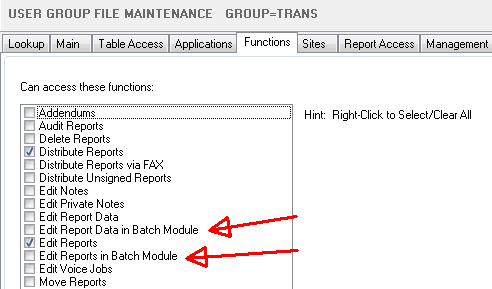
Workflow Server Fixed: Issues relating to font spacingIn rare cases, some reports displayed fonts with irregular spacing between each letter. This occurred when multiple document fragments were merged using different fonts defined as “Default Font”. This issue was resolved. Fixed: Text in table cells are wrapping unnecessarilyIn rare cases, text in a table cell wrapped regardless of how much horizontal space was available. This issue was resolved. Added: Allow report edit options added for Batch Preview screenIn the batch preview screen, Report Data and Report Edit options are now configured in User Group access functions.
Changed: Report events and Voice Events are logged in ISO date-time formatEvent messages had previously recorded timestamps in US American format. The date-time format was changed to: 2014-11-14 08:56:37
|
|
|
|
|

Regards,

SpeechMotion Software Team