Customer release notes for all versions are available at the following url:
http://download.speechmotion.com/installs/
|
What’s New in SpeechMotion
5.40 Release Summary
Enterprise Client · Fixed: Transcribe module prompts to exit twice · Fixed: Addendums do not display correctly in Report Search and Print Preview · Changed: Report details and Voice details · Changed: Layout of module buttons on main screen Workflow Server · Fixed: Images in signature blocks not displaying · Fixed: Table cell height is too large when importing reports · Fixed: Issues with default tab stops when importing reports · Fixed: Redundant blank lines in HL7 text distributions · Changed: Improvements to how orphan controls and signature blocks are placed on new pages · Changed: Orphan controls, tables and numbered lists · Added: Support for GIF and PNG graphic file formats
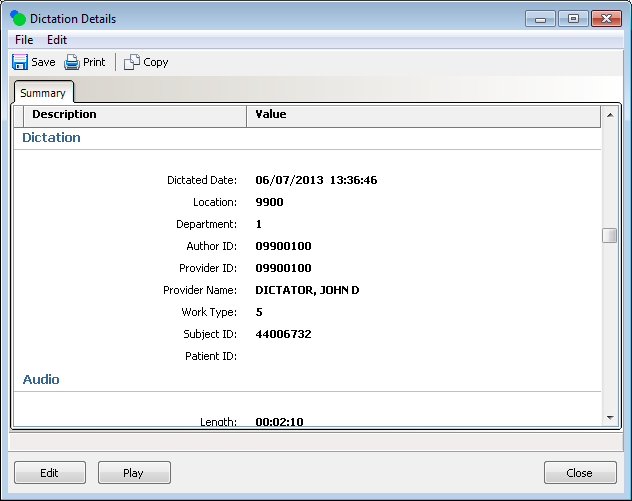
Enterprise Client Fixed: Transcribe module prompts to exit twiceWhen exiting the transcribe module, users were prompted two confirmations. This has been resolved Fixed: Addendums do not display correctly in Report Search and Print PreviewIn rare cases, addendums would display incorrectly in report previews when the option ‘Addendum prefix line’ was used. This issue has been resolved. Changed: Report details and Voice detailsThe detail record displays for Voice and Reports were updated to include file save options.
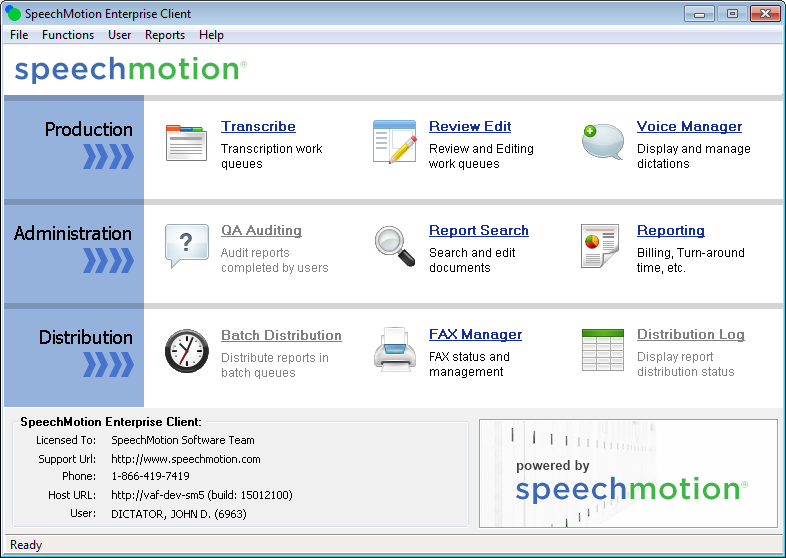
Changed: Layout of module buttons on main screenThe modules displayed on the main screen have been reorganized.
Workflow Server Fixed: Images in signature blocks not displayingIf an image was inserted in the Sig Block of a form, the image would not be displayed in a document. This has been resolved. Fixed: Table cell height is too large when importing reportsThe cell height in the tables was displaying larger in SpeechMotion than the cell height of the original document. This could be seen in Report Search, the SpeechMotion editor, and on distributed reports. This problem has been fixed. Fixed: Issues with default tab stops when importing reportsTab stops where Fixed: Redundant blank lines in HL7 text distributions Changed: Improvements to how orphan controls and signature blocks are placed on new pages Fixed: Redundant blank lines in HL7 text distributionsBlank lines at the end of a report after the signature block for text distributions are now removed automatically. Changed: Improvements to how orphan controls and signature blocks are placed on new pagesOrphan Control now marks the lines between *START* and *END* in the signature block and the appropriate number of lines of text above the signature block using the Paragraph options ‘Keep with next’ and ‘Keep lines together’. This means that when a line at the end of the signature block goes to a new page, all of the lines marked with these options will go the next page. Previously, Orphan Control would insert a page break at the appropriate position in a document to move the text to a new page. This process would sometimes result in the document displaying incorrectly when opening a SpeechMotion RTF file in Microsoft Word. Have added some logic to Orphan Control that keeps only one line of a paragraph from moving to the next page. For example: Orphan Control is set to Automatic and the Minimum number of body lines on last page is set to 2. The body of a document ends as below. Advised symptomatic treatment for the upper respiratory infection including antipyretics such as Tylenol or Motrin and drinking plenty of liquids. Thank you for this referral. Previous Orphan Control would put the lines antipyretics such as Tylenol or Motrin and drinking plenty of liquids. Thank you for this referral. on the next page. Orphan control will now just put the line Thank you for this referral. on the next page. Changed: Orphan controls, tables and numbered listsImprovements to how orphan controls handle numbered lists and tables. Added: Support for GIF and PNG graphic file formatsSupport to use additional image file formats has been added. GIF and PNG image files can now be used in SpeechMotion. In the SpeechMotion editor and Form maintenance in Setup, the Insert, Graphic dialog now includes file types .gif and .png in addition to .bmp and .jpg. In Provider Maintenance the Signature Bitmap Filenames fields can now use .gif and .png files in addition to .bmp and .jpg files. The hint for these fields is updated to say that these four file types can be used. In the SpeechMotion editor, Insert, Provider Signature #1 or Provider Signature #2 now insert the image as a link. The image is no longer imbedded. In Setup, Site Graphics, have included .gif and .png files to be downloaded from and uploaded to the application server.
|
|
|