Notes for previous releases can be found here:
http://download.speechmotion.com/installs/
|
What’s New in SpeechMotion
5.50
Release Summary
Enterprise Client · Fixed: Review jobs displaying wrong start/end time in user activity log · Fixed: Copy contents of cell in Voice Details not working · Changed: Disabled “Pin this program to taskbar” Workflow Server · Fixed: Default report type in Site configuration not working · Fixed: HL7 messages with EVN segments · Added: Philips DSS file support · Added: Enhance field mapping for DSS files. · Added: Workpool comments · Added: X fields to return portions of SpeechMotion job numbers · Added: Support for metric rulers on Form configurations
Enterprise Client Fixed: Review jobs displaying wrong start/end time in user activity logIn rare occasions when CDA Workflows are used, Review activities is incorrectly labeled as VREDIT. This has been fixed. Fixed: Copy contents of cell in Voice Details not workingCopying the contents of a column(s) in the Voice Details screen was not working. This has been fixed. Changed: Disabled “Pin this program to taskbar”In Windows Vista, 7, 8 and 10. This option has been disabled. Enterprise Client (MTCLIENT), Voice Client and Voice Player do not execute directly without the login and update launch app (MTLOGIN). The option to “Pin this program to taskbar” has been removed. This change requires a “Register Components” on installations without privileged access.
Workflow Server
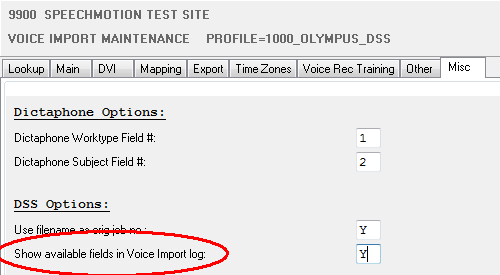
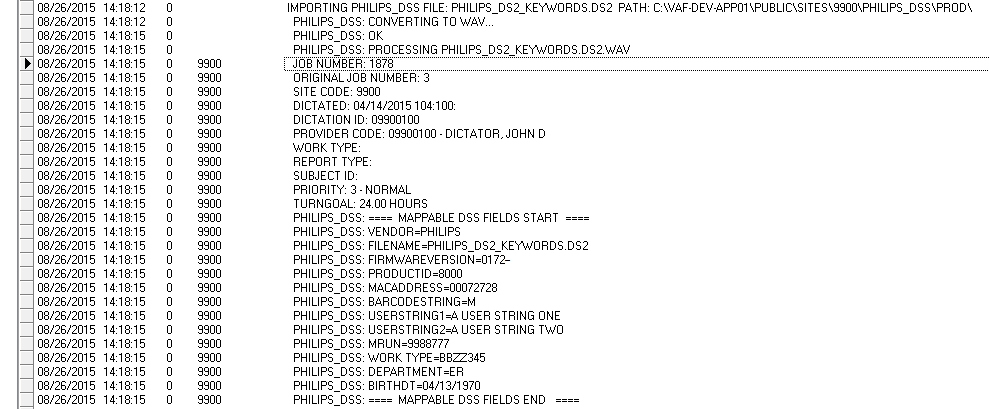
Fixed: Default report type in Site configuration not workingThe default report type set in Site configurations would only work when creating auto-jobs without dictations. This has been fixed so jobs without report types assigned during dictation import now have a default value. Fixed: HL7 messages with EVN segmentsOn rare occasions, HL7 messages may have a EVN segment when no EVN segment was configured for its output. This has been fixed. Added: Philips DSS file supportPhilips DSS and DS2 files can now be imported. Mapping data within the DSS file is also supported. Added: Enhanced field mapping for DSS filesWhen importing DSS files, Its much simplier to map data contained in the files to fields. Enable “Show available fields in Voice Import log” when importing test files. The Voice Import log will display all the available fields and data found in the field. Use the field names to map on the Mapping tab. Once the mapping configuration is complete, you can disable “Show available fields in Voice Import log”.
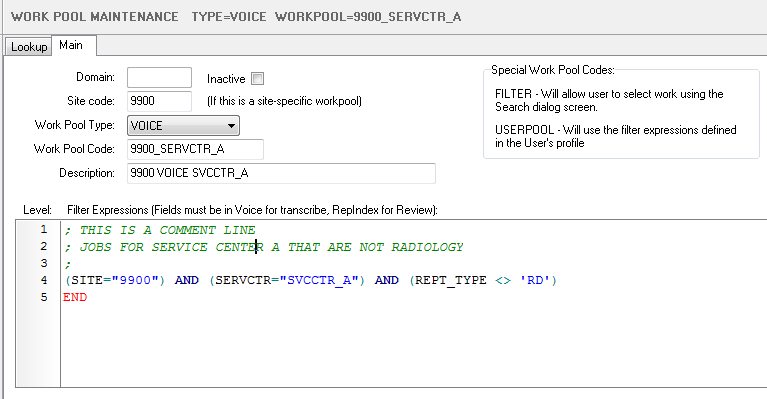
Added: Workpool commentsComment can be entered in Work Pool filters using a semicolon.
Added: X fields to return portions of SpeechMotion job numbers |
|
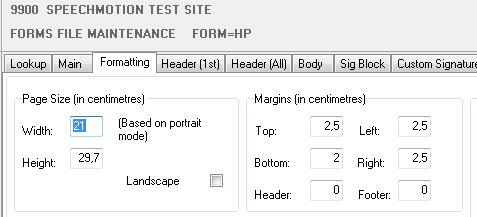
· X.CNETJOB_BASE – returns the CNETJOB number. If a split job, returns the CNETJOB number without the split value. 1234567-1 will return 1234567. · X.CNETJOB_SPLIT – returns the split value of the CNETJOB number. 1234567-1 returns a 1. · X.CNETJOB_SPLIT_AS_ALPHA – returns the split value of the CNETJOB number as a letter. 1 is A, 2 is B, etc. 1234567-3 returns a C. Added: Support for metric rulers on Form configurationsSupport for Metric values are configured at the Global level in the license file.
|
|
|

Regards,

SpeechMotion Software Team