Notes for previous releases can be found here:
http://download.speechmotion.com/installs/
|
What’s New in SpeechMotion
5.50
Release Summary
Enterprise Client · Fixed: Issues with bullet lists and print previews · Fixed: Body header templates not displayed in print preview · Fixed: New report viewer and blank pages · Fixed: Issues relating to order fields on the Report Data Screen (RDS) · Fixed MPI Multiple Visits dialog · Fixed: Zoom document setting not saved · Changed: Added dictation length (minutes) to reports · Changed: Fixed scribe code in report ‘Transcriptionist Line Summary (D003)’ · Changed: Additional fields relating to the current document added to the Review Edit module. · Changed: Site and Form instructions now supports text formatting
Workflow Server · Fixed: Issues related to stale “Distribution Pending” statuses · Fixed: Batch distribution logs not generating in rare occasions · Fixed: Batch schedule time slots 7 and 8 not working · Changed: Improved program configuration screens · Added: Batch Distribution Reporting |
|
Enterprise Client Fixed: Issues with bullet lists and print previewsBullets were displayed as ‘clock’ characters when displaying document in print preview. This was fixed. Fixed: Body header templates not displayed in print previewBody header templates were not displayed in print preview when Template lookups were used in the AnyModal editor. This was fixed Fixed: New report viewer and blank pagesUsers complained of blank pages on a mult-page result. This was fixed. Fixed: Issues relating to order fields on the Report Data Screen (RDS)Fixed a problem on the RDS where all of the values from an order in the orders table were not filled in on the RDS when associated orders are passed from the voice file to the RDS. Until now, these fields from the MPI table automatically filled in the corresponding field in the report record when these fields were not on a form. Birthdt, sex, patserv, location, facility, pattype, admdr, and refdr. Added these additional fields that will also be filled in on the report record when the field is not on the form. acctno, distdt, distm, mrun, ptname, visitdt, visittm, and consult. On forms with orders fields, the dialog for selecting an order now opens after the visit is selected when doing a lookup (entering a value in the field and selecting F1) from the ptname, acctno, or mrun field. Previously, you would have to move to the orderno field and do another lookup after the visit was selected. Fixed MPI Multiple Visits dialogThe visit results are now displayed in visit date/time descending order. Previously, visits with no visit dates/times would be displaying above visits that have visit dates/times. Fixed: Zoom document setting not savedThe zoom setting for a user in the SpeechMotion editor was not being saved. A user would have to keep readjusting the zoom setting every time a report was opened in the SpeechMotion editor. User zoom setting in the SpeechMotion editor is now being properly saved for a user. Setup, forms and templates configuration screens are now using the zoom setting. Changed: Added dictation length (minutes) to reports.The following reports now include dictation length in minutes. · Billing Summary (M101) · Transcriptionist Payroll Summary (M032) Changed: Fixed scribe code in report ‘Transcriptionist Line Summary (D003)’The scribe code was hidden when 6 or more characters were used. This was fixed Changed: Additional fields relating to the current document added to the Review Edit module.Added additional field columns to the grid. These fields are also found in the Report Search module. Changed: Site and Form instructions now supports text formattingSite and Form instructions now accept standard font formatting and bulleted lists.
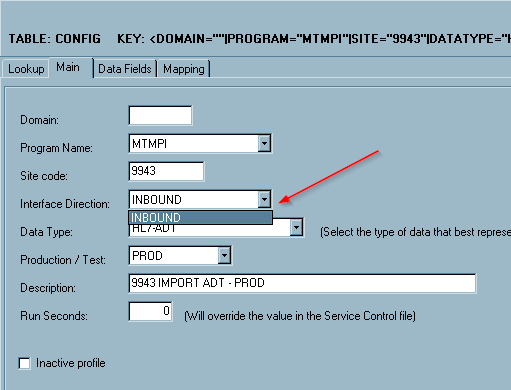
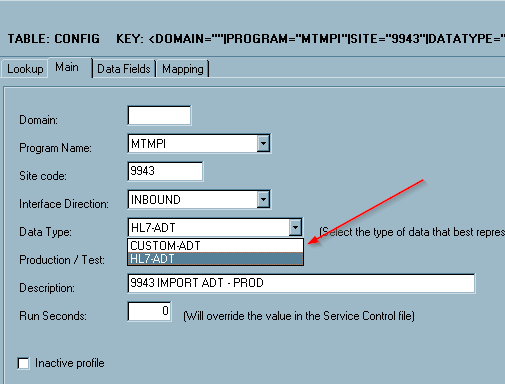
Workflow Server Fixed: Issues related to stale “Distribution Pending” statusesThis would happen when a user had a report open at the same time that the report was being distributed on a gateway server. Fixed: Batch distribution logs not generating in rare occasionsBatch log files might not get created on batch distributions to a Gateway server. This was fixed. Fixed: Batch schedule time slots 7 and 8 not workingScheduled times in the 7th and 8th fields were not working. This was fixed. Changed: Improved program configuration screensThe items displayed when setting program configurations are now specific to interface direction. The Interface Direction field and the Data Type field now only show the appropriate options for the program that is selected. For example, for MTMPI, the Direction is only INBOUND and the only two data types you can select from are CUSTOM-ADT and HL7-ADT.
Added: Batch Distribution ReportingTwo additional reports were added to list batch distributions. 1. Batch Distribution Detail (D300) 2. Batch Distribution Summary (D301)
|

Regards,

SpeechMotion Software Team