Notes for previous releases can be found here:
http://download.speechmotion.com/installs/
|
What’s New in SpeechMotion
5.50
Release Summary
Enterprise Client · Fixed: Elapsed editing time is lost when application crashes during editing. · Fixed: Address lookups displayed inactive providers · Fixed: Sorting TURN GOAL field in Voice Manager · Fixed: Forms configuration screens and non-working toolbars · Added: Philips brand foot pedal support · Added: Stedman Spell Check Dictionary 2016 · Added: Hidden text toggle in Forms configuration screens · Added: Updates to Unsigned Reports - Details (D020) · Changed: Voice manager color coding Workflow Server · Fixed: Site Maintenance work type mapping does not create report type list · Fixed: Incomplete markers are not correctly counted after providers edit in E-Sign · Fixed: Issues with workflows using “exclude or include users” lists · Fixed: Issues with E-Sign searches using date fields and date ranges · Fixed: Turnaround Time Detail (D041) goal percentage issues · Fixed: User Group Voice Manager filter not working · Fixed: ADT files and the 'Copy MPI files path' parameter in MTMPI config · Added: User Group restricting access to NO DICTATION status · Added: Failed doctor and work type handling on dictation imports · Added: “Reject job with Note” option for dictations rejected by transcriptionist · Added: Support for NTE segments in HL7 result messages · Added: OTHER_ID field can now be mapped to patient database in the RDS · Added: System level custom views in the voice manager · Added: Review status change option in Report Search module · Added: Transcription VBC Detail (T017D) report Work Pool Routing & Priorities · Added: Enhanced work pool routing and priorities · Added: PASTTRIGGERTIME field for use in work pool filters · Added: Dictations work pool require priority indexes
|
|
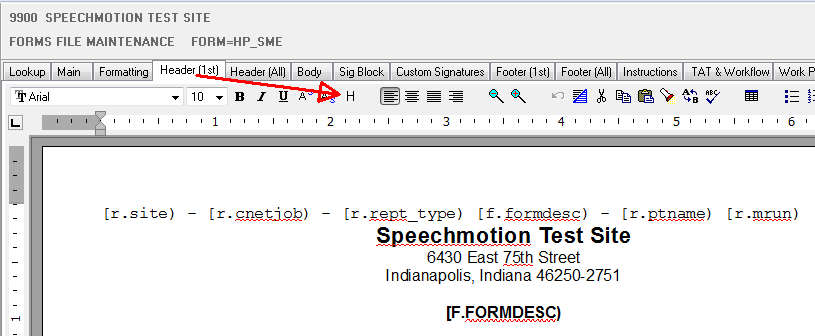
Enterprise Client Fixed: Elapsed editing time is lost when application crashes during editingOn rare occasions the elapsed editing time counter would not save before a lockup or crash during editing. This has been fixed Fixed: Address lookups displayed inactive providersProviders marked ‘inactive’ should not have been displayed during normal lookups when editing. This has been fixed. Fixed: Sorting TURN GOAL field in Voice ManagerSorting the turnaround goal field in Voice Manager would result in an error. This has been fixed. Fixed: Forms configuration screens and non-working toolbarsIn Forms maintenance, most of the icons on the toolbar did not function on the RTF tabs such as Header (All), Footer (All), Sig Block, etc. This has been fixed. Added: Philips brand foot pedal supportPhilips foot pedal support has been added. Supported pedals are: · Infinity IN-USB-1 · Philips USB 2310 Euro style · Philips USB 2320 US style · Philips USB 2340 US style When making your selection in the foot pedal setup screen, restart the Enterprise Client for your settings to take effect. Added: Stedman Spell Check Dictionary 2016Medical spell check dictionaries have been updated to include the latest medical and drug terms for 2016. Added: Hidden text toggle in Forms configuration screensThis allows you to manage hidden text when creating or editing forms. The main menu item Text, Hidden has been changed to toggle hidden text on or off. Previously, this menu option would only remove the hidden text attribute.
Added: Updates to Unsigned Reports - Details (D020)This report now includes discharge date and patient account numbers. Changed: Voice manager color codingThe colorization of rows has been changed to include new status and prioritization features. A color legend was added at the bottom of the screen
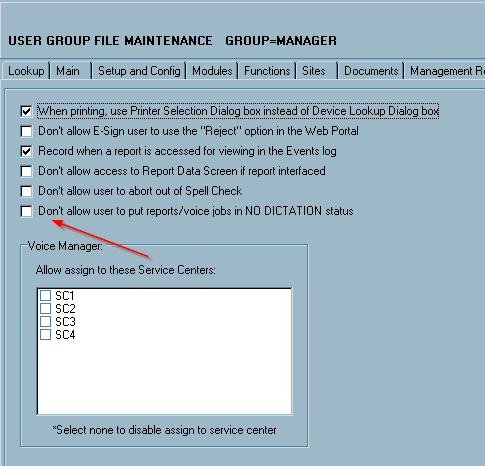
Workflow Server Fixed: Site Maintenance work type mapping does not create report type listUsers were unable to select report types from a list when editing work type maps in site maintenance screens. This has been fixed. Fixed: Incomplete markers are not correctly counted after providers edit in E-SignWhen editing documents in the E-Sign Portal, incomplete markers were incorrectly counted when the document was saved. This has been fixed. Fixed: Issues with workflows using “exclude or include users” listsPreviously, this was comparing users in the list against the value from the scribe or firstrevby field of the report instead of the current user submitting the report. This has been fixed. Fixed: Issues with E-Sign searches using date fields and date rangesRecent changes to datefield selections prevented the user from querying date ranges in the E-Sign Portal. This has been fixed. Fixed: Turnaround Time Detail (D041) goal percentage issuesThe Total Reports and Reports Meeting TAT Goal percentage fields are now showing correct values. Fixed: Issues with TAT goals not correctly applying the GOAL MET flag.In rare cases, TAT goals were recorded before documents were delivered, resulting in incorrect values. This has been fixed. Fixed: User Group Voice Manager search filter not workingThe User Group option to set a predefined filter for Voice Manager searches was not working. This has been fixed. Fixed: ADT files and the 'Copy MPI files path' parameter in MTMPI configThe ADT file does not get copied when a path is put in the 'Copy MPI files path' parameter in MTMPI program config. This has been fixed. Added: User Group restricting access to NO DICTATION statusThis new option prevents users from putting reports into a NO DICTATION status when saving a report in the Transcribe module and when in the Report Options screen. It also prevents users from putting voice jobs into a NO DICTATION status in Voice Manager. “Don’t allow user to put reports/voice jobs in NO DICTATION status’. This is on the Other tab in User Group Maintenance.
Added: Failed doctor and work type handling on dictation importsAdditional options were added to the Voice Import configuration.
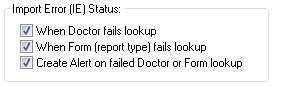
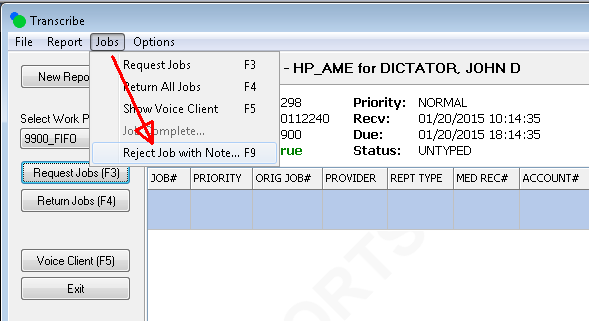
Incoming dictations that fail Doctor lookup or Form lookup can be set to a special status where the dictation is held for review by a system manager and kept from transcription pools. The system manager can fix the dictation in the Voice Manager and re-assign it to a work pool. Added: “Reject job with Note” option for dictations rejected by transcriptionistWhen dictations have issues that prevent the user from completing the job, instead of creating an incomplete report to a review queue, the jobs can be rejected to a reject status queue for a system manager to repair and re-assign. This is an alternate workflow and must be enabled at the user level. Email alerts to these rejected jobs can be set to a manager. Transcriptionist can enter a note describing the reason for the rejection.
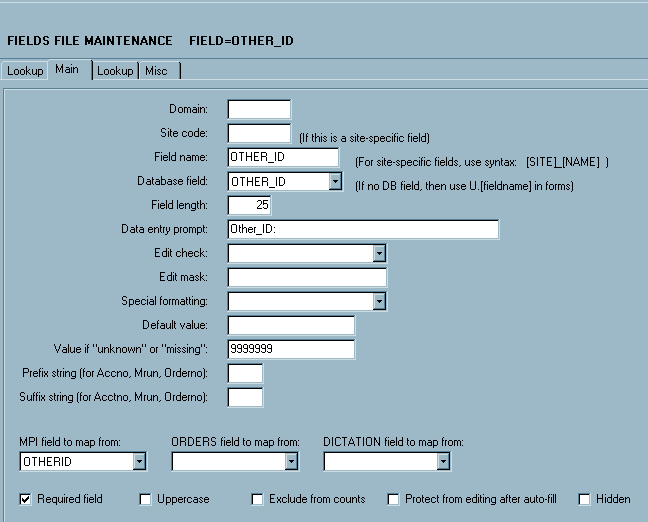
Added: Support for NTE segments in HL7 result messagesNTE Segments can now be mapped in HL7 mapping configurations. Added: OTHER_ID field can now be mapped to patient database in the RDSAdded the OTHERID field from the MPI table as a lookup field for MPI on the Report Data Screen. To use: First create a new field. In this example the field is named OTHER_ID
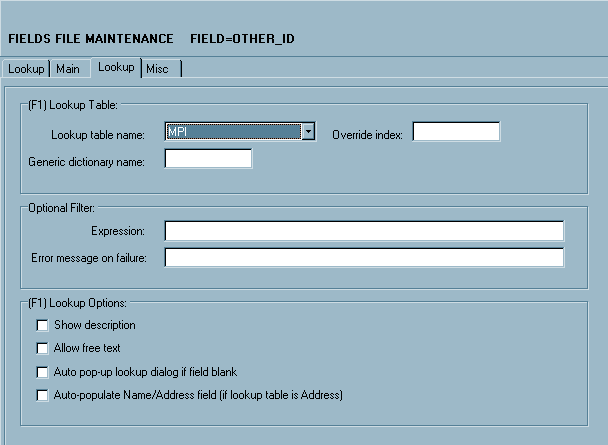
Then set MPI as the lookup table name.
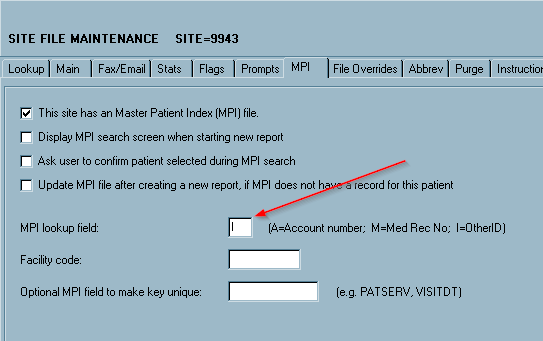
If this will be the lookup field on all or most of the forms, set the MPI lookup field on the site record to I. I = OtherID.
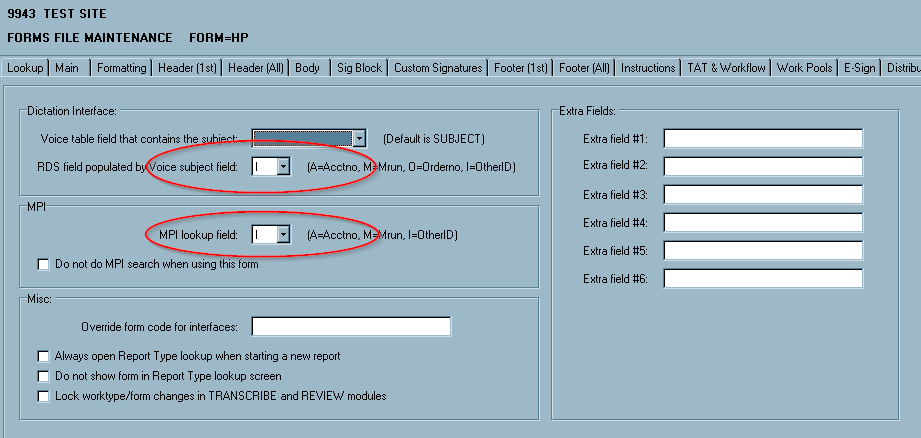
If a form will use a different field for the MPI lookup, set the ‘MPI lookup field’ and ‘RDS field populated by Voice subject field’ to I on the Other tab.
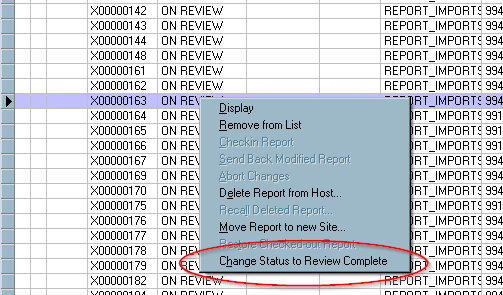
Added: Review status change option in Report Search moduleAdded a new feature in Report Search to allow changing the status of a report from ON REVIEW to REVIEW COMPLETE without needing to display the report. From the Report menu or popup menu there is a new menu item called ‘Change Status to Review Complete’. When this is selected, you will get the normal modified Confirmation dialog. After entering your password and selecting OK, the status of the report will be changed to REVIEW COMPLETE and the report will be sent back to the server and go through the workflow process.
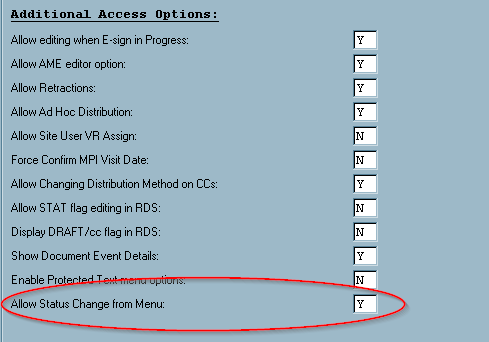
This menu will only be available to select if the user is in a User Group that has this feature enabled, the report is in an ON REVIEW status, and the report does not have any Incomplete Markers or Missing Demographics. The User Group option to enable the menu item called ‘Allow Status Change from Menu’ and is on the Misc tab.
Added: Transcription VBC Detail (T017D) reportThis report details each transcribed reports along with individual breakdowns of characters.
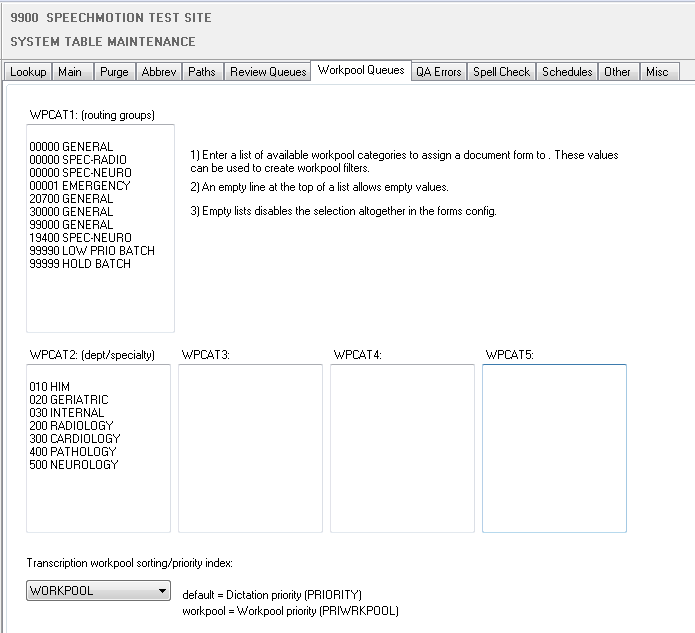
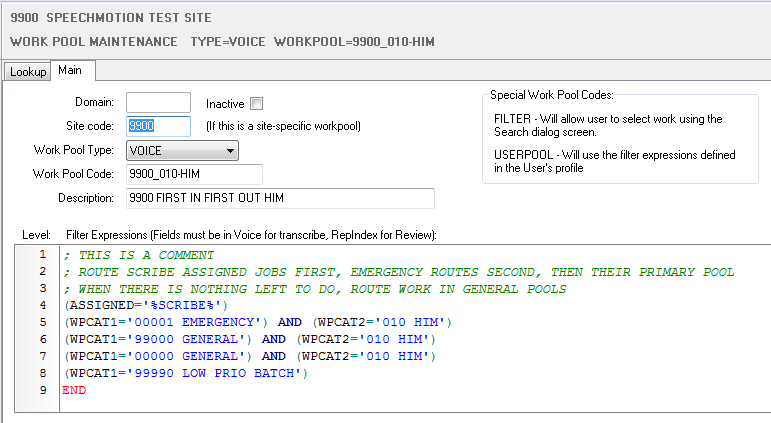
Work Pool Routing & Priorities Incoming dictations are assigned a particular route in which a group of transcriptionist have included in their shared or private work pools. Transcriptionists would have one work pool which describes their responsibility or specialty, and all dictations would flow to the groups automatically, if an exceptional situation would arise, a manager would alter the routing of 1 or more dictations which would route dictations to alternate pools of transcriptionist without requiring MTs to ‘switch’ work pools. Added: Enhanced work pool routing and prioritiesBy default SpeechMotion handles the order at which work pools assign jobs using dictation priorities. Dictation priorities are defined by the Due Date/Time of each job as well as the STAT/NORMAL priority flags. Dictations due now will be prioritized before dictations due tomorrow, but dictations marked STAT have the highest priority. As an alternative, dictations can be prioritized and routed to specific transcriptionist groups based on many factors such as report types, turn around, dictation length, and billing contract value. Automation of priority change using “Triggers” can manage the most effective assignments of jobs during high volume days, making sure the most valuable dictations always get assigned ahead of the lower value dictations regardless of due date/time. Set the system record with a list of possibly values. The example below is set up like so:
· WPCAT1 = transcription routing groups. 00000 is not site specific, xxxxx is specific to a site. · WPCAT2 = is a list of departments or specialties. · WPCAT3 = unused · WPCAT4 = unused · WPCAT5 = unused
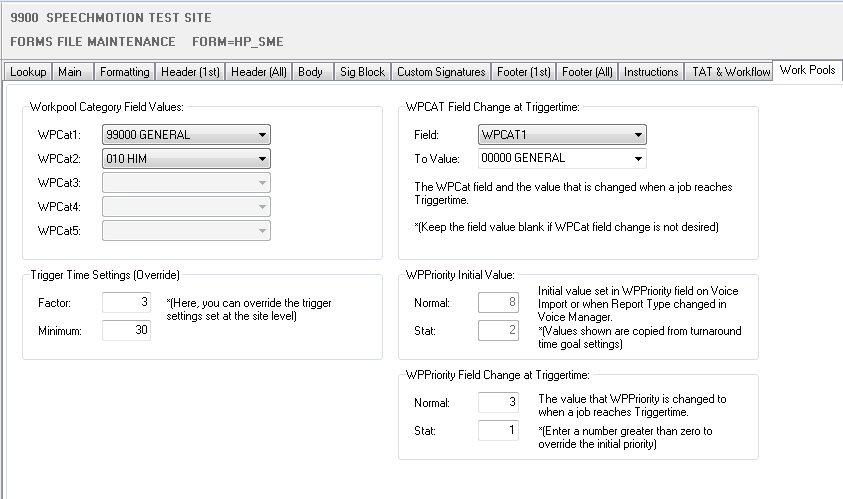
At the Form level, you can assigned the workpool category values to each dictation via the form config. The example below initially routes H&P reports to a general site queue called ‘99000 GENERAL’ to transcriptionist with the ‘010 HIM’ specialty. Once the job approaches its due date/time (trigger time), the job is automatically re-routed to the ‘00000 GENERAL’ routing pool.
Assign MTs work pools for the various route groups and specialties Work Pool configuration example:
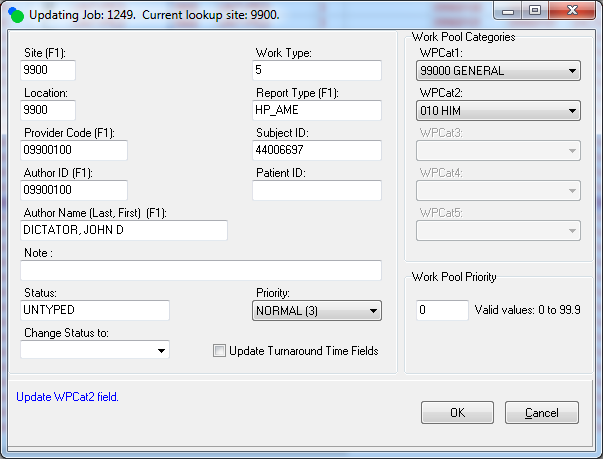
Updates to Voice Manager Edit screen.
Added fields for the five Work Pool Category fields.
Updating the Status field is now done with a combo box instead of radio buttons. Status is listed in one field and changed in the ‘Change Status to’ combo box.
Updating the Priority field is now done with a combo box instead of radio buttons.
The Work Pool category fields will be disabled when values for the Work Pool category fields have not been defined in the system record and when the initial values for the Work Pool category have not been set on the form record. In this case WPCat4 field is disabled because no values for that field have been defined in the system record.
Behavior of the Work Pool category fields on the Voice Manager edit screen
When changing the Report Type field, the values of each Work Pool category field will be changed to the initial values of the WPCat fields of the new form selected in the Report Type field. All of the Work Pool category fields on the edit screen will be disabled if the form for the new Report Types does not have any initial values set for the WPCat fields.
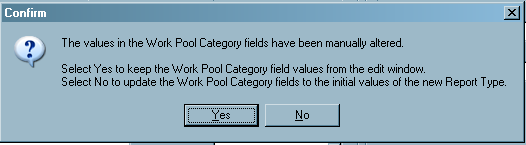
If the value in one or more of the Work Pool category fields is changed and then you change the Report Type, the user will be prompted to keep the Work Pool category values from the edit window or to change the Work Pool category values to the initial values of the WPCat fields of the new Report Type.
When not changing the Report Type or after changing the Report Type, the values in one or more of the enabled Work Pool category fields may be manually changed.
Additional changes
When selecting multiple voice jobs from multiple sites to edit, the site field can no longer be edited.
When selecting multiple voice jobs from the same site to edit, the site field can no longer be edited. The site number is displayed but cannot be changed.
When a voice job is in a status such as DELIVERED or TRANS COMPLETE the status cannot be changed. Now, the Priority also cannot be changed.
If a Work Pool category field is changed when editing multiple voice jobs and one or more of those jobs are a Report Type that does not have initial values set for the WPCat fields, a warning message will be displayed for each job that could not be updated.
The Status of a job can only be changed for voice jobs with a status of UNTYPED, TRANSCRIBED, DELETED, HOLD, NO DICTATION, EXPORTED, IMPORT ERROR, and TRANS REJECT.
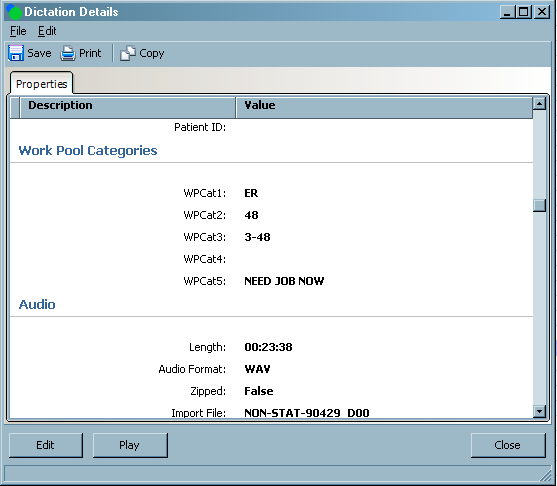
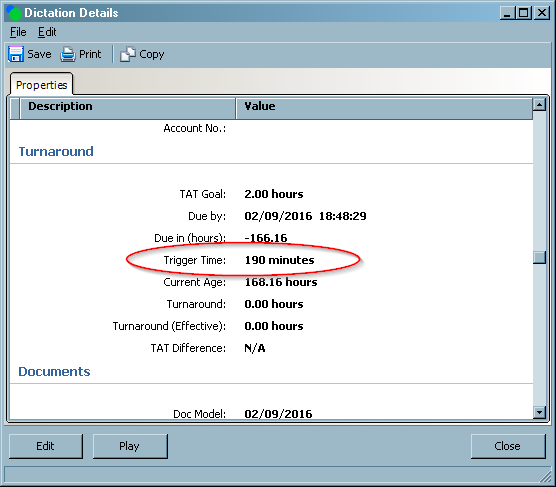
Added the five Work Pool category fields and the triggertime fields to Dictation Details.
The triggertime field is automatically updated when the Report Type and/or Provider is changed on the edit screen. It is updated to a new value based on settings in the form for the new Report Type and on the weight field of a provider.
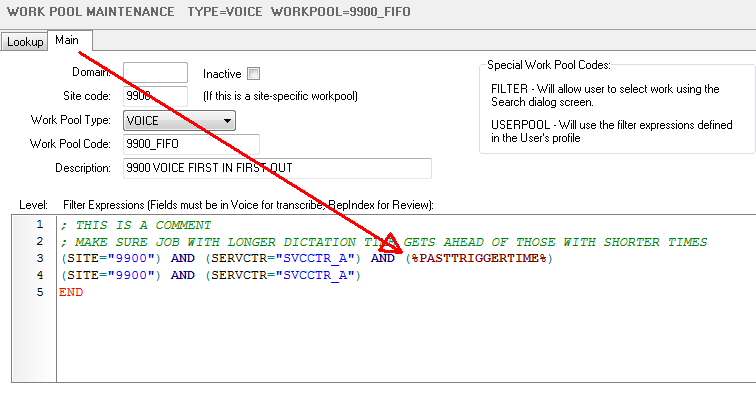
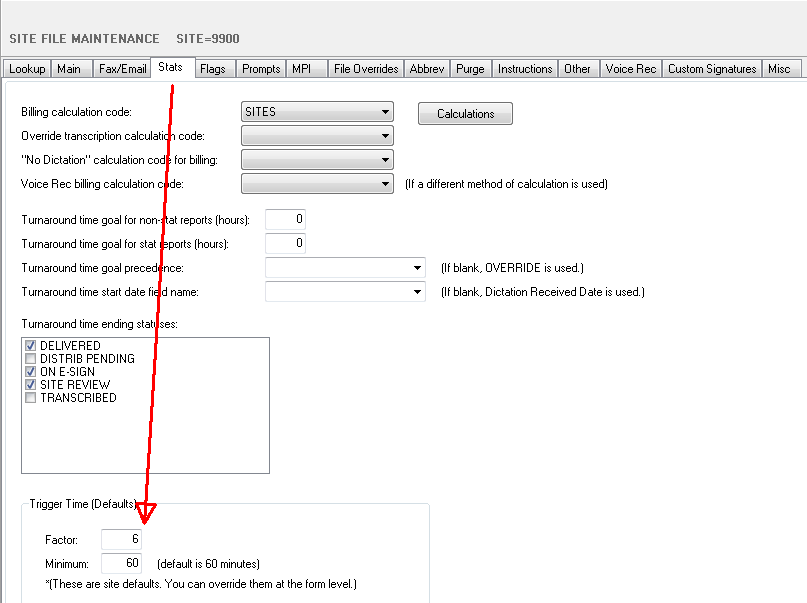
Added: PASTTRIGGERTIME field for use in work pool filtersThe length of a dictation can be used in conjunction to the due date/time when prioritizing and assigning jobs. Longer dictations due will be assigned before shorter jobs that are due at the same time. The amount of priority adjustment depends on 2 configuration settings. Trigger Factor and Trigger Minimum. A trigger factor of 4 will ‘trigger’ the assignment of a 10 minute dictation 40 minutes before it approaches due date/time. Giving the transcriptionist time to finish the job on time. A trigger factor of 10 will assign a 15 minute job 150 minutes before it is due. A trigger minimum of 30 says all jobs will trigger an assignment at least 30 minutes before they are due. Trigger Times can also be used to alter the priority or routing of a job when it approaches due date/time. See Work Pool Priorities. To use the new trigger handling, simply add the %PASTTRIGGERTIME% code in your work pool filters. Note: Trigger data is updated every 5 minutes.
Setting Trigger Time as a default for a site. You can override the site settings on each form.
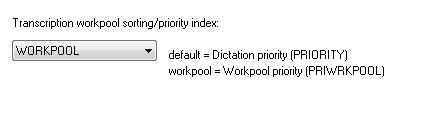
Added: Dictations work pool require priority indexesFor MTSOs interested in work pool priorities, a system level change is made in the System->Work Pool Queues tab. The default priority is driven by the dictation priority (STAT, NORMAL) and due date/time. Work pool priorities are driven by TAT order, due date/due time and other configured parameters.
|




Regards,

SpeechMotion Software Team