Fixed: Protected fields in RDS after auto-fill
When a user Field is configured to use ‘Protect from
editing after auto-fill’, the field can still be edited on the Report Data
Screen after it is filled in. This has been fixed so that the field can
no longer be changed.
Fixed: Some fields not retaining values after changing form types
User field values and memo field values on the Report Data
Screen were not copied to the new form when using Change Form Type.
This was only seen when changing form type before
selecting OK to go to the editor screen.
This issue has been fixed.
Fixed: Issues with Infinity USB pedals using non default switch
assignments
When default switch assignments were changed, the play
button worked as a on/off toggle.
This has been fixed.
Fixed: Rare issues with expanders not working after a CTRL+F7 lookup
I rare cases, CTRL+F7 would trigger a ‘disable next
expander’ behavior, forcing the user to type the abbreviation twice.
The issues occurred in the SpeechMotion Editor.
This has been fixed.
Fixed: Philips foot pedals not working in AnyModal Editor
The Philips foot pedals would no longer trigger events
after the AnyModal editor is displayed.
This has been fixed.
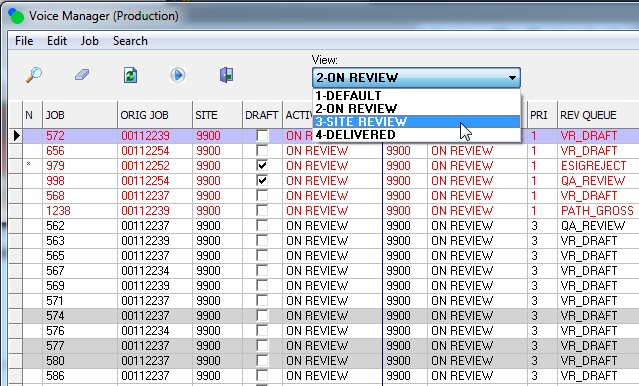
Added: Additional views in Voice Manager
Two new views added to the Voice Manager.
On Review displays all dictations currently in a review
queue.
Delivered displays all dictations delivered in the last 2
days.
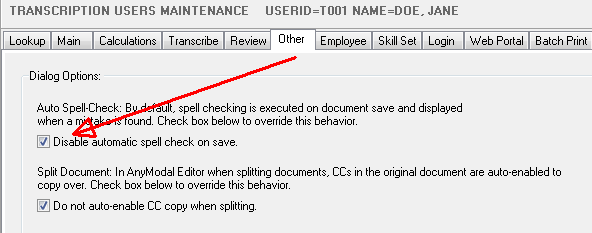
Added: User option to disable auto spell checking on document save
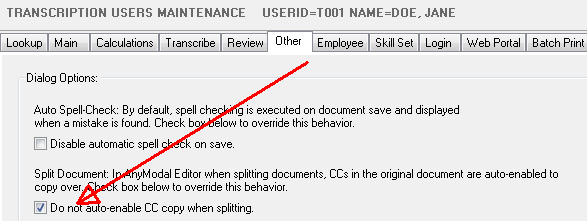
Added: Split report and CC name copy default user options
Default options after splitting a document can be
controlled on user configurations.
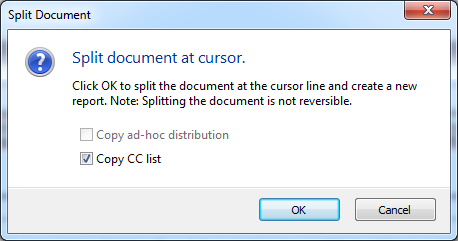
IF CCs are listed with the document, this option does
not auto-select the copy list.
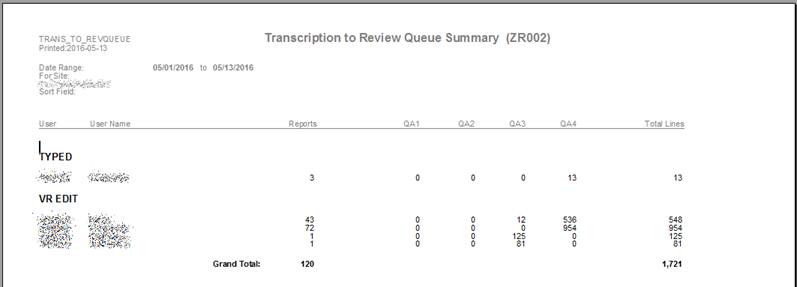
Added: Custom Trans to Review Summaries
These reports show the number of lines that resulted in
routes to QA per transcriptionist. Or QA to Delivery.
·
Transcription to Review Queue Summary (ZR002)
·
Review to Review Queue Summary (ZR003)
·
Review to Delivered Summary (ZR004)
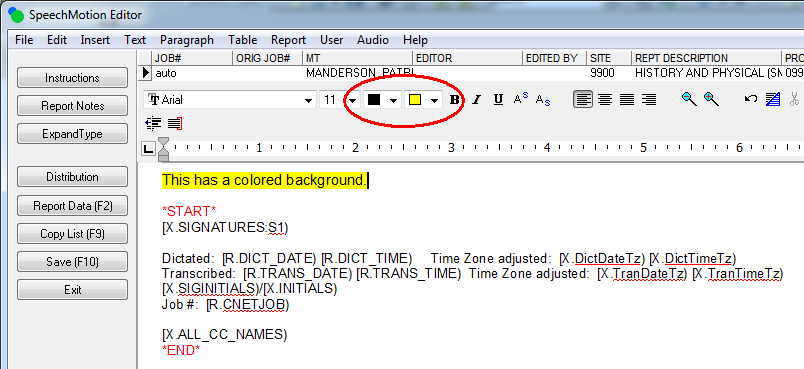
Added: Background color font options
In the SpeechMotion editor, user setting that allow
font options while editing now include background color selectors.
Added: New report TAT Detail (D042)
Turnaround Time Detail (sort options) (D042) gives
users various sort options.
Changed: Fax Manager REDIRECTED fax status
Added a column on the Fax Queues screen: REDIRECTED. This field shows the
total number of failed faxes that where redirected to the alternate
distribution device.
The SENT DATE
and SENT TIME fields will now
be set with a date and time when changing the status of a fax job to
6-SENT. Previously, these fields were not set.
Changed: Report Data Screen (RDS) form width adjustment
The RDS had previously been non sizable due to its
dynamic generation.
The width of the dialog can now be resized by the
user.
Fixed: Workpool priority event messages
The workpool trigger process was incorrectly adding an
event to a voice job. The message was indicating that the WPPRIORITY field had been changed
when it had not. This has been fixed.
Fixed: MTLOGIN backup path dated directory names
The backup location used while updating Enterprise Client
was incorrectly excluding date in the directory name, using only the current
time as the directory name instead.
This has been fixed.
Fixed: IMPORTERROR and TRANS_REJECT alert email messages
These dictation events where not triggering email alerts.
This has been fixed.
Added: HL7 device macro to disable default MDM message type outputs
Added a new macro to use for a device in mapping for HL7
MDM output distribution.
SpeechMotion’s default is to set the Message Type value
that is in the MSH.8.2
field to a value based on the type of output the HL7 message is.
Values used in SpeechMotion are
·
T01 - original
document notification
·
T02 - original
document notification and content
·
T05 - document
addendum notification
·
T06 - document
addendum notification and content
·
T08 - document edit notification and content
·
T09 - document replacement notification
·
T10 - document replacement notification and content.
The new macro is #BYPASSMDMMSGTYPELOGIC.
Adding this macro in the device mapping will use the value set for MSH.8.2 that is set in the mapping
rather than evaluate the message type and use one of the values above.
Added: HL7 ZCR segment support
Added support in HL7 report message for ZCR segment.
Added two X fields for use in the ZCR segment.
X.CC_NOADDR
– returns a string of cc recipients added to the copy list that are not in
the address table. The format of the string is
name1^address1^address2^address3^address4^address5~name2^address1^address2^address3^address4^address5~etc.
Empty address fields will not be in the returned string. For example,
if address3 and address5 are empty the returned string will be
name1^address1^address2^address4
X.CC_NOADDR#
- returns the number of cc recipients in the copy list that are not in the
address table.
Added: Field codes for Doctor signature images
When Signature Bitmap files are defined for a provider
these two new fields will insert the provider images into the report.
The fields are named
[X.DRIMAGE1) and [X.DRIMAGE2).
[X.DRIMAGE1) will insert
Signature Bitmap File #1 and [X.DRIMAGE2)
will insert Signature Bipmap File #2. As with other field codes, the
field codes will be displayed in the SpeechMotion editor and the images will
be displayed in Report Options, Print Preview, and in RTF, PDF, and print
distributions.
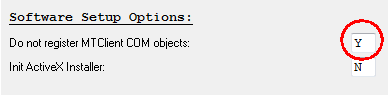
Added: NOCOMREGISTRATION user group option
Disable com registration for individual Enterprise Client
users.
This options can be used in rare circumstances. Located in
the Misc tab.
Added: TAT calculation for Voice Only workflows
Voice Only workflow previously did not track
turnaround time.
Turnaround time is now calculated on dictation
receive time and transcription complete time.
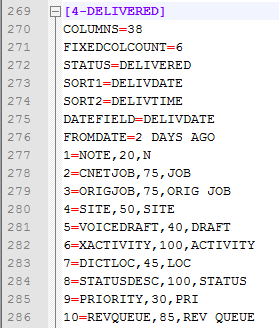
Added: Using date ranges in custom voice views
Date ranges can now be used in custom voiceview.ini
files for the Voice Manager.
Additional instructions are noted in the
z:\bin\voiceview.ini file
List of DATEFIELD
values:
For use with FROMDATE and TODATE
·
DICT_DATE - dictation date
·
DICTRECVDT - dictation received date
·
DUEDATE - calculated due based on TAT
·
TRANS_DATE - transcribed date
·
DELIVDATE - delivered date
List of FROMDATE
and TODATE values:
For use with DATEFIELD
·
YESTERDAY
·
2 DAYS AGO
·
3 DAYS AGO
·
THIS WEEK
·
LAST WEEK
·
THIS MONTH
·
LAST MONTH
An example:
Added: New fields for customer reporting
These fields can be used to populate customer specific
data and displayed on various management reports.
The reports will have to be created by request.
Fields: CUSTDATA1, CUSTDATA2, CUSTDATA3, CUSTDATA4
The values created on RDS are copied over to STAT,
REPINDEX and VOICE tables
Changed: Marking a template as inactive prevents it from being used as a
body header template
Changed the behavior of the Inactive flag for
Templates. Previously, when the Inactive flag was set, the template
would not display on a report when the template was used as a body header
template on a form. The template will now be displayed on the report
when the Inactive flag is set.
Added an Inactive column and removed the Domain column on
the Lookup tab in Template File Maintenance.
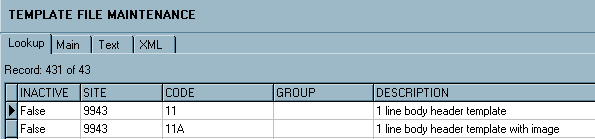
Added a View combo box in Template File Maintenance.
This is to be used to display All templates, Active templates, or Inactive
templates. The default is ALL.

Changed: Voice Client root path initialization in multi-user
installations
In multi-user installations, registration of COM based
modules can result in problems if users do not have permission to re-register
the COM components.
Changes were made so in these situations, the modules
correctly know where the correct user cache files are located.
Changed: Size of MPI.Location field from 20 to 80 characters
The character length has been expanded to accommodate more
data.
Changed: Size of file paths used in configurations changed from 60 to 250
characters
In configurations, the total character length of a
configured path has been increased.
Changed: Minimum purge days for MPI and Voice data
Minimum values were changed.
MPI – 7 days
Voice – 14 days
Regards,

SpeechMotion
Software Team
www.speechmotion.com
|
