Notes for previous releases can be found here:
http://download.speechmotion.com/installs/
|
What’s New in SpeechMotion
5.50
Release Summary
Enterprise Client · Fixed: Issues relating to jump markers and adjacent text · Fixed: Protected text and control keys · Fixed: Page breaks are not visible · Fixed: Blank pages in generated Management Reports · Fixed: “FORMS.ADT does not have an index named: COMBOBOXSORT” · Fixed: “…exclusive access…” errors on Expander data. · Fixed: Audio does not play, shuttle jumps to end of file · Changed: Voice Manager “Assign” and “Clear” job options · Changed: 'Set Status to IN-TRAINING' and 'Set Status to TRAINED' Provider Maintenance VR config Workflow Server · Fixed: Insert Field “Referring Doctor Name” in Forms setup · Added: Disable Voice Manager options: Assign/Clear job from MT, VR · Added: Service Center user options to see non-service center jobs in Voice Manager · Added: Report: Work Pools (T013)
Enterprise Client Fixed: Issues relating to jump markers and adjacent textUsers experienced issues when typing next to a Jump Marker in the SpeechMotion Editor. Typed text would sometimes display in red and would be treated as hidden text. This has been resolved. Functions include inserting a template, Incomplete marker, Provider Full Name, Provider Last Name, Provider Signature #1 and #2, Address, Symbol, Symbol (Unicode), Special Symbol, Exam Descriptions, Non-breakable Space, Soft Hyphen, Graphic, File, Previous Note, and ExpandTypes. The inserted text should now be in the Font, Font Size, Color, Background Color, and Style (Bold, Italic, Underline, etc) of the insertion point. Exceptions to this rule are when a Template has the option ‘Keep RTF formatting in Text tab when inserting’ checked, when an ExpandType has the option ‘Keep this formatting when inserting’ checked, or when inserting a File. In these case the inserted text will have the formatting of the Template, ExpandType, or File. Note: Jump Markers and the *START* and *END* markers are using the hidden attribute. SpeechMotion is now using the hidden text attributes to show the markers in the red color instead of the text color. When the cursor is on or immediately following these markers the color on the toolbar will the text color not red. Auto Caps now works when typing text immediately after a Jump Marker when the Jump Marker is at the beginning of a document or when the Jump Marker is on a blank line. Fixed: Protected text and control keysThe Tab, Enter, and Delete keys are ignored when the cursor is in protected text. Fixed: Page breaks are not visibleIn the SpeechMotion editor page break markers would intermittently no display. Fixed: Blank pages in generated Management ReportsIn rare occasions the generated output would insert blank pages. This has been fixed. Fixed: “FORMS.ADT does not have an index named: COMBOBOXSORT”This error would occasionally occur when trying to start a new report in the Transcribe module. Fixed: “…exclusive access…” errors on Expander data.Users experienced an error when displaying Expander Maintenance. This has been fixed. Fixed: Audio does not play, shuttle jumps to end of fileIn rare occasions a user is unable to play audio. The shuttle point would jump to the end when the user toggles ‘Play’. This was caused by file corruption and logging out and back in would not resolve it. Changes were made so the corrupt data can be refreshed on each login. Changed: Voice Manager “Assign” and “Clear” job optionsA number of changes were made in the logic that determines if a job can be assigned or have its assignment cleared in the Voice Manager. Currently, “Assign to MT” will not allow a user to be assigned to a job if the job is assigned to a Service Center and the Voice Manager user is not assigned to the same Service Center as the job. This behavior is still the same. “Assign to MT” menu item changes. 1. Will not assign a job to a new MT if the job is assigned to the MModal user (ZMM1). You either have to wait for the job to be returned from VR or you can use “Unassign from VR” before you can assign the job to another user. 2. Jobs that are currently being transcribed (shows PLAYING in Activity column) cannot be assigned to another user. 3. Jobs that are checked out to a MT can conditionally be assigned to another MT if only one job is selected in Voice Manager. The user will get a dialog stating that the job is checked out to one MT and asked if they want to assign it to a different MT. If the job is assigned to another MT, it will also be checked in from the original MT. 4. Jobs that are checked out to a MT will not be assigned to a another MT when more than one job is selected in Voice Manager.
“Clear Assigned” menu item change. 1. Can no longer use “Clear Assigned” to un-assign a job from VR. Have to use the menu option “Unassign from VR” to un-assign a job from VR.
“Assign to VR” does some additional testing before assigning a job to VR. “Assign to VR” will no longer assign a job to VR if: 1. The job is already assigned to VR. 2. The job has already been voice recognized. 3. The job is not in an UNTYPED status. 4. The job is assigned to a Service Center and the user attempting to assign it is not in the same Service Center. 5. The job is currently checked out to another user. Changed: 'Set Status to IN-TRAINING' and 'Set Status to TRAINED' Provider Maintenance VR configUpdated the behavior of the “Set Status to IN TRAINING” and “Set Status to TRAINED” buttons that are on the Voice Rec tab in Provider Maintenance. Previously, these buttons prompted the user to enter the sample rate of the entry in the Voice Recognition Status grid that you want to update. Now, you will no longer be prompted for the Sample Rate. The Status will be updated for the entry that is selected in the grid.
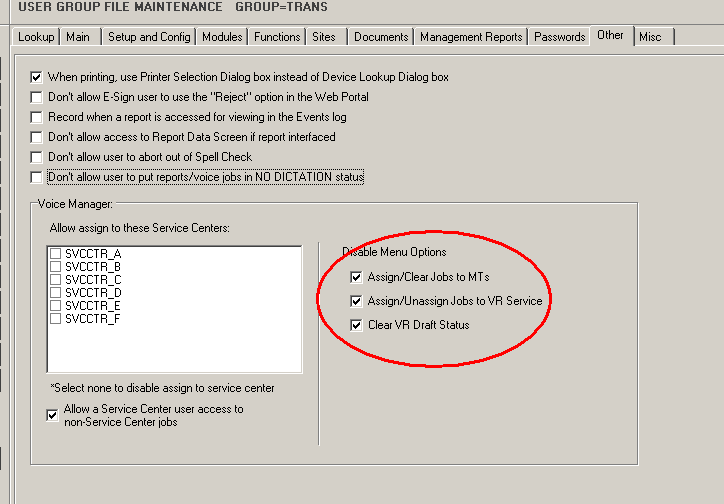
Workflow Server Fixed: Insert Field “Referring Doctor Name” in Forms setupInserting the Referring Doctor name field was incorrectly inserting the Dictating Doctors name. This has been fixed. Added: Disable Voice Manager options: Assign/Clear job from MT, VRFor users with access to Voice Manager, options to Assign and Unassign jobs to MTs and VR Service have been added in User Group maintenance.
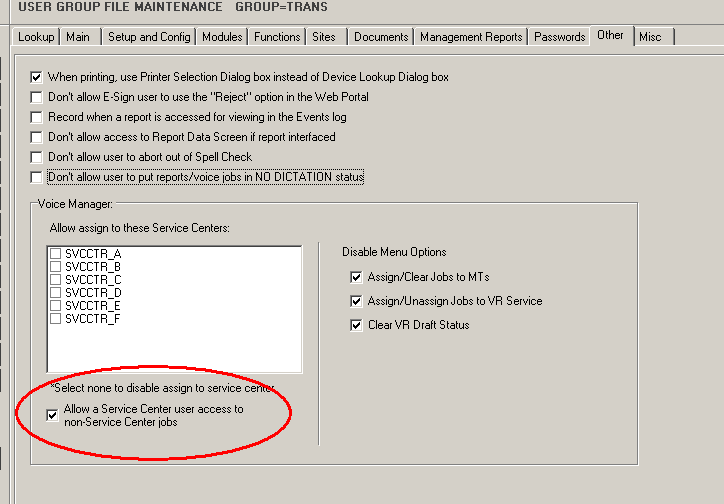
Added: Service Center user options to see non-service center jobs in Voice ManagerIn Voice Manager, users of Service Centers have a User Group option to see other jobs in their Site range that do not have service center assignments.
Added: Report: Work Pools (T013)This report lists the filter config of each work pool record. It is optimized for Excel display and import into a 3rd Party application.
|
|
|
|
|

Regards,

SpeechMotion Software Team