Notes for previous releases can be found here:
http://download.speechmotion.com/installs/
|
What’s New in SpeechMotion
5.50
Release Summary
Enterprise Client · Fixed: Issues relating to querying reports by Job number in Review Module · Fixed: Issues with workpool priority values while editing in Voice Manager · Fixed: Rare issues with missing paragraphs in document previews · Fixed: Resolved issues with FILTER job request in Transcribe Module for Service Centers · Fixed: Rare crashes in Voice Manager when switching views Workflow Server · Fixed: Device filename expressions and character casing · Added: New Provider EXTRAID field · Added: Site code to Reject Job alert messages · Changed: E-Sign Portal interface and browser compatibility updates
Enterprise Client Fixed: Issues relating to querying reports by Job number in Review ModulePreviously, when using FILTER to request a report by the Job number in the Review Module. User access restrictions were applied on the Enterprise Client. Changes were made to handle user access restrictions additionally on the request servers. Fixed: Issues with workpool priority values while editing in Voice ManagerIn German localizations, Workpool Priority values would add an additional zero when “Update Turnaround Values” was checked. Fixed: Rare issues with missing paragraphs in document previewsDocument previews would crop off the last paragraph in configurations with empty header/footer configurations. This has been fixed. Fixed: Resolved issues with FILTER job request in Transcribe Module for Service CentersA number of changes were made to resolve job request by FILTER when user was part of a Service Center. Fixed: Rare crashes in Voice Manager when switching viewsIn rare instances, Voice Manager would crash when switching views with a large number of results. This has been fixed.
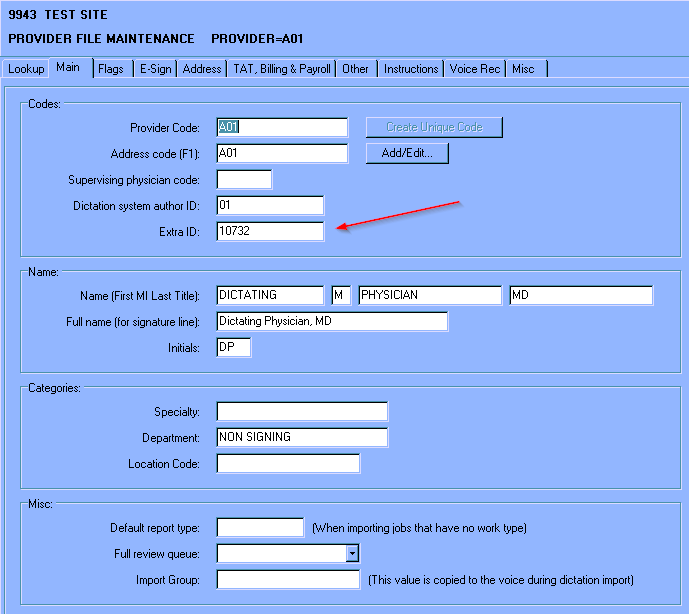
Workflow Server Fixed: Device filename expressions and character casingWhen editing device filename expressions, the configuration was forced to UPPERCASE. Mixed case editing is now enabled. Previously the filename was forced to UPPERCASE regardless of Patient and Doctor name modifiers. This has also been fixed. Added: New Provider EXTRAID fieldThe provider maintenance screen now includes an additional field: EXTRAID. One example of for the use of this field would be to store a hospital information system number that is not the same as the SpeechMotion provider code. This number could then be sent in a HL7 result message as the doctor’s code so that it would match the HIS number. This new field is found on the Main tab in Provider Maintenance. Please also note that the Dictation system author ID field has been moved from the Name group to the Codes group.
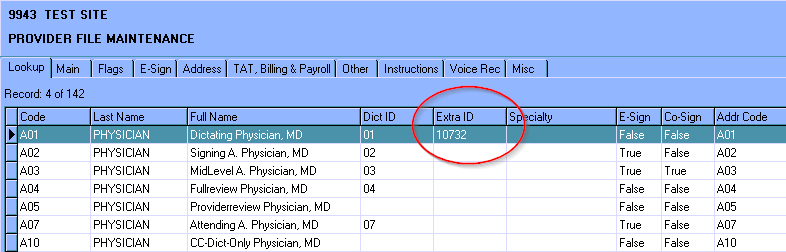
A new column has been added to the grid on the Lookup tab for the EXTRAID field.
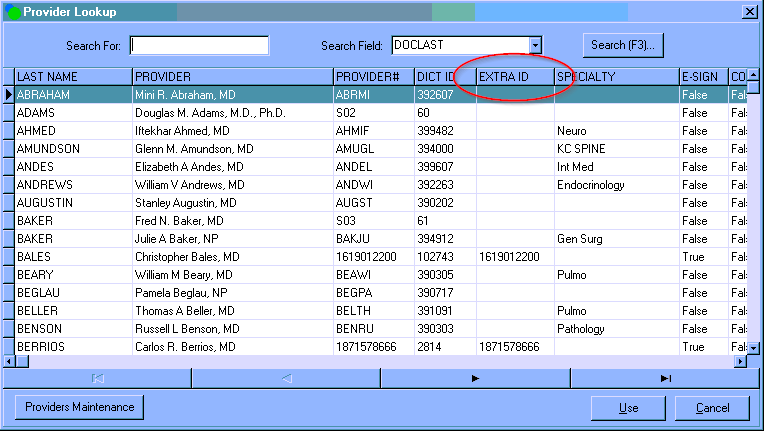
The Provider Lookup screen also has a new column for the EXTRAID field. Please note, users will need to select the grid in Provider Lookup and the press CTRL+SHIFT+Z to see the new column.
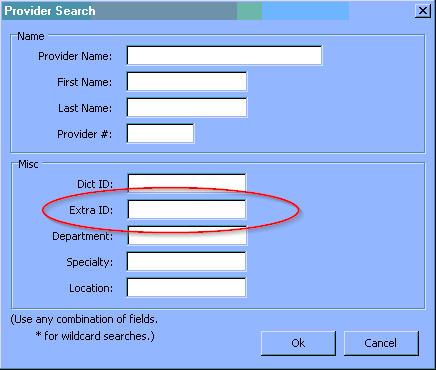
When you press the Search button or select F3 on the Provider Lookup screen it will bring up a Provider Search screen. A new field to search by the Extra ID has been added.
Currently, the EXTRAID field cannot be used to match against doctor codes in the MPI table. Plans are to add this feature in the future. Added: Site code to Reject Job alert messagesMTALERT mail messages for Reject Job now include the site code of the rejected job . Changed: E-Sign Portal interface and browser compatibility updatesE-Sign Portal user interface has been optimized for modern browsers. Internet Explorer “Compatibility Mode” is no longer required. Document preview in non-IE browsers has been improved. For document editing using ActiveX Web Editor component: · Microsoft Internet Explorer 9, 10, 11. Document Preview mode is available in all browsers: · Chrome · Firefox · Safari |
|
|
|
|

Regards,

SpeechMotion Software Team