|

What’s New in SpeechMotion
5.50
SpeechMotion 5.50 build 17021500 for February 15, 2017
Enterprise Client
·
Fixed: Dictionary lookup ‘Search for’ stops at the first typed
letter
·
Fixed: Line spacing can change when inserting an ExpandType in
SpeechMotion editor
·
Fixed: Issues adding a single Unicode character in Expander
Maintenance
Workflow Server
·
Fixed: Incomplete marker flag and count issues
·
Fixed: Workpools marked as inactive still showing in Users
Maintenance
·
Fixed: Various issues relating to the display of batch queue
lists in System Maintenance
·
Fixed: Issues with periods in patient name formatting for HL7
outputs
·
Added: Remove AME field markers on Save option
·
Added: DATEFIELD parameter displayed on Management Reports
·
Added: Usergroup option ‘Disable Pagebreak Shortcuts’
·
Changed: DELIVDATE parameter added to Management Reports
·
Changed: NORMALIZEDATE function in ‘Optional string expression’
in Fields Maintenance
·
Changed: Payroll, Billing char adjust max number increased from
9,999 to 99,999
Fixed: Dictionary lookup ‘Search for’ stops at the first typed letter
In the Dictionary lookup when using DESCRIPTION in the
Search field, the search would stop on the first typed letter. See
example below. Typing MUN in the Search For field results in the entry
for Marion to be selected. This is because the text in the Search For
field is entered in all upper case and the text in the description field is
in mixed case. Searches in the database are case sensitive.
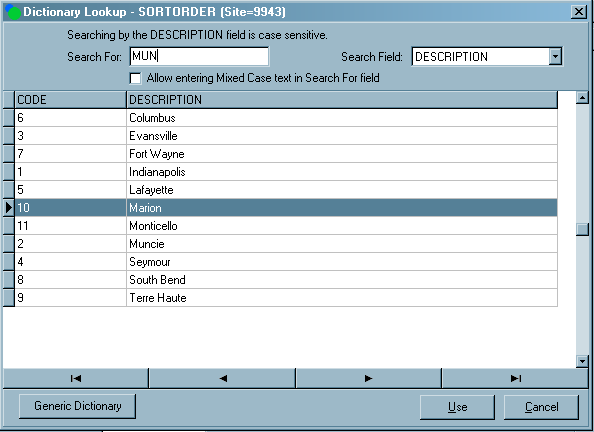
Resolved this issue by adding a check box labelled ‘Allow entering
Mixed Case text in Search For field’. When this is selected, the text
entered in the Search For field can be in mixed case. This will find
the correct entry in the database as shown below. Also, added a label
‘Searching by the DESCRIPTION field is case sensitive’ as an aid for users.
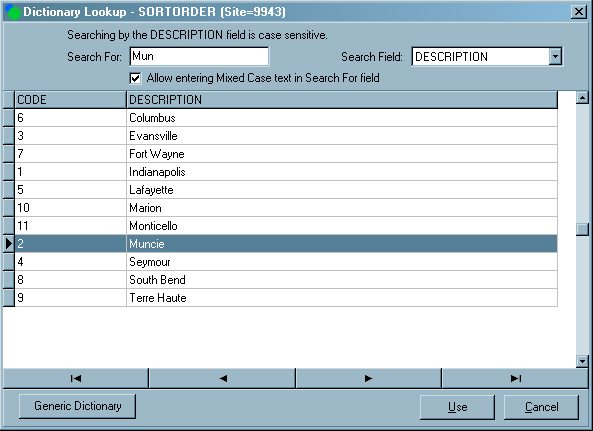
The ‘Allow entering Mixed Case text in Search For field’
check box setting is a user setting and will be retained when the user exits
the Dictionary lookup screen.
The default behavior of the text being entered in all
upper case in the Search For field was not changed because many of the
entries in the Dictionary table are in all upper case. This new check
box is for customers that have used mixed case in the Description
field.
Fixed: Line spacing can change when inserting an ExpandType in
SpeechMotion editor
Fixed an issue where the paragraph line spacing could
change when inserting an ExpandType or a template at the beginning of a blank
line.
Fixed: Issues adding a single Unicode character in Expander Maintenance
Inserting
Unicode characters using CTRL+S would not update the MODIFIED flag. This had
the effect of not saving the character to the Expander record.
Fixed: Incomplete marker flag and count issues
Editing documents on E-Sign Portal would not recount
incomplete markers after a report after the edit when on ESIGN status.
This was fixed.
Fixed: Workpools marked as inactive still showing in Users Maintenance
Work pools marked as inactive are displayed in User
Maintenance, the Transcribe module, and the Review Edit module. This
has been fixed so that work pools marked as inactive are no longer displayed
in these modules.
Fixed: Various issues relating to the display of batch queue lists in
System Maintenance
A number of
changes were made when displaying a list of Batch Queues.
·
No longer displaying batches from inactive sites
·
No longer displaying batches for sites that a user does not
access to
·
Batches for all sites that a site user has access to are now
correctly displayed
Fixed: Issues with periods in patient name formatting for HL7 outputs
Resolved an issue relating to the formatting and placement
of periods within a patients name.
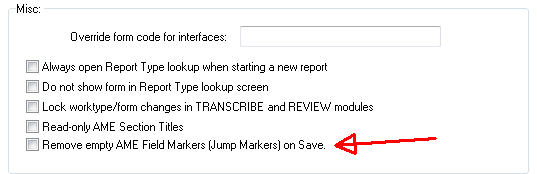
Added: Remove AME field markers on Save option
When AME documents are saved, remaining jump markers are
converted to incomplete markers. This new option removes the markers
completely. This can be set at the Forms Maintenance Options tab.
Added: DATEFIELD parameter displayed on Management Reports
Billing detail reports now display the DATEFIELD parameter
used in the date range in the report header section.
·
Billing Detail (D100)
·
Billing Detail (D101)
·
Billing Detail (D102)
·
Billing Detail (D103)
·
Billing Detail (D1032)
·
Billing Detail (D1033)
·
Billing Detail (D104)
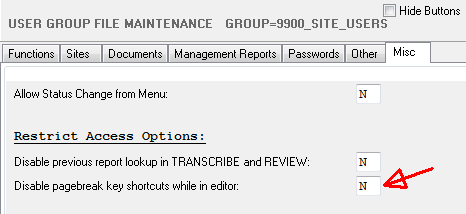
Added: Usergroup option ‘Disable Pagebreak Shortcuts’
The shortcut key was interfering with a common German key
sequences. The menu option still works, this option disables the keyboard
shortcut.
Changed: DELIVDATE parameter added to Management Reports
Management report Site Turnaround by Report Type (M008)
now includes a DELIVDATE option for date ranges.
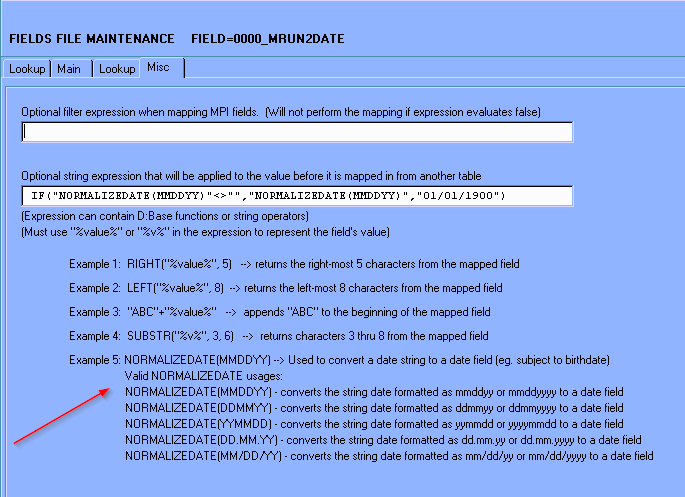
Changed: NORMALIZEDATE function in ‘Optional string expression’ in Fields
Maintenance
Changed some of the functionality of the NORMALIZEDDATE()
function used in the Optional string expression… field in Fields maintenance.
NORMALIZEDATE currently takes a 6 or 8 character string
and converts it to a date field. It returns an empty string if the
string cannot be converted to a date. This has not changed.
Previously, if the input string was not 6 or 8 digits, the
function would return the incoming string. This has been changed to
return an empty string if the input string is not 6 or 8 characters.
Previously, NORMALIZEDATE
was the only function that could be used in the Optional string expression
field. Now, additional string expressions can be used with
NORMALIZEDATE in this field. For example,
IF("NORMALIZEDATE(MMDDYY)"<>"","NORMALIZEDATE(MMDDYY)","01/01/1900")
Updated the labels for the
usage of the NORMALIZEDATE function on the Misc tab of Fields File
Maintenance.
Added syntax verification for the Optional string
expression… field when saving a Field configuration.
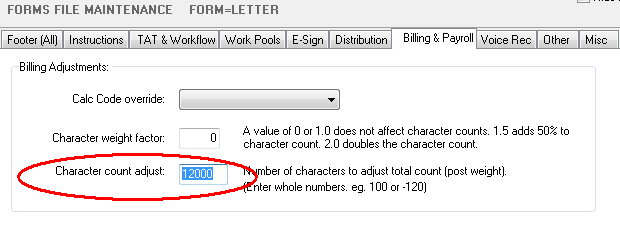
Changed: Payroll, Billing char adjust max number increased from 9,999 to
99,999
The maximum allowable range for Transcription and Billing
character adjustments was increased to: -99,999 to 99,999.
Regards,

SpeechMotion
Software Team
www.speechmotion.com
|