Notes for previous releases can be found here:
http://download.speechmotion.com/installs/
|
What’s New in SpeechMotion 5.50
Release Summary
Enterprise Client
Workflow Server
Enterprise Client Fixed: Various issues with Incomplete Marker insertions in AMEFixed an issue in the AME editor when inserting an Incomplete Marker (CTRL+G). This behavior was not always consistent. The cursor should be positioned after the Incomplete Marker after it is inserted but in some cases the cursor was at the beginning of the Incomplete Marker. This seemed to happen when going to a Jump Marker and replacing it with an Incomplete Marker or after typing a word or two on a line that had a Jump Marker. This behavior has been corrected and the cursor should not be place at the end plus one space of the inserted Incomplete Marker.
Fixed an issue with Find Incomplete Marker (CTRL+ALT+I) in the AME editor. Sometimes the function would not go to the next Incomplete Marker but would instead go to the first Incomplete Marker in the document. This behavior has been corrected and it should always go to the next Incomplete Marker now.
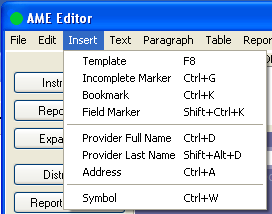
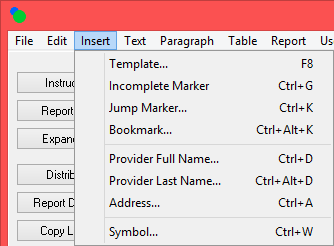
In the AME editor, modified the Insert menu options as
shown below:
Old New
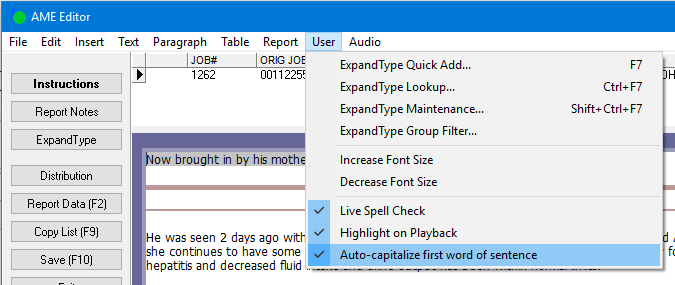
Changed the Jump Marker insertion routine so that cursor is positioned just to the right of the inserted Jump Marker instead of the Jump Marker being selected. Fixed: RDS Master Search results in correct date orderFixed an issue on the RDS when using Master Search for MPI and searching by VISIT DATE or BIRTH DATE. The results displayed in the Master Patient Search window were not displaying in the correct order. They should now display in the correct order. Fixed: Document models are not loading when blank document and training is enabledDocument models associated with dictations in VR training are now loaded and applied when transcribing. Added: Stedman’s Medical Dictionary 2017 updateSpellcheck dictionaries were updated with the 2017 release of Stedman’s Medical Dictionary 28th Edition word lists. Added: Auto-capitalize user option in AMEAuto-capitalize (first word) was not a user option in AME. It now is and the option is synchronized with the SpeechMotion editor.
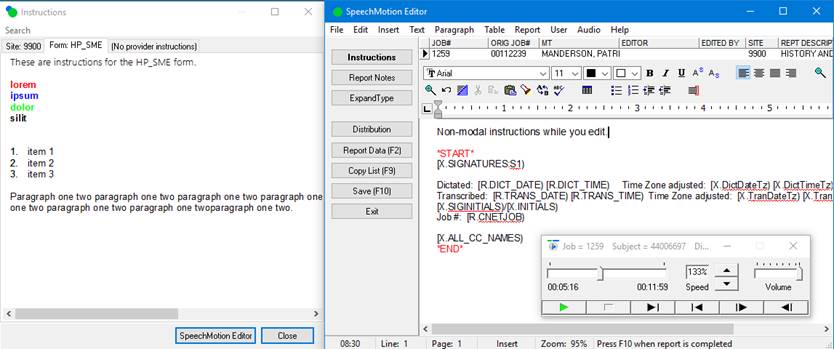
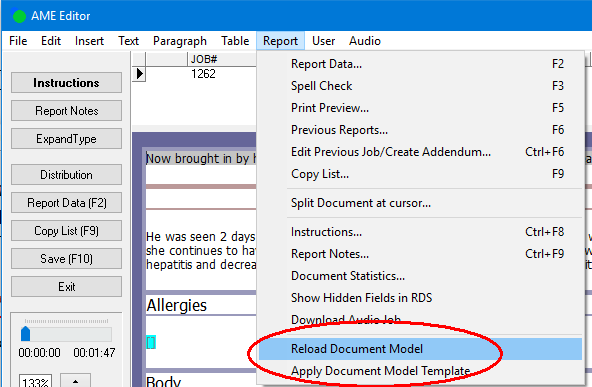
AME had previously applied auto capitalization by default. Changed: Site, Form instructions can now display while editing documents in editorThe Instructions button is now highlighted in bold in the Report Data Screen, AnyModal Editor, SpeechMotion Editor, and QA Auditing Editor when there are site, form, and/or provider instructions for a report.
The Instructions screen can remain on display while editing in Report Data Screen, AnyModal Editor, SpeechMotion Editor, and QA Auditing Editor.
Previously you could open the Instructions screen in the RDS and editors to view the instructions but you had to close the Instructions screen before going back to the RDS or the editor. Now you can leave the Instructions screen open while switching back to the RDS or the editors.
The Instructions screen will stay open (it actually closes and reopens) when going from the RDS into one of the editors or when in one of the editors and going to the RDS.
The position of the RDS, editors and instruction screens are remembered and displayed each time.
Changed: Expander word boundary now includes ‘!’ and ‘?’ in SpeechMotion editorAdded additional characters that trigger Expanders at word boundaries.
‘!’ and ‘?’ are now included in list of word delimiters. Changed: Improvements to document model caching on Enterprise ClientDocument Model file updates are now checked each time a document is started. If a new version is available the updated model is downloaded and cached for the next document. Document models are downloaded and cached as needed.
Previously users had to be notified to manually force a model update… this is no longer required.
These manual options are still available to update the local model file while the editor is displayed.
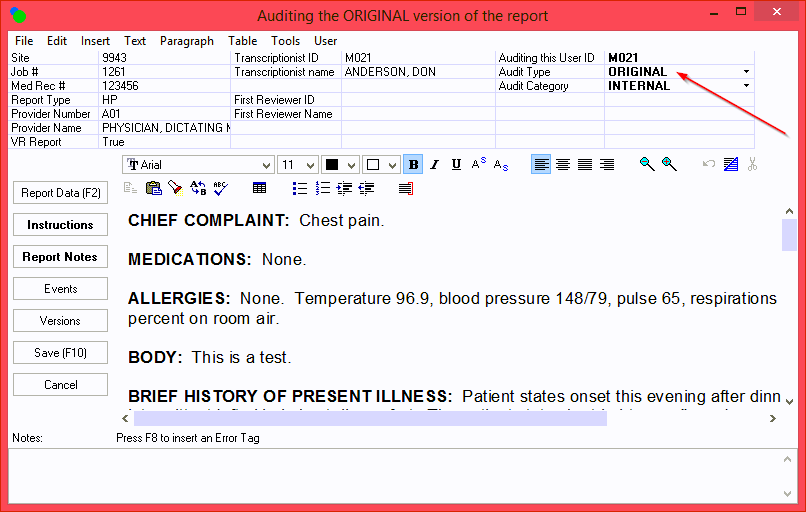
Changed: QA Audit type option on SaveAdded a new user setting for QA Auditing to save the Audit Type setting when using Audit Specific Report in QA Auditing. Previously this defaulted to CURRENT.
Changed: Site lookup form in transcribe module when only 1 site is availableIn user configurations where only 1 site is available, users will no longer receive the Site Lookup dialog when starting a document without a dictation file. This includes ‘auto’ jobs.
Workflow Server Fixed: Various localized date format issues in RDS fieldsFixed an issue with using the NormalizeDate string expression function in the Optional String Expression field on a Field. Would cause a “Failed converting value to a date for field” error if the value in the field was already a localized date value. This has now been changed so that it will just use the value in the field if it is already in a localized date format.
Updated the VerifyField procedure when a field is using an Edit Check value of DATE, DICT_DATE, or VISITDT. Previously, if a user typed in a date that was not in the localized date format, such as mm/dd/yy instead of mm/dd/yyyy, the value would not get updated to the localized format(mm/dd/yyyy). The value is now getting updated on the RDS. Fixed: Split Reports intermittently stuck in TRANSCRIBE statusFixed a problem where splits reports that were split in the AME editor would intermittently be stuck in a TRANSCRIBE status.
This problem could happen when a MT split a report, did not make any edits to the reports, and then selected Exit instead of Save to exit the report. Now if Exit is selected in this situation, the Document Modified dialog will display to give the MT the option to save the report which is what needs to be done to keep the split report from getting stuck in the TRANSCRIBE status.
In the document event list, the message now displays as ‘Split in AME’ instead of ‘Cloned’ when a report is split in the AME editor. Fixed: HL7_TBL2OBX device output with soft returnsLine feeds were not handled correctly when the document originated from AME.
This has been resolved. Fixed: Tilde ~ and caret ^ characters not in text in HL7 uploadsFixed an issue with HL7 outputs where the tilde and caret characters or their corresponding HL7 escape sequences were not in the text of the HL7 upload message. Fixed: Tab order for edit items in Batch Control and Batch Print maintenance screensFixed the tab order on some of the tabs in Batch Control Maintenance and Batch Print Definition Maintenance.
The Other tab on Batch Control Maintenance is no longer visible. There are no settings on this tab. Fixed: Various edit items in Site and Forms file maintenanceChanged the labels on the Prefix and Suffix fields on the Main tab in Fields File Maintenance.
Changed the following in Forms File Maintenance.
Changed or fixed the following on Site File Maintenance.
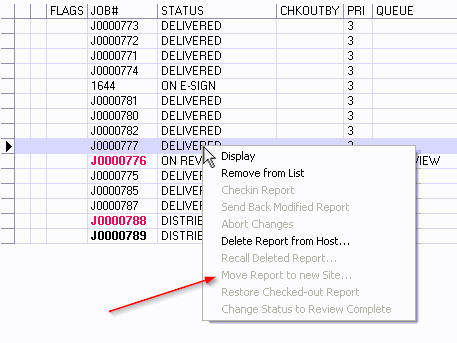
Fixed: Issues when ‘move report’ to new site actionsFixed an issue with moving a report to a new site in Report Search. Intermittently, the report would get deleted from the REPINDEX table and the report could not be found in Report Search after the move.
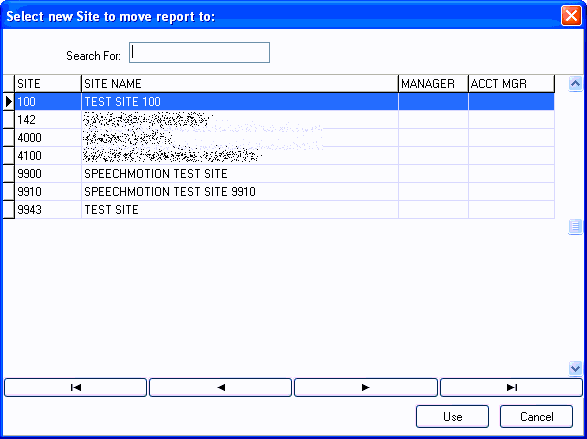
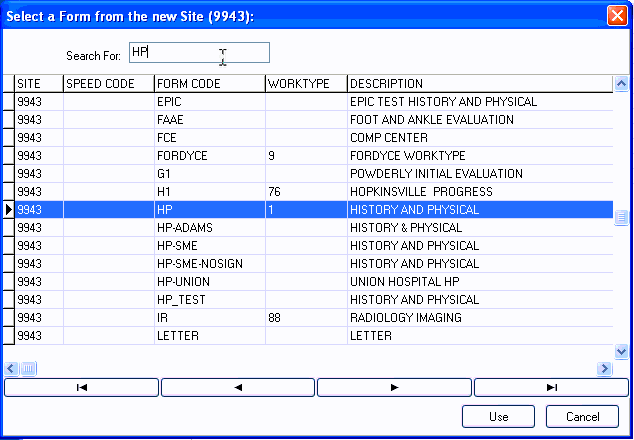
‘Move Report to a new Site…’ in Report Search has been updated to use a site lookup dialog and a form lookup dialog to select the new site and new form instead of the prompt dialogs where you had to manually type in the new site and form.
In Report Search, the Menu and Pop-up menu option for ‘Move Report to an new Site…’ will be grayed out when the user only has access to one site.
Fixed: Global Edit when using a filter expressionFixed an issue in System Setup->Global Edit when using a filter expression. The status bar shows that it is processing more records than the table has and you have to select Cancel to stop processing.
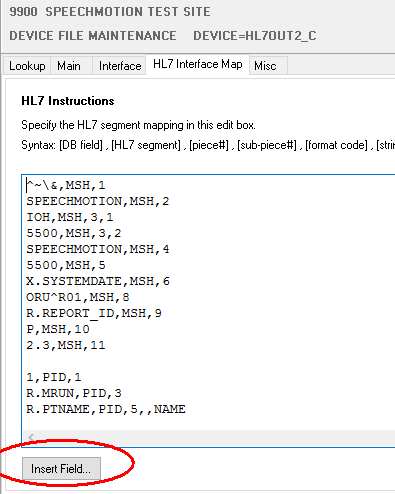
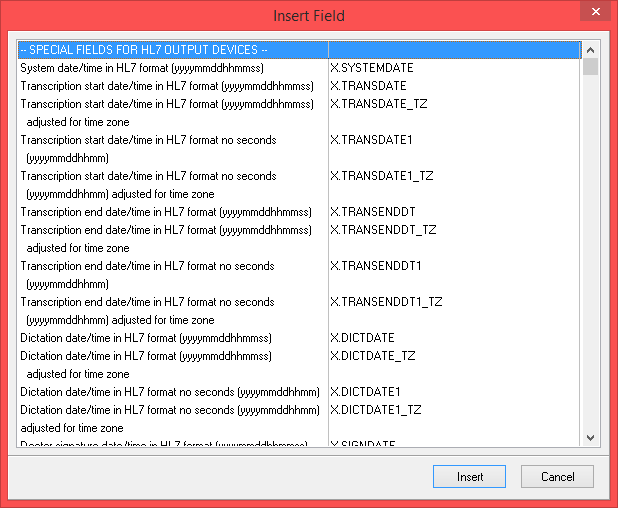
This should no longer occur. Fixed: Insert Field button when mapping device configThe Insert Field button on the mapping tab in Device File Maintenance should work correctly now. Will not insert bracketed field markers only the field text and cursor will not move to the end of the line it will move to the end of the inserted field. |

|
X.MDPSIGDATE |
Signature date/time of mid-level provider in hl7 format (YYYYMMDDhhmmss). |
|
X.MDPSIGDATE_TZ |
Signature date/time of mid-level provider in hl7 format (YYYYMMDDhhmmss) adjusted for time zone. |
|
X.SIGNDATE2 |
Signature date/time of attending provider in hl7 format (YYYYMMDDhhmmss). |
|
X.SIGNDATE2_TZ |
Signature date/time of attending provider in hl7 format (YYYYMMDDhhmmss) adjusted for time zone. |
|
X.TRANSENDDT |
Transcription end date/time in hl7 format (YYYYMMDDhhmmss). |
|
X.TRANSENDDT_TZ |
Transcription end date/time in hl7 format (YYYYMMDDhhmmss). |
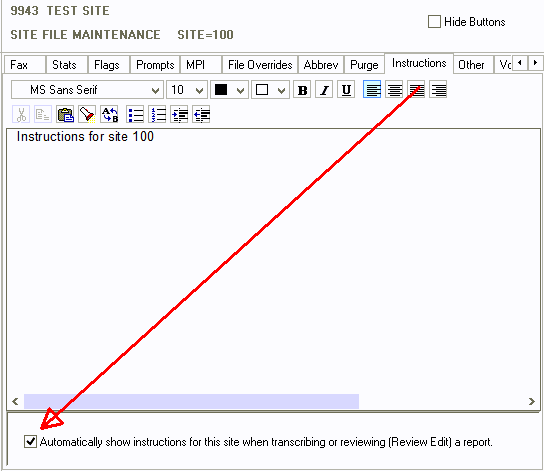
Added: Force display Site/Form/Provider instructions on RDS
The Instruction screen can now be automatically opened when starting a new report in the Transcribe module or when opening a report in the Review Edit module.
This is sort of an automatic pop-up of the Instructions screen.
Configuration consists of two settings in the users record and one setting in each of the sites, forms, and/or doctors records.
In User Maintenance, on the Transcribe tab, click on the
check box ‘Automatically display instructions when transcribing a report’ to
automatically have the instructions display when starting a new report in the
Transcribe module. To automatically have the instructions display when
reviewing a report in the Review Edit module, click on the check box
‘Automatically display instructions when reviewing a report’ on the Review
tab in User Maintenance.

In addition to enabling the settings in Users Maintenance,
one or more of the check boxes ‘Automatically show instructions for this site
when transcribing or reviewing (Review Edit) a report’ on the Instructions
tab in Site File Maintenance, ‘Automatically show instructions for this form
when transcribing or reviewing (Review Edit) a report’ on the Instructions
tab in Forms File Maintenance, or ‘Automatically show instructions for this
provider when transcribing or reviewing (Review Edit) a report’ on the
Instructions tab in Provider File Maintenance must be checked. There
must also be instructions in the corresponding site, form, or provider
record.
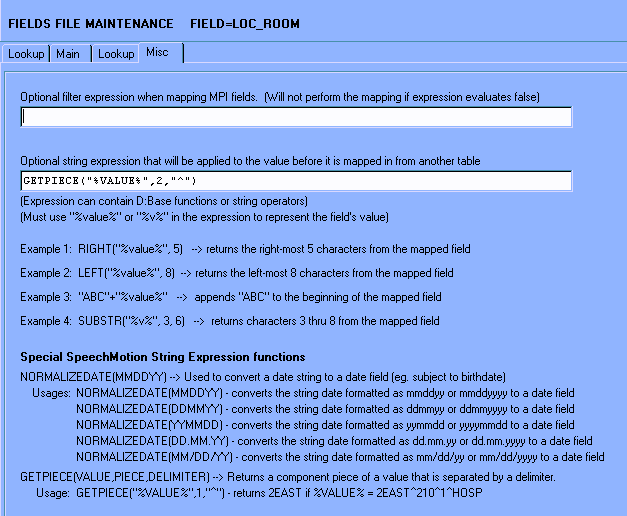
Added: GETPIECE - Additional string expressions for fields
Added a function: GETPIECE can be used on the Optional String Expression… field on the Misc tab of Fields File Maintenance.
The purpose of this new GETPIECE is to return a component value from a field that contains multiple values that are separated by a delimiter character. A use for this function would be to fill in a field on the RDS with just the room number or point of care from the location field in the MPI table.
Format: GETPIECE(VALUE,PIECE,DELIMITER)
Usage: Assume a field with a value of 2East^210^1^Hosp. GETPIECE(“%VALUE%”,1,”^”) would return the value 2East and GETPIECE(“%VALUE%”,2,”^”) would return the value 210. The first parameter should always be “%VALUE%” or “%V%”, including the quotes.
The GETPIECE function can be used with other string expression functions but string expression functions cannot be used as the parameters of the GETPIECE function.
Updated the labels beneath the Optional String Expression… field on the Misc tab to include help for the new GETPIECE function.
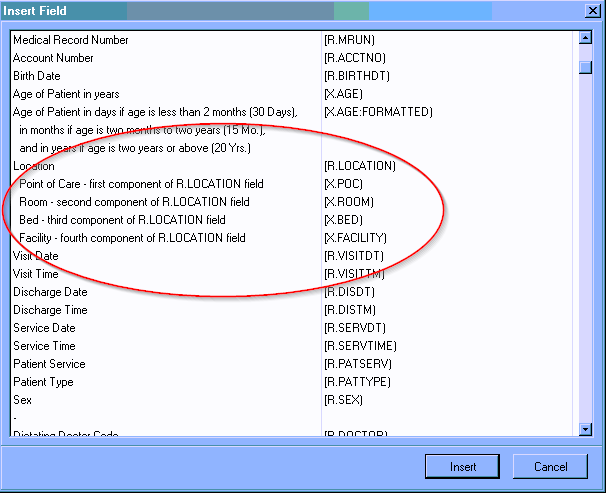
Added: Patient Location - four new X fields for use on forms and devices.
X.POC – this returns the first component of the value in the Reports location field.
X.ROOM – this returns the second component of the value in the Reports location field.
X.BED – this returns the third component of the value in the Reports location field.
X.FACILITY – this returns the fourth component of the value in the Reports location field.
These fields have been added to the Insert Field dialog.
Added: HL7_NOTIFY device for HL7 notification messages
Added a new HL7_NOTIFY output device. The purpose of this new interface type is to output a HL7 message for a report but to not include the report text in the message. This is useful cases where a client requires a HL7 message and the report saved in a file share. The HL7 message would include a value in a field pointing to the file.
We can current create a HL7 message without the report using the HL7 interface type and the #NOOBX or #NOREPORTTEXT macro in the mapping. A recently discovered problem with this method is that while building the HL7 message the report has to be converted to a text file even though it will not be in the message. Reports with too many table columns were failing this conversion. With the new interface type, the conversion of the report to a text file is skipped. You also don’t need to use the #NOOBX or #NOREPORTTEXT in the mapping.
A new wizard has been added for this device interface type.
Added: 10 new miscellaneous fields to the Sites table.
These fields are available in Site File Maintenance on a new Misc. Fields tab.
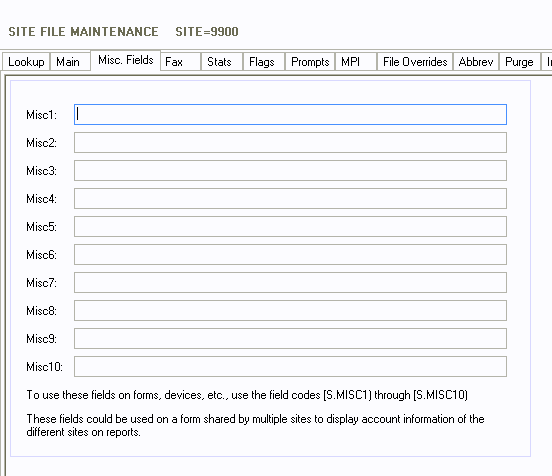
These fields can be used on forms and devices using the field codes [S.MISC1) through [S.MISC10). The field length is 100 characters each.
Used on a form shared by multiple sites to display different site specific information on reports.
Added scroll boxes to all of the tabs in Site File Maintenance so that when the screen is resized all of the fields can be accessed.
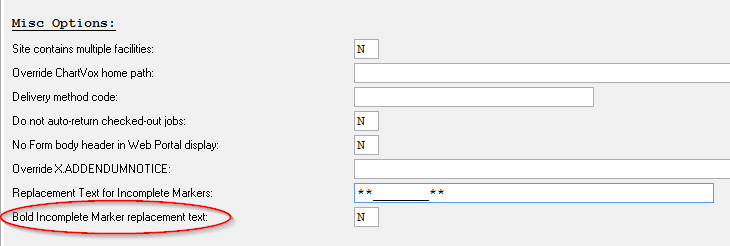
Added: Option to format incomplete markers with BOLD text on formatted document outputs
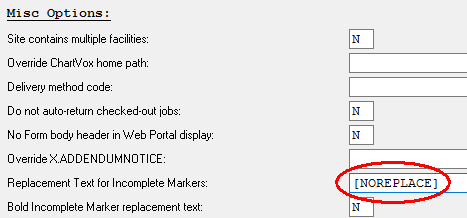
Added a Site option to bold the Incomplete Marker Replacement text when a report is distributed or previewed.
This option is configured on the Misc tab in Site File Maintenance.
Added: Incomplete marker options to deliver marker timestamp on outputs
Incomplete markers can be delivered unchanged to include the TIMESTAMP indicated on the marker.
Site options – Misc tab: [NOREPLACE]
Added: New HL7 line length and paragraph wrapping options
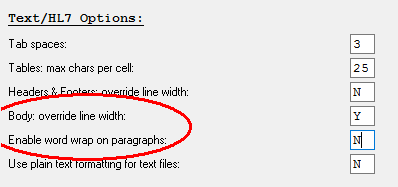
Two additional Misc tab options for Device: HL7/Text outputs.
Body: override line width:
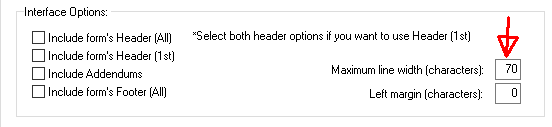
Enabled by default. Uses the Max Line Width setting on the
Interface tab.
This option overrides the natural line width from the document and instead
reformats lines using Max Line Width (default=70).
Set this option to ‘N’ will ignore the Max Line Width value and instead generate lines as they are formatted in the RTF document. This is recommended if tables are used in the document body.
Enable word wrap on paragraphs:
Natural paragraphs (not in table cells) are wrapped by
default using Max Line Width or natural RTF lines.
Change to ‘N’ to force paragraphs on one OBX line. Line feeds are converted
to paragraphs.
Added: MTVIMP logging of assigned user to imported dictation
When assigning a user to a new job, now logging the assignment in the events of the voice record.
Added: Report - Dictation List with Notes (V010D)
Displays a list of dictations that have notes attached to the dictation record.
Added: Report - Billing Detail by Patient Location (B008D)
Billing details sorted using the patient location code.
Added: Report – Site Provider Summary by Report Type (M006C)
A summary count of reports, minutes, lines and avg turnaround scores listed by provider and report type.
Added: Report – Turnaround Time Detail by Patient Location (D044)
Turnaround details sorted by patient location code.
Changed: Report - Site Transcriptionist Summary (M004)
Dictation length is now totaled in the site summary
Regards,

SpeechMotion Software Team