Notes for previous releases can be found here:
http://download.speechmotion.com/installs/
|
What’s New in SpeechMotion 5.50
Release Summary
Enterprise Client
Workflow Server
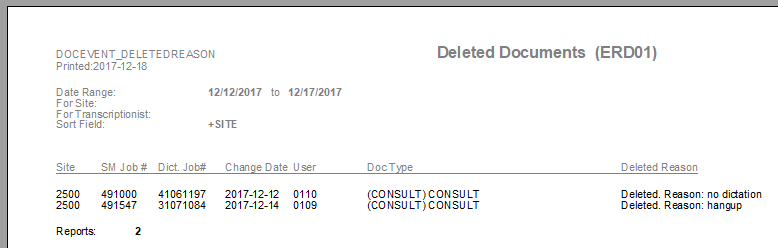
Enterprise Client Fixed a problem with Distribution when distributing to a local deviceThe distribution to the local device would be okay but when the report was exited the report would distribute its normal distributions. This has been fixed so that when a local device is the only device selected in a distribution, that the report will be distributed to the local device only and not distribute the normal distributions. Changed: AME Editor CTRL+BACKSPACE and delete word leftCTRL+BACKSPACE is now mapped to delete word left as it is the standard key mapping in MS Word. Previously ALT+BACKSPACE was mapped to delete word left and currently remains for now. Changed: Increase the number of providers that can be added to the Copy List from 15 to 20The max number of items in a reports CC list is now 20. Changed: AME Editor has been updated to v7.139This version does not support Windows XP, Windows 2003.Added: New report Deleted Documents (ERD01)This management reports displays a list of documents deleted with a ‘reason note’ displayed
Workflow Server Fixed: Issues when importing csv files into the doctor and address tables
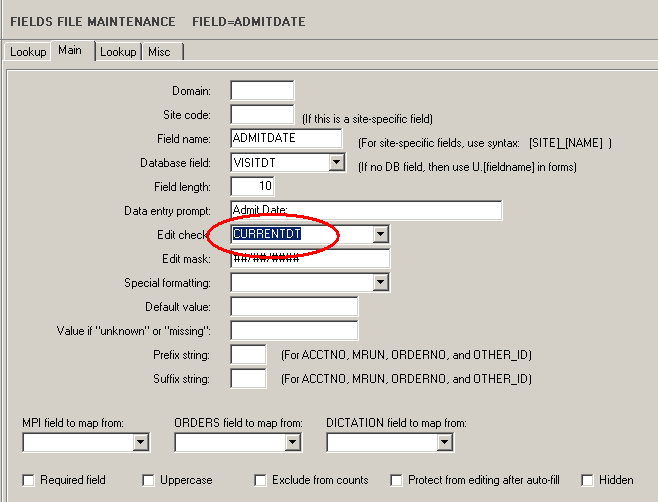
This is on the client in Setup when using Import from Standard Format file. The issue was that the data from the import file was compared to the data in the database record. If the data matched, the record in the database was not supposed to be updated. However, this check was not working and every record in the database was updated. This has been fixed so that only records from the import file that do not match existing records in the database are updated. Fixed: Space issues with text options on HL7 messagesFixed an issue when distributing text or HL7 files using the device option ‘Enable word wrap on paragraphs’ with the option set to N. The text will no longer have words pushed together with no space character between them about every 70 characters. Added: New “Edit Check” parameter for date fieldsThe new parameter is CURRENTDT. When this is selected for a date field, the valid dates that will be allowed in the field on the RDS will be from one year previous to current date to 90 days in the future from current date. |
|
|
|
|