|

What’s New in SpeechMotion 5.50
SpeechMotion 5.50 build
19091800 for September 18, 2019
Release
Summary
Enterprise
Client
- Fixed: Document data in editor grid is not
saving custom user column order.
- Fixed: XML/CDA editor focus is lost after using
Instructions button
- Fixed: Various issues with Voice-Only workflows
- Fixed: Issues with INC markers within table
cells
- Added: Document Data Panel to transcription
editors
- Added: Audio streaming during document previews
in E-Sign Portal
- Added: Enable/Disable ActiveX Installation
prompts in Internet Explorer
Workflow Server
- Fixed: Batch Distribution-Batch Detail
view-values in MT column are incorrect
- Added: New X fields for POC and Room/Bed
- Added: New fields to use with Forms and HL7
device mappings
- Added: Batch Detail view sorting options
- Added: SERVDT field as a column in Batch Detail
- Added: X.AGEF to display age with a format
modifier
Enterprise Client
Fixed: Document data in editor grid is not
saving custom user column order.
In SpeechMotion editor, now
saving the grid columns settings per user.
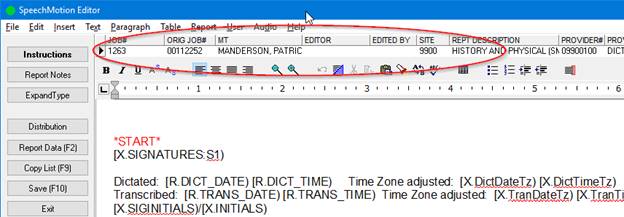
Fixed: XML/CDA editor focus is lost after
using Instructions button
Fixed an issue where the cursor
does not automatically go back to the XML/CDA editor after using the
Instructions, Report Notes, Expandtypes, Distribution, and Report Data
buttons.
Cursor will now go back to
the edit control without the need to click on it to begin typing after using
the previously noted buttons.
Fixed: Various issues with Voice-Only
workflows
When a user requested a job
from the Voice Client that was already in TRANS COMPLETE status, listened to
the job, and then Completed the job, SpeechMotion would create a cloned job
and create a new report record for the cloned job. SpeechMotion will no
longer create a cloned voice job and new report record in this circumstance.
In the same circumstance as
above, when the user completed the job it would not be removed from the Voice
Client. The job is now being removed.
Added events to the job
record when a voice only job is completed. New events added are ‘Job
transcribe by <scribe> after x.xx hrs’ and ‘STATUS changed from UNTYPED
to TRANS COMPLETE’.
Fixed: Issues with INC markers within
table cells
Fixed some obscure issues
with placing INC markers around a bunch of jump markers in tables while
editing in XML/CDA.
Added: Document Data Panel to
transcription editors
Additional data relating to
the dictation, patient info and document workflow can be toggled on/off in a
panel to the right of the editor.
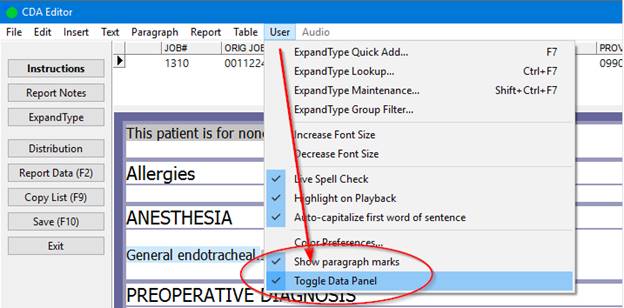
The panel’s on/off state as
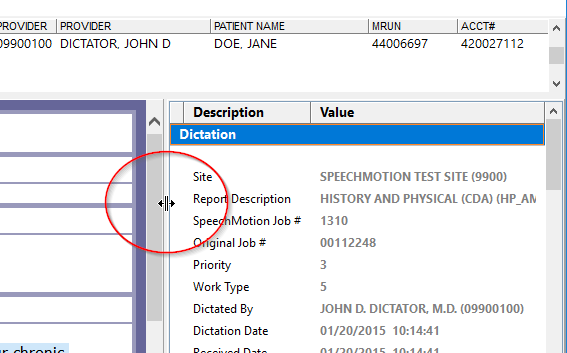
well as width can be adjusted and saved between jobs.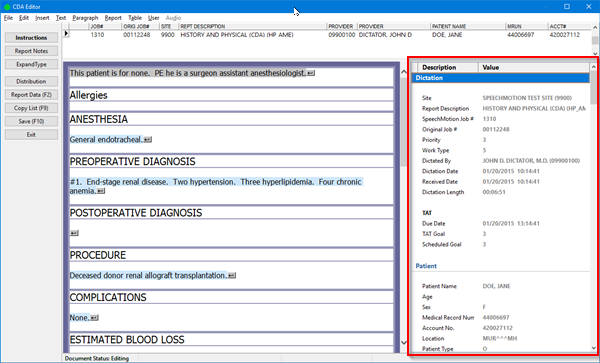
Hover the mouse here to
adjust the width of the panel.
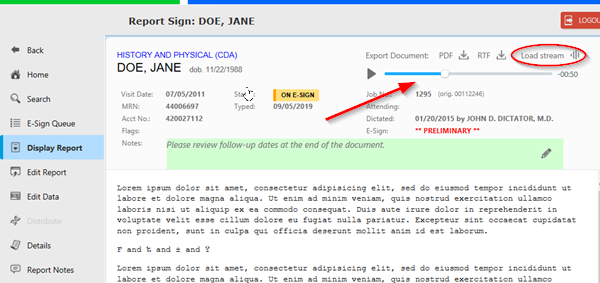
Added: Audio streaming during document
previews in E-Sign Portal
Previously, audio was only
delivered via separate download and only in WAV format.
This change streams the
audio in the document preview and supports IOS, Andriod as well as all
browsers in Windows.
Added: Enable/Disable ActiveX Installation
prompts in Internet Explorer
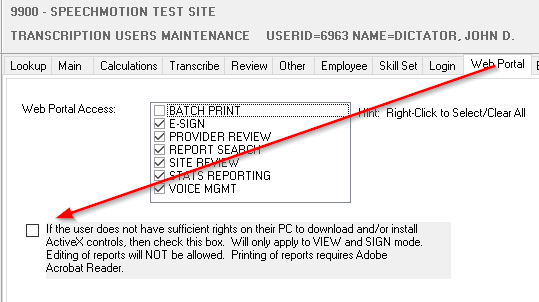
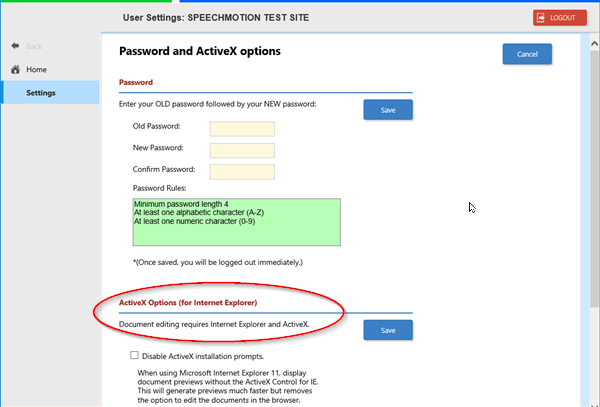
Internet Explorer E-Sign
Portal users are prompted to install the SpeechMotion ActiveX WebEditor.
Previously this behavior
could only be disabled by an administrator in the User Maintenance screen.
E-Sign users can now change
the option in the User Settings screen directly in the E-Sign Portal.
Workflow Server
Fixed: Batch Distribution-Batch Detail
view-values in MT column are incorrect
In Batch Distribution on
the Batch Detail view, values in the MT column were incorrect.
This has been fixed.
Changed: New X fields for POC and Room/Bed
Added new fields for use on
Forms. X.POC-RM to display Point of Care-Room Number and X.RM-BED
to display Room Number-Bed. These values are pulled from the Location
field in the Reports table.
Added: New fields to use with Forms and
HL7 device mappings
X.EDITDATE – value is from the editdate field. If
editdate is blank, the value is from the trans_date field.
X.EDITTIME – value is from the edittime field. If
editdate and edittime are blank, the value is from the trans_time field.
X.EDITDATETX – same as X.EDITDATE but value
is adjusted for the site’s time zone.
X.EDITTIMETX – same as X.EDITTIME but value
is adjusted for the site’s time zone.
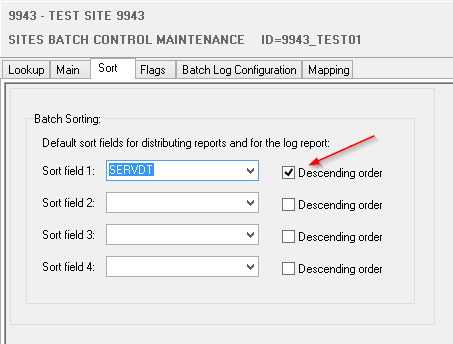
Added: Batch Detail view sorting options
In Batch Control, options
to sort fields when displaying reports in the Batch Detail view in Batch
Distribution Module in descending order.
Simply select the
Descending order check box next to the appropriate Sort field.
Added: SERVDT field as a column in Batch
Detail
Added Service Date as a
column in the Batch Detail grid. Should be the column following
ACCOUNT#.
May require pressing
CTRL-SHIFT-Z while in grid to see the new column.
Added: X.AGEF to display age with a format
modifier
Added a new X.AGEF field
which works exactly like the X.AGE:FORMATTED field except the new field will
allow the use of additional format modifiers.
Regards,

SpeechMotion
Software Team
www.speechmotion.com
|