|

What’s New in SpeechMotion 5.50
SpeechMotion 5.50 build 20041500 for April 15 2020
Enterprise Client
- Changed: Playback progress
indicator moved during speech rec. editing
- Added: Stedman’s Medical
Dictionary 2020
Workflow Server
·
Fixed: Page source in device maintenance not displayed
·
Fixed: Multiple issues with override sites in setup
·
Fixed: Batch Distribution-reports in Error status not removed
from batch queue when successfully distributed
·
Fixed: Using wizard to create a new device record puts new
device in the wrong site
·
Changed: E-Sign Portal ActiveX install & update improvements
·
Added: New audio file formats for Voice Import
·
Added: New report views
Changed: Playback progress indicator moved during speech rec. editing
The playback progress indicator has options to display
below (default) or above the editor.
When “Hide Player options” is enabled – the current speed
and optimization toggle is displayed in the status panel at the bottom right
of the screen.
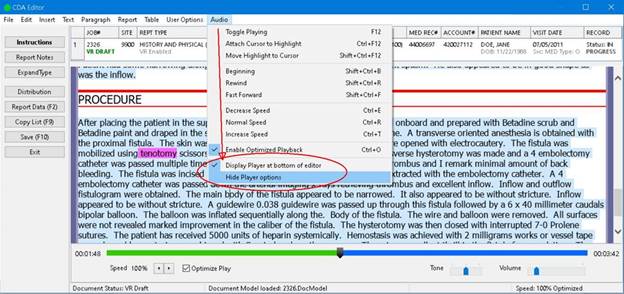
Added: Stedman’s Medical Dictionary 2020
The built-in spellcheck dictionary has been updated to
include the latest Stedman’s Medical dictionary release.
Fixed: Page source in device maintenance not displayed
In Device file maintenance for printer devices, the values
for Page 1 paper source and Page 2 paper source were not being
displayed.
This is now fixed.
Fixed: Multiple issues with override sites in setup
Changes to override site values in Sites File Maintenance
are now immediate. Previously, you would have to exit SpeechMotion and
log back in to see the override site change for those tables both in setup
and in other modules
In Site File Maintenance, the several fields have been
changed from combo boxes to edit fields. Also, a F1 lookup has been
applied to these fields as well as data validation when saving the record.
These are the fields that
were changed:
·
Main tab
·
Default report type code
·
Default device for distributing CC’s
·
Default Gateway server Alias name
Fax tab
Cover sheet form code:
If visible: To device code: field in Redirect Failed
Fax Queries section.
Voice Rec tab
Default report Type for voice jobs that have no Report
Type assigned:
Other tab
The popup menu on the Work Type to Report Type Mapping
Table field has been replaces with a Report Type lookup form.
All of the site fields on the File Overrides tab now have
a F1 lookup options. Also, the site values in the fields are validated
when the record is saved.
Fixed: Batch Distribution-reports in Error status not removed from batch
queue when successfully distributed
Fixed an issue in Batch Distribution where a report that
was in an Error status would not be removed from the Batch queue list when it
successfully distributed.
Changed fonts on controls on forms related to Batch
Distribution to Segoe UI.
Added an Exam Time column to the grid in Orders File
Maintenance in Setup.
Fixed: Using wizard to create a new device record puts new device in the
wrong site
Fixed an issue in Devices setup where a device could be
created in the wrong site when using the Wizard.
Fixed an issue in Devices and Forms setup where a device
would not be created in the override site if an override site was set for
forms or devices in the site record.
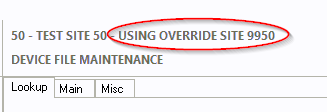
In setup on tables that can have override sites, added
USING OVERRIDE SITE XXXX verbiage to the Site label if a table has an
override site set.
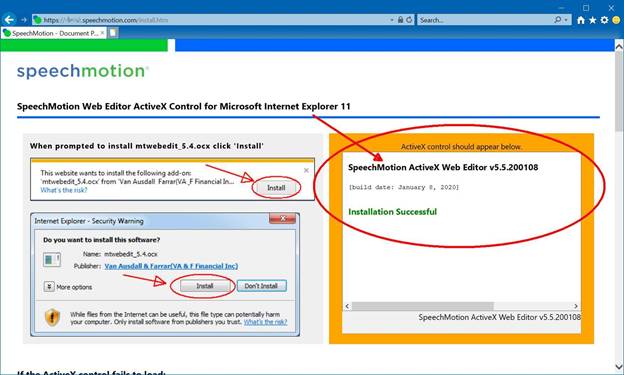
Changed: E-Sign Portal ActiveX install & update improvements
A number of changes to the E-Sign Portal landing page and
install page to improve user experience.
https://servername.speechmotion.com/install.htm
Updating:
If users already have the ActiveX Web Editor installed -
this link will update their installation to the latest version.
You can see the Active X Web Editor load in the orange
box. The update generally takes 5 to 10 seconds to complete.
New Installations:
New users will be prompted to install but may have to add
the site to Internet Explorers list of trusted sites. See the instructions
further down the page.
Added: New audio file formats for Voice Import
The following file formats were added to Voice Import
service.
·
GENERIC_M4A
·
GENERIC_WMV
·
GENERIC_AAC
These files will be imported and converted to WAV (PCM)
format. The only field mapping available to these is filename mapping.
Additionally, changes were made to the MP3 format
importer.
Added: New report views.
New management reports use database table views.
The new views will be listed under table name with a
“V_” prefix. Currently there is only 1 view available.
The V_BILLING view can only go back 90 days.
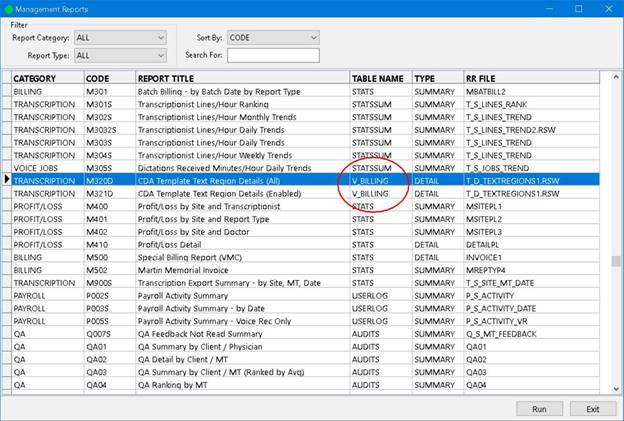
The additional reports allows joining of multiple tables
data to be represented in the reporting.
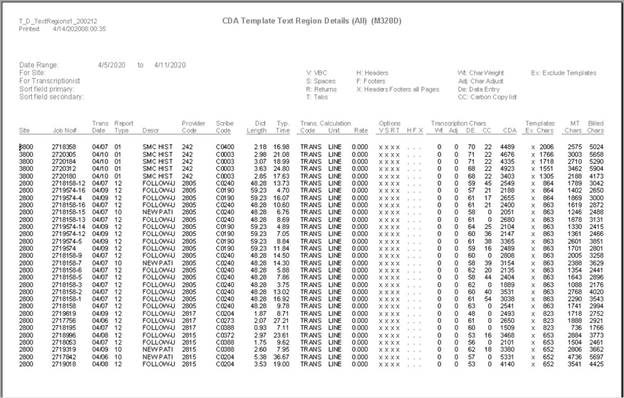
These new reports join STATS, FORMS and CALCS table
configurations in one display:
·
Transcription: M320D – CDA Template Text Region Details (ALL)
·
Transcription: M321D – CDA Template Text Region Details
(Enabled)
·
Billing: B320D - CDA Template Text Region Details (ALL)
·
Billing: B321D - CDA Template Text Region Details (Enabled)
Regards,

SpeechMotion
Software Team
https://www.speechmotion.com
|