Notes for previous releases can be found here:
https://download.speechmotion.com/installs/
|
This update includes support for Philips & MModal Mobility apps & schedule interfaces (HL7-SIU). Additional mapping options for Doctors and Address with MPI and Orders. Support for MatrixCare EHR ADT feeds. |
|
What’s New in SpeechMotion 5.50
Release Summary
Enterprise Client
Workflow Server · Changed: Rendered documents no longer include Author, Company and Operator properties. · Added: Additional data fields added to Doctors, Address tables for Order lookups. · Added: Support for MModal Mobility (Fluency) in Voice Import. · Added: Support for Philips Mobile Server, Philips Mobile App in Voice Import. · Added: Support for ADT feeds from MatrixCare EHR. Additional Changes
Enterprise Client Changed: Application taskbar previews and Windows 10 compatibility.Windows 10 taskbar now correctly thumbnails the loaded module.
Previously users would only see a thumbnail of the main screen.
Workflow Server Changed: Rendered documents no longer include Author, Company and Operator properties.MTRender now removes the author, company, and operator properties from the rtf document stored in SpeechMotion when importing document from MTCdatoWord.
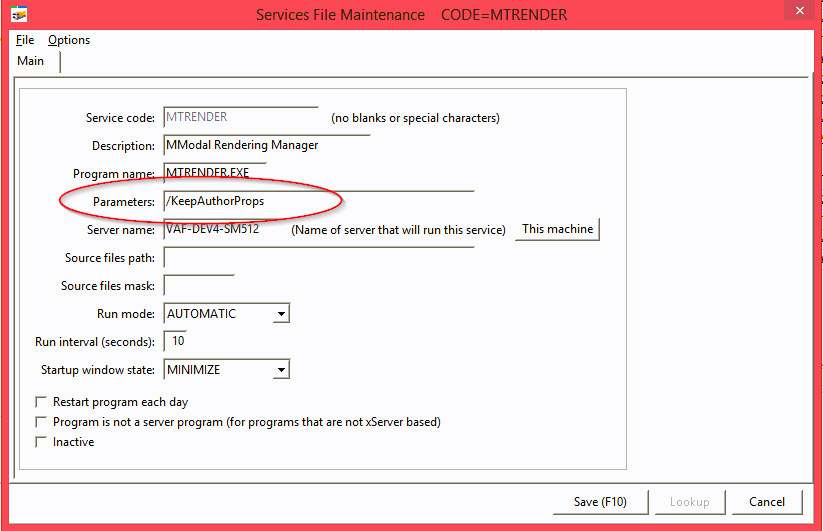
For previous behavior, which is to include these properties in the RTF document in SpeechMotion, add /KeepAuthorProps in the Parameters field of the configuration for MTRender. See below.
This change obviously only applies to newly rendered documents in SpeechMotion. Previously rendered documents will still have these properties.
Added: Additional data fields added to Doctors, Address tables for Order lookups.Added a new feature that allows using additional fields from the Doctors and Address tables when filling in the provider fields on the RDS during an MPI search or Orders search.
Previously, the matchup between the Doctors table and the provider fields in the MPI table only used the value in the DOCTOR field in the Doctors table record to match the values in the provider fields in the MPI table record when filling in the provider fields on the RDS after an MPI or Orders search. Now, two additional fields are available in the Doctors table to use to match the provider fields in the MPI table record. The fields are NPI and EXTRAID. NPI is a new field in the Doctors table. EXTRAID already existed but could not be used for the matchup.
Similarly, the matchup between the Address table and the provider fields in the MPI table only used the value in the ADDRCODE field in the Address table record to match the values in the provider fields in the MPI table record when filling in the provider fields on the RDS after an MPI or Orders search. Now, three additional fields are available in the Address table to use to match the provider fields in the MPI table record. The fields are NPI, EXTRAID1, and EXTRAID2. These fields are all new in the Address table.
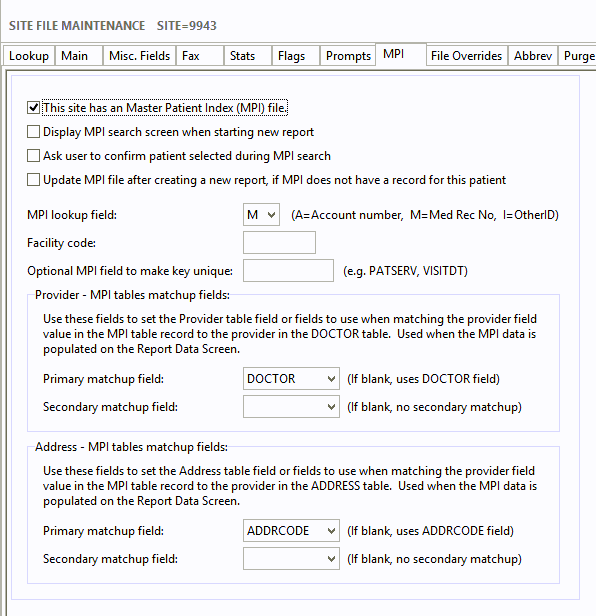
Configuration for this new feature is done in Site File Maintenance on the MPI tab.
The matchup field or fields for the Doctors table is done in the ‘Provider – MPI tables matchup fields:’ group box and for the Address table in the ‘Address – MPI tables matchup fields:’ group box. Simply set the Primary matchup field and, if needed, the Secondary matchup field for both tables. SpeechMotion will take the value in the provider field in the MPI record and try to find a record in the Doctors or Address table using the field in the Primary matchup field. If no record is found using the Primary matchup field and a Secondary matchup field is set, then SpeechMotion will try to find a record in the Doctors or Address table using the field in the Secondary matchup field.
Updated Provider File Maintenance and Address File Maintenance with fields where these new fields could be entered. Also, added new fields to the grids on the Lookup tabs.
Added new fields to the Provider and Address lookup forms. May have to press Ctrl-Shift-Z to see new fields.
Fixed an issue with the System Setup form not opening in the last user save position.
Added some additional documentation to the Help form on the HL7 Interface Map tab in Device File Maintenance.
Added: Support for MModal Mobility (Fluency) in Voice Import.Added support for receiving voice files from MModal that were dictated using MModal’s Mobility app.
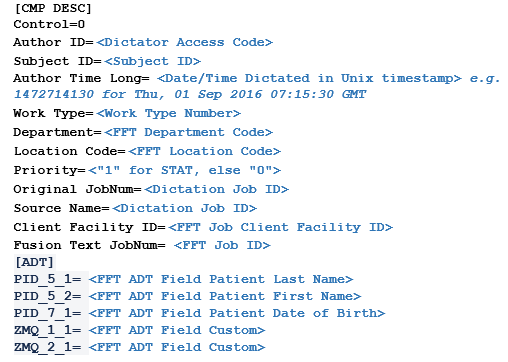
MModal will sent voice files as wave/text pair. The text file is very similar to a text file in SpeechMotion’s DVI_TXT_WAV format. See below. The MModal text file has additional fields in an ADT section.
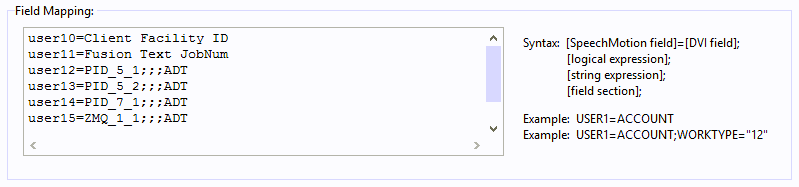
Modified the DVI_TXT_WAV format so that the values in the fields in the ADT section could be imported. Configuration for this is done in the Field Mapping field on the DVI tab in Voice File Maintenance. Added a field section parameter to the lines in Field Mapping. See below. To get values from a field in the DVI file that are in the ADT section, you simply add ADT as the fourth parameter on the mapping line.
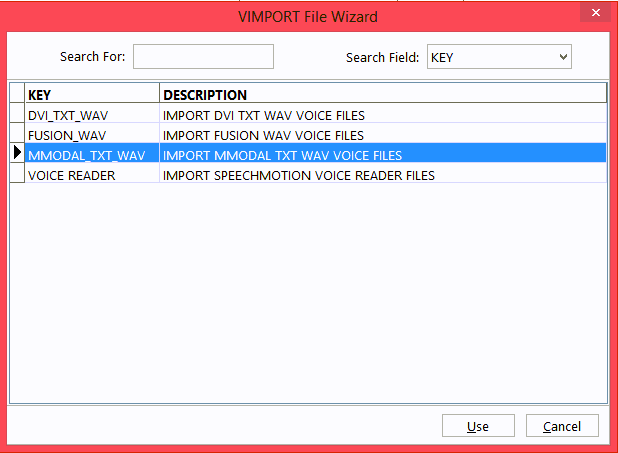
Have added a new Voice Import wizard for MModal voice imports.
MModal also requires an acknowledgement message to verify SpeechMotion receiving the voice files.
This acknowledgement message is done as a HL7 MDM message. In SpeechMotion, we will use a HL7 Dictation Interface to send this message. This message is created from the MTMessage application on an application server. The HL7 message to MModal required sending data in a field in a ZMQ segment. Added support in SpeechMotion for the ZMQ segment in outgoing HL7 messages.
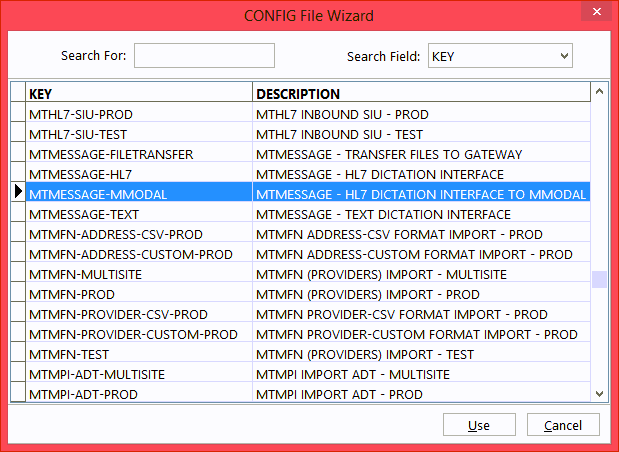
Configuration: 1. If not already installed and running on the Application server, install and run the MTMessage application. There is a wizard for this. 2. In Setup, in Prm Config, add a new configuration for MTMESSAGE using a HL7-DICTMSG data type. There is a new wizard for this. See below. Some modification to the mapping and the output file location may need to be made.
How we get this HL7 message file to the MModal Integrator is still to be determined.
On the Gateway Server, added a HL7-SIU data type for MTUPLOAD and MTHL7PROC. SpeechMotion does not use Scheduling messages currently. However, we are going to be using MModal’s mobility app and we may need a Scheduling interface. This new data type is to allow our Gateway server to pass Scheduling HL7 messages to our Application server in the data center and the forward those messages to MModal via their Integrator software.
New wizards have been added for this data type for MTUPLOAD and MTHL7PROC. Added: Support for Philips Mobile Server, Philips Mobile App in Voice Import.Two new voice import formats that convert and map Philips Mobile Apps dictations.
The reception and licensing of these dictations are handled on the new MHS-PAP server. Once received there, each author profile exports the files to a path to Voice Import.
PHILIPS_MOBILESERVER is able to read and map the XML file generated by the Philips Mobile Server software on MHS-PAP. PHILIPS_MOBILEAPP is able to read the raw XML file generated by the app itself without Philips Mobile Server software.
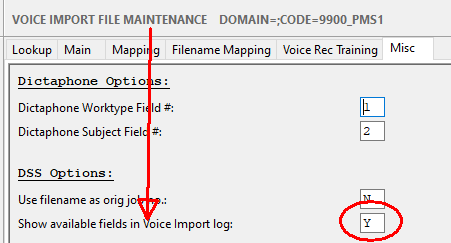
This option will display in the MTVIMP log each mappable piece of data found in the import.
Added: Support for ADT feeds from MatrixCare EHRAdded support for MatrixCare EHR web service ADT feeds.
MatrixCare requires a formal request from customer to allow us to receive the ADT.
Once that request is given, They will provide a Facility OID. Each facility will require a Program Config with a unique Facility OID.
Running MTMatrixCare form SpeechMotion Workflow Server.
The program config will write the ADT from MatrixCare to a import path assigned to a MTMPI feed. Make sure the Out Path points to the path where MTMPI consumes ADT, example: %root%\public\sites\9900\HL7-ADT\PROD\
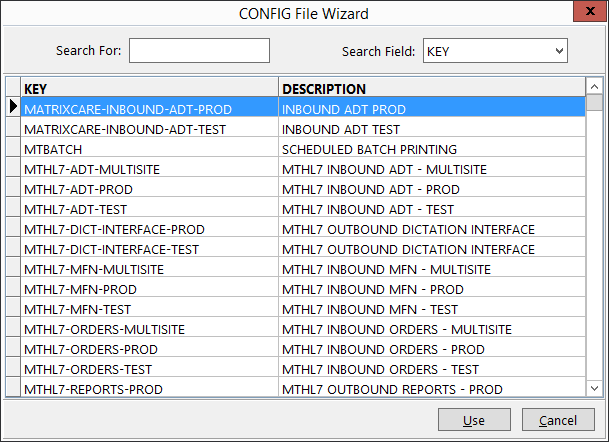
Program Config
The value in Startup Hours Request will, on initialization – request back <n> hours for new ADT messages. After this initial request, it will check every 5 minutes for any new messages added since last request.
Changed: Updated code sign certificate for SpeechMotion executables.Code-signature certificate was renewed and will expire August 2021.
Regards,
SpeechMotion Software Team
|